


Last week I ran our cannibalization report on Keywords Everywhere, the SEO tool I've been working on for years.
The first thing I saw was a keyword called "seo minion" with three of our pages all competing for it.
The pricing page was hoovering up 2,398 monthly impressions with a 0.8% click-through rate. The blog post was on page two and getting zero clicks at all.
Between the three pages, we were leaving money on the table every day.
I want to walk you through what I found, what I plan to do about it, and what I'd ignore even though it looks identical on a report.
Because here's the thing nobody tells you about keyword cannibalization: most of the time, the "fix" makes things worse.
The art is knowing the difference.
- Most cannibalization "fixes" make things worse. Diagnose first.
- Real cannibalization needs four things at once: same query, same intent for that query, meaningful impression share on the secondary page, and a CTR gap.
- The fix is usually differentiating intent (changing the lower page's title and H1 to target a longer-tail variation), not deleting or merging.
- False positives (branded SERPs, mixed intents, paginated archives, homepage authority) need to be ruled out first.
What keyword cannibalization actually is
Keyword cannibalization is when two or more pages on the same site compete for the same search query.
Google has to pick one. Sometimes it splits its picks across visits.
Either way, the impressions, clicks, and link equity that should be concentrated on one page get spread across two or three or nine. None of them rank as high as one well-optimized page would.
The classic version goes like this.
You have a long-form guide about widgets at /widgets/.
Three years later your content team writes a blog post called "What is a widget?" at /blog/what-is-a-widget/.
Both pages target "what is a widget." Google can see both.
Google then rotates which one shows up in the SERP based on personalization, freshness signals, and a coin flip. Neither page ever quite breaks the top three.
There are four patterns worth naming, because the fix depends on which one you're looking at:
- Full duplicate. Two pages targeting the exact same head term and intent. Usually the result of the SEO team and the content team not talking to each other.
- Partial overlap. Two pages targeting the same head term but at different intents (one buyer, one researcher). Looks like cannibalization, sometimes is, sometimes isn't.
- Intent mismatch. A page that ranks for a query Google thinks belongs on a different page entirely. The page is "borrowing" rankings it can't convert.
- Brand-vs-content. Your homepage and a deep page both rank for the brand term. Almost always fine, sometimes not.
The seo minion case I'm about to show you is pattern #3 dressed up as pattern #1.
When cannibalization is and isn't a problem
The single biggest mistake I see SEOs make is treating every "two pages ranking for the same query" report row as a problem to fix.
It isn't.
Most of the time Google ranking multiple pages from your site is a sign of authority, not confusion.
Here's the three-question diagnostic I run before I touch anything:
- Do the competing pages serve the same search intent? If one is answering "what is X" and the other is "buy X now," those are different intents and Google is right to rank both.
- Are the competing pages collectively underperforming? If your top page has a 9% CTR and your second page has a 1% CTR, the second page is stealing impressions. If both are at 5%, they're sharing intent legitimately.
- Is the lower-ranked page getting any clicks? A page at position 17 with zero clicks isn't a "second result," it's noise. Whether it counts as cannibalization depends on whether removing it would help the higher page.
If the answer to all three is yes, you have a problem worth fixing.
If any is no, you probably don't.
The four false positives
Before you touch a single page, rule these out. Each looks like cannibalization on a report and isn't:
| Pattern | Is it a problem? | What to do |
|---|---|---|
| Branded multi-result SERPs Brand search returns 6+ pages from your domain |
No. Google trusts you and is showing sitelinks-style results so users can navigate inside your site. | Leave it alone. Confirm each page serves a distinct sub-intent (install, pricing, FAQ, etc). |
| Mixed-intent SERPs Different pages match different intents for the same query |
No. You're serving different audiences with the same root query (e.g. buyer's guide + product page both ranking for "best running shoes"). | Leave it alone. Make sure each page is clearly optimized for its specific intent and doesn't drift toward the other. |
| Paginated archives Category pages, tag pages, paginated lists |
Usually no. They share keywords by design. | Confirm only the first page is indexable. Use canonical or noindex on filtered/paginated variants if they shouldn't rank. |
| Homepage authority spillover Homepage ranks broadly for many queries due to overall site authority |
No, this is normal. | Leave the homepage alone. If a head term ranking on the homepage should belong to a deep page, see "de-optimize" later in this article. |
Let me show you a false positive before we get to the real one.
The very top row of our cannibalization report on Keywords Everywhere is the keyword "keywords everywhere" itself, with nine pages competing.
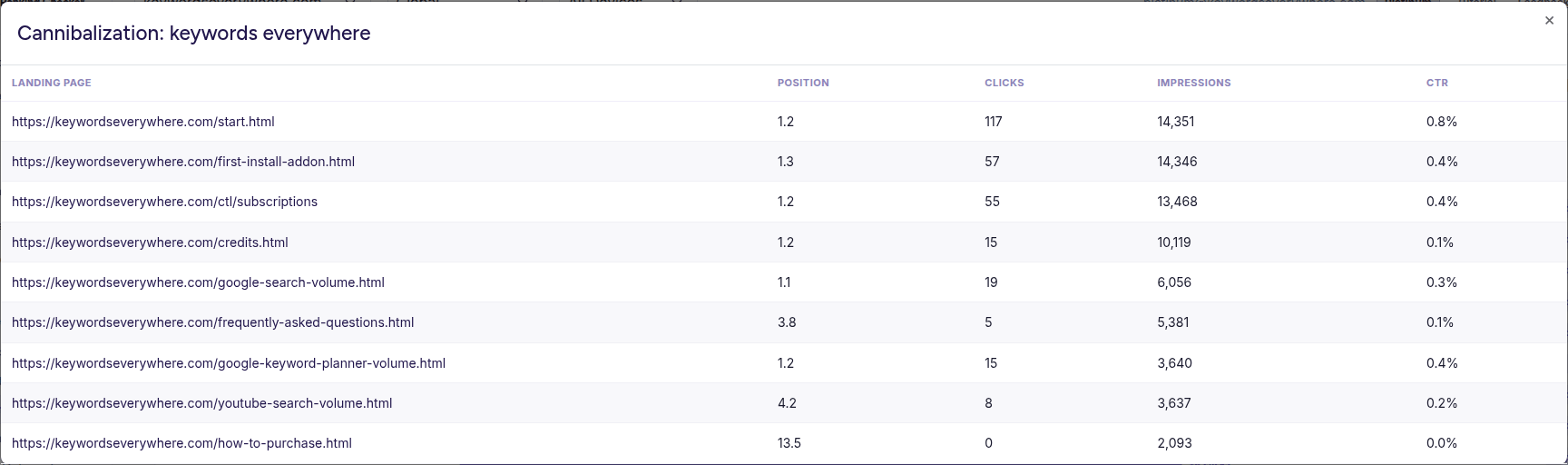
False positive: nine pages all ranking near position 1 for our brand query. Different URLs, different sub-intents, surfaced as sitelinks rather than competing.
| Landing page | Position | Clicks | Impressions | CTR |
|---|---|---|---|---|
| keywordseverywhere.com/start.html | 1.2 | 117 | 14,351 | 0.8% |
| keywordseverywhere.com/first-install-addon.html | 1.3 | 57 | 14,346 | 0.4% |
| keywordseverywhere.com/ctl/subscriptions | 1.2 | 55 | 13,468 | 0.4% |
| keywordseverywhere.com/credits.html | 1.2 | 15 | 10,119 | 0.1% |
| keywordseverywhere.com/google-search-volume.html | 1.1 | 19 | 6,056 | 0.3% |
| keywordseverywhere.com/frequently-asked-questions.html | 3.8 | 5 | 5,381 | 0.1% |
| keywordseverywhere.com/google-keyword-planner-volume.html | 1.2 | 15 | 3,640 | 0.4% |
| keywordseverywhere.com/youtube-search-volume.html | 4.2 | 8 | 3,637 | 0.2% |
| keywordseverywhere.com/how-to-purchase.html | 13.5 | 0 | 2,093 | 0.0% |
Nine pages. 73,091 impressions. That looks catastrophic until you read the URLs.
They're not competing pages. They're sitelinks.
Someone searches "keywords everywhere" and Google fans out across our install page, our subscriptions page, our credits page, our FAQ.
Each click goes to a page that serves a different intent: install, manage credits, ask a question, see search volume.
The CTR is low because the searcher is mostly trying to find their account, not click a marketing page.
The "fix" here would be to consolidate eight of these pages onto the homepage.
That would tank the user experience for our existing customers, who are searching the brand to do something specific and rely on Google routing them to the right page.
So we leave it alone.
That's a false positive. Now let me show you what real cannibalization looks like.
A real cannibalization on my own site
Same report, a few rows down, the keyword "seo minion." Three pages, 5,455 impressions, 255 clicks total.

Real cannibalization: the pricing page absorbs 44% of impressions for the head term but converts at 0.8% CTR, vs the main product page's 8.9%.
| Landing page | Position | Clicks | Impressions | CTR |
|---|---|---|---|---|
| keywordseverywhere.com/seominion/ | 2.6 | 235 | 2,640 | 8.9% |
| keywordseverywhere.com/seominion/pricing | 5.8 | 20 | 2,398 | 0.8% |
| keywordseverywhere.com/blog/how-to-use-seo-minion/ | 17.0 | 0 | 417 | 0.0% |
Walk through this with me. The numbers tell the whole story.
The main /seominion/ product page is doing its job: position 2.6, 8.9% CTR, 235 of the 255 total clicks.
That's roughly the CTR you'd expect for that position. Healthy.
The /seominion/pricing page is the problem.
It's grabbing 2,398 impressions, almost as many as the main page. But its CTR is 0.8%, compared to 8.9% on the main page.
Why? Because someone who types "seo minion" into Google wants the product, not a price list.
Google is showing the pricing page to roughly 45% of searchers who would have clicked through to the product page if it had ranked alone.
Our pricing page is, in effect, eating impressions that a higher-converting page deserves.
The blog post at position 17 is barely a participant. 417 impressions, zero clicks.
It's not stealing anything meaningful, but it's not contributing either.
This is real cannibalization.
Three pages all ranking for the same query ("seo minion"), but only one of them is the right answer to that query. The wrong pages are grabbing roughly half the impressions, and the collective CTR is well below what a single well-matched page would deliver alone.
A keyword is being cannibalized if all four of these are true:
| Check | What to look for | SEO Minion case |
|---|---|---|
| Same query | Two or more pages ranking for the exact same search term | ✓ 3 pages |
| Same intent for that query | What the searcher wants matches what only one of the pages can give them | ✓ main product page |
| Meaningful impression share on the secondary page | The losing page has >20% of total impressions for that query | ✓ pricing has 44% |
| CTR gap | Losing page's CTR is well below the winning page's (typically <25%) | ✓ 0.8% vs 8.9% |
Two of three or three of four is suspicious. All four is real cannibalization worth fixing.
Spotted a similar pattern on your own site? The cannibalization report at Website Ranking Checker pulls from your Google Search Console and runs this exact check on every query. Free for Keywords Everywhere users, no trial.
How I'm going to fix it (and what I expect)
I'm not going to consolidate.
The pricing page exists because people who specifically search "seo minion pricing" deserve a focused answer. Killing that page would break the buyer journey for those searchers.
Same with the tutorial blog post: people searching "how to use seo minion" should get a tutorial, not a sales page.
What I'm going to do is differentiate intent so each page targets a more specific query and stops competing for the head term.
Here's the plan.
On /seominion/pricing:
- Change the page title from "SEO Minion - Pricing" to "SEO Minion Pricing and Plans" so the head term shares weight with "pricing" and the page ranks for "seo minion pricing" cleanly
- Add an H2 right after the headline that says "Looking for the SEO Minion main page?" linking back to
/seominion/ - Add a comparison table specifically targeting "seo minion pricing" and "seo minion cost" queries
On /blog/how-to-use-seo-minion/:
- Re-optimize the H1 and first paragraph around "how to use SEO Minion" rather than the head term
- Add a clear breadcrumb at the top: "Home > Blog > How to Use SEO Minion"
- Add a strong internal link in the first 200 words back to
/seominion/for readers who land there but actually want the product
On /seominion/:
- Nothing. It's working. The most common cannibalization mistake is touching the page that's already winning.
If the fix works, I'd expect to see:
- The pricing page's impressions on "seo minion" drop, and its impressions on "seo minion pricing" rise
- The main page's impressions on "seo minion" rise modestly, somewhere in the 200 to 600 a month range
- The main page's CTR hold or improve slightly
- Total clicks across the three pages rise by 40 to 80 a month
That's the bet. A few of those numbers will be wrong.
SEO predictions are usually directionally right and quantitatively off. The point is to have a falsifiable prediction so you know whether the fix did anything.
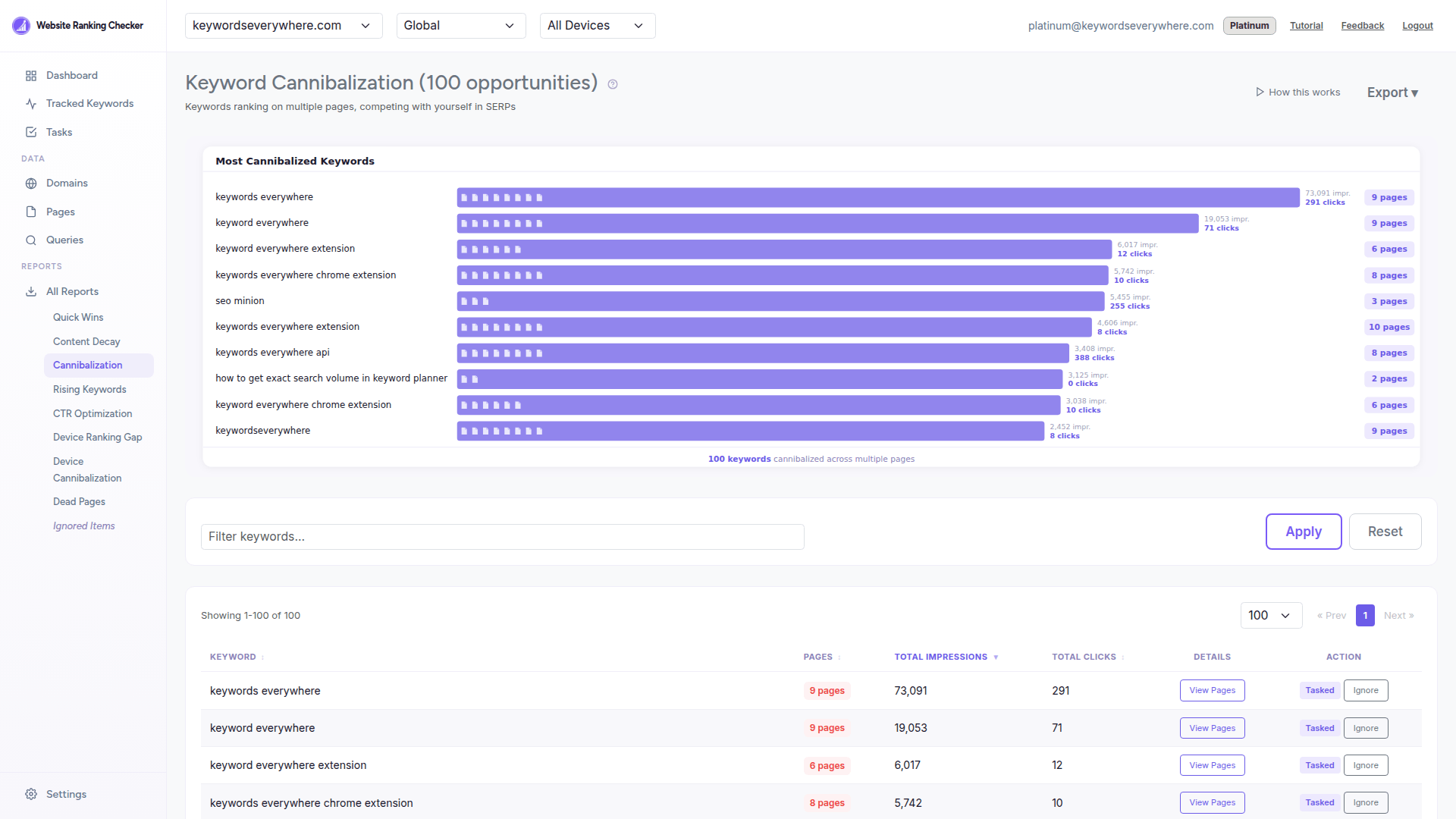
The full cannibalization view in Website Ranking Checker, sorted by impression-weighted severity. Each row expands to the per-page detail shown above.
The report above is from the cannibalization tool we built into Website Ranking Checker.
It pulls directly from your Google Search Console data, so the impressions and CTR numbers are the same ones Google sends you.
You can run the same diagnostic on your own site by signing up here (it's free for Keywords Everywhere users).
But that's only one of the three ways to find cannibalization. Let me cover the other two, because you should know how to do this without any tool at all.
Three ways to detect cannibalization
Method 1: The site: plus &filter=0 trick
Manual, free, takes 30 seconds per keyword.
Google by default filters its results to show one page per domain in most positions.
If you want to see every page on your site that's eligible for a query, you have to ask for it explicitly.
Open an incognito window, then search:
site:yoursite.com "keyword you're worried about"
That returns every page on your site that contains the phrase.
If you see two or three pages all targeting the same query and intent, that's a candidate.
Want to see how Google actually ranks them in the open SERP (not just the site: filtered view)?
Search the keyword normally and add &filter=0 to the URL. That removes Google's host-clustering filter and shows you all the pages Google considered.
This will show you the worst offenders. It will not scale to your full site.
Method 2: Google Search Console
Free, the most accurate, and the method I'd use if I had no tool at all.
Open GSC, go to Performance, and:
- Click on the Queries tab and find a query you're worried about
- Click into that query (it filters the report to that specific query)
- Switch to the Pages tab
- If you see two or more pages with meaningful impressions for the same query, you have a candidate
What you're looking for isn't just "two pages exist."
You want "two pages share impressions with non-trivial percentages."
If page A has 95% of impressions and page B has 5%, the cannibalization is mostly cosmetic.
If page A has 55% and page B has 45%, you have real splitting.
A few patterns to watch for in GSC:
- The shared impressions pattern. Two pages each show 30 to 60% of total impressions for a query. Real cannibalization.
- The position oscillation pattern. One page's average position swings between, say, 3 and 12 day-to-day for the same query. Often a sign Google is rotating which page it shows.
- The CTR cliff pattern. One page has 9% CTR, the other has 0.5%. The 0.5% page is borrowing rankings it can't convert.
The downside of the GSC method: you have to do this query by query.
If you have a few hundred queries, you'll be there for hours. That's why automated tools exist.
Method 3: Automated tools
The major paid SEO suites (Semrush, Ahrefs, Sitechecker) all have a cannibalization tool.
Most of them are gated behind a 14-day trial or a subscription.
We built one into Website Ranking Checker that's free for Keywords Everywhere users. It pulls the same GSC data the manual method uses, just visualizes it for you.
Whichever tool you use (including ours), the principle is the same: every accurate cannibalization tool is using your GSC data, so the underlying signal is identical.
The differences are speed of analysis, filtering options (by country, by device), and how easy it is to act on what you find.
How to fix cannibalization (general playbook)
Here are the fix options, in roughly the order I'd consider them.
Most articles list these in alphabetical order, which is unhelpful. Severity-ordered is better.
1. Differentiate intent
Least invasive, usually right.
Rewrite the lower-performing page to target a longer-tail variation of the head term.
Update the title, H1, and first 200 words.
Add internal links from the lower page to the higher one for users who landed in the wrong place. Don't touch the winning page.
This is what I'm doing for SEO Minion.
It works when both pages have a legitimate reason to exist but are accidentally targeting the same head term.
2. Consolidate via merge and 301
Take the better page, fold the unique content from the worse page into it, then 301 redirect the worse page.
Preserves link equity, eliminates the conflict.
Use this when both pages are answering the same question and one of them is clearly the canonical home for it.
3. Internal linking and authority routing
Sometimes cannibalization is a symptom of poor internal linking, not duplicate content.
If your lower-ranked page has more inbound internal links than your higher-ranked page, Google will keep cycling between them.
Audit your internal links and route authority to the page you want to win.
4. Canonical tags
Use rarely.
A canonical tag tells Google "treat this page as a copy of that one."
It can work for paginated archives or filtered category pages.
It rarely works for the duplicate-blog-post problem, because Google often ignores canonicals when the pages have different visible content.
Try this last for true duplicates.
5. Noindex
Use almost never.
Removing a page from Google's index is the heaviest hammer.
Use it for thin pages that exist only for navigation, or for old content that's actively misleading.
Don't reach for noindex when a 301 redirect would work.
6. De-optimize (the underrated lever)
Got a brand-vs-content cannibalization problem? Your homepage is ranking for a head term that should belong to a deeper page?
The best fix is often to actively remove the head term from the homepage's title, H1, and first paragraph.
Most people instinctively want to add keywords to fix rankings.
Sometimes the right move is to subtract.
Fixes you should NOT do
- Don't delete the page without a 301 redirect. You'll lose the link equity and any historical traffic the URL was getting.
- Don't apply blanket canonicals across an entire content category hoping it solves the problem. It usually creates a different problem.
- Don't noindex a page that's getting any meaningful traffic. The traffic doesn't come back when you re-index it; the original signals are gone.
How to prevent cannibalization in the future
Three things, none of them fancy:
- Maintain a keyword map. Before any new piece of content is written, the assigned keyword has to be checked against an existing list. If it's already mapped to another page, the writer either picks a different keyword or merges with the existing page. The map dies the moment it's a Google Sheet maintained by one person; it works when it's part of the content brief workflow.
- Write a tight content brief for every page. The brief locks the target query and intent before the page is written. Most cannibalization is downstream of two writers picking adjacent topics independently.
- Run a quarterly audit. Twenty minutes to triage, an hour to fix the obvious ones. Most cannibalization is created in tiny increments and is easy to clean up if you don't let it pile up for two years.
FAQ
- Does Google publicly say keyword cannibalization is bad?
-
Not exactly.
In a 2025 statement, Google's John Mueller said that having three different pages appearing in the same search result "doesn't seem problematic to me just because it's 'more than 1'... pages aren't duplicates just because they happen to appear in the same search results page."
Google's framing is "make sure each page has a clear job," not "delete duplicates."
- Will a canonical tag fix my cannibalization?
-
Sometimes.
If the two pages are genuinely near-duplicates (same title structure, similar body, same intent), a canonical tag pointing the loser at the winner can work.
If the pages have meaningfully different visible content, Google will probably ignore the canonical and go on ranking both.
- Should I delete the losing page?
-
Almost never.
The page exists for a reason. If you're sure it has no purpose, 301 redirect it to the winner so you don't lose the link equity.
Don't just delete it.
- What if my homepage is the problem?
-
Yes, this is real.
If your homepage is ranking for a head term that should belong to a deep page, the fix is usually to de-optimize the homepage. Remove the head term from the title, H1, and first paragraph.
Then add a strong internal link from the homepage to the deep page. Don't try to "fix" this by adding more keywords to the deep page.
- How long after a fix until rankings recover?
-
Two to six weeks for noticeable movement, three to six months for full settlement.
The biggest predictor of recovery speed is how much Google has been rotating which page it shows.
If Google was already favoring one page strongly, removing the competitor speeds things up. If Google was genuinely confused, it takes longer for new signals to stabilize.
See your own cannibalization in 30 seconds
Website Ranking Checker pulls your Google Search Console data and flags every keyword where two or more of your pages compete. Free for Keywords Everywhere users, no trial, no credit card.
Connect Google Search Console