

Content Decay Report
The Content Decay report identifies pages that are actively losing clicks compared to the previous 30-day period. It catches traffic declines early so you can refresh content before rankings tank completely.
Content naturally decays over time as competitors publish fresher information and Google re-evaluates relevance. The pages that were your top performers last month might be sliding this month. This report tells you which ones need attention.
See it in action
What the report looks like
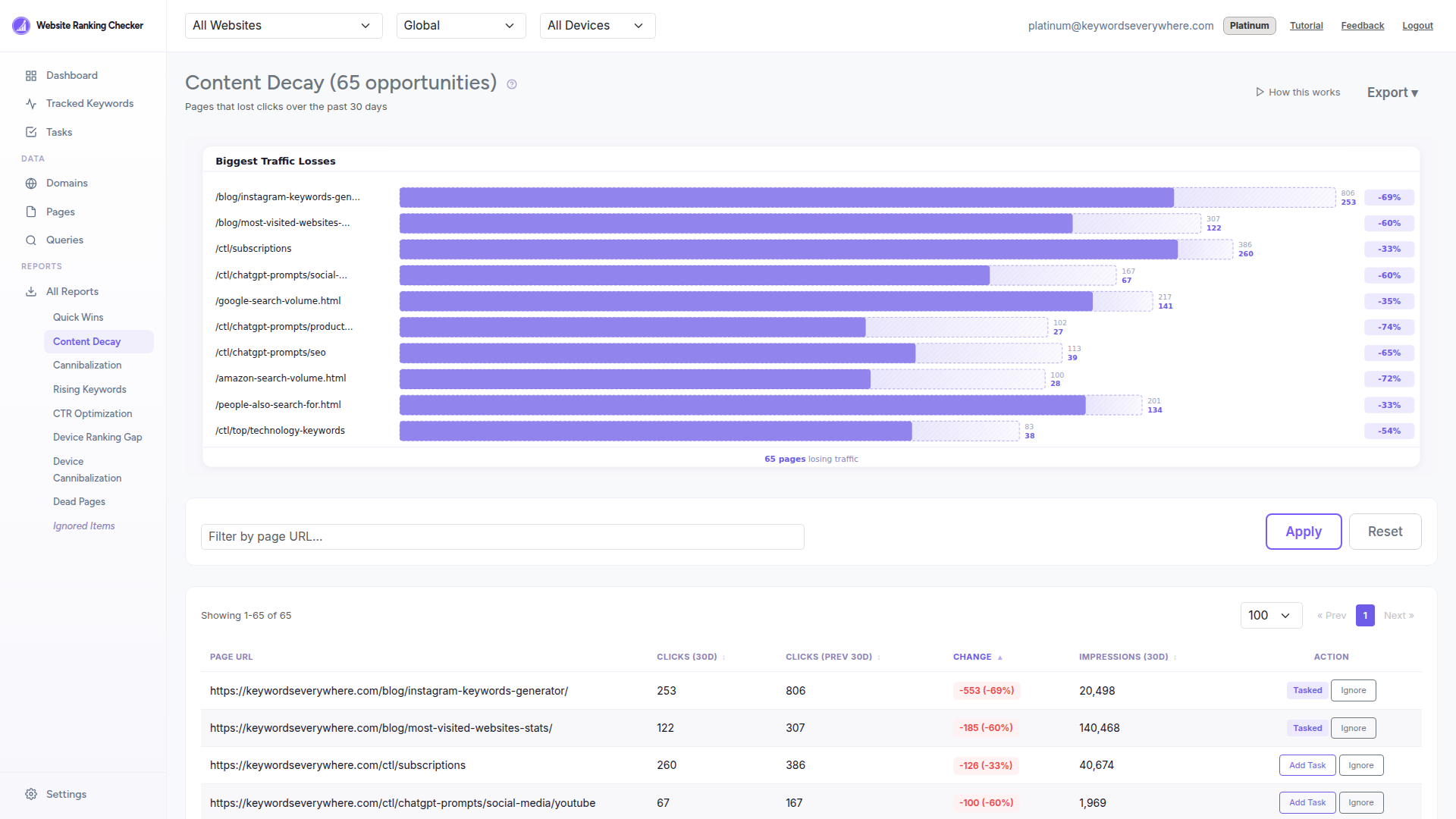
Each row shows a page URL with its current clicks compared to the previous period. The change column makes it immediately clear how much traffic has been lost.
What the report shows
Page URL - The page losing traffic. Click to review it directly.
Clicks (30d) - Current clicks in the most recent 30-day period.
Clicks (Prev 30d) - Clicks from the previous 30-day period (days 30-59 ago).
Change - The absolute decline in clicks. A larger negative number means a bigger drop.
Impressions (30d) - Current impressions, so you can see if the page is still being shown but not clicked.
How to use it
Sort by largest decline to find the pages losing the most traffic first.
Click the page URL to audit the content. Is the information still accurate and up to date?
Check for new competitors - search for the main keyword and see if a newer article has overtaken yours.
Refresh the content with updated information, better examples, and fresh internal links. Update the published date if your CMS supports it.
Add it as a Task to track recovery. The task completes when clicks return to the previous level.
How it is calculated
The report compares page-level clicks from the last 30 days against the previous 30 days (days 30-59 ago). Only pages with a negative click change are included - if a page gained or held steady, it does not appear.
Results are sorted by click change ascending (biggest drops first). Data comes from the page_data table in ClickHouse and refreshes daily.
Ready to catch content decay?
Connect Google Search Console and find out which pages need a refresh. Free for all Keywords Everywhere users.