

Daily Rank Tracking: Is It Actually Worth It? (An Honest Take from Someone Who's Done It Both Ways)

For weeks, "google trends search volume" sat at position 7 in my Google Search Console.
It's a query I care about. We run a Google Trends search volume page over at Keywords Everywhere, and that query is the highest-impression entry point we have for it. So I watched it.
Then one Wednesday I opened the dashboard and saw it at position 48.
Forty-one positions down. Overnight. On a keyword I'd been ranking steady for, on a page I hadn't touched in weeks.
I almost rewrote the page that night.
I'm glad I didn't. The next morning it was back at position 9. The day after that, position 5, better than where it had been before the drop. The cliff lasted forty-eight hours and then disappeared completely, like it had never happened.
The "41-position drop" on that Wednesday wasn't a ranking event. It was noise. Most likely a GSC partial-day sample or a query-classification flicker on Google's side. Nothing about the page had changed. Nothing about the SERP had really changed. The number on my dashboard had.
If I had been emailing myself an alert every time a tracked keyword moved by more than 5 positions, I'd have gotten two of them in 24 hours, one on Tuesday and a worse one on Wednesday. I'd have read them as a crisis. I'd have spent a Saturday rewriting a page that didn't need rewriting.
That story is what this article is about. Daily rank tracking is genuinely useful. It's also genuinely overrated. Whether it's worth your time and money depends on three things, and most people skip the part where you decide.
I'll walk you through when daily tracking actually pays off, when weekly is plenty, what "normal" daily movement looks like at each position tier (with real numbers from our own user base), and the alert framework I use to filter signal from noise.
- Daily tracking is worth it for 10-30% of your keywords (the ones that drive revenue, the ones you just launched, and the ones tied to active algo updates). The rest belong on a weekly or monthly cadence.
- The "noise floor" is bigger than most people realize. At positions 1-10, keywords routinely move 1-2 positions a day with nothing changing. At positions 31+, the median daily move is 3.5 positions.
- Flat alert thresholds ("alert me on any 5-position move") are the #1 reason people quit their rank tracker. Use tiered thresholds: 3 positions for top 10, 5 for page 2, 10 for the rest.
- Free options exist. Google Search Console refreshes daily for your own site. Free GSC-powered trackers layer alerts and history on top. You don't need a $99/month tool to start.
The case for daily rank tracking
There is a case. I'll make it before I push back on it.
You catch algorithm updates within 24 hours instead of 7. Google ships ranking updates almost continuously, and named "core" updates land every couple of months. If a core update drops you 20 positions on your top revenue keyword, you want to know on Wednesday, not the following Tuesday.
You can validate a content change immediately. You republished a page yesterday. You changed the title, expanded the intro, added a comparison table. Did it work? Daily tracking shrinks the feedback loop from "wait two weeks and squint" to "check tomorrow."
You spot competitor moves before they compound. A competitor publishes new content on Monday targeting your top query. By Friday they're at position 3 and you've dropped from 4 to 7. Daily tracking catches the move in the first 48 hours, when a response (internal link, content refresh, schema upgrade) can still tip it back.
You can babysit a new launch. The first two weeks of a new article's life are the most volatile and the most diagnostic. Daily tracking during that window tells you whether the page is going to settle on page 1, page 2, or page 11. You don't need daily after that.
Reputation and brand queries deserve daily. If someone's running a hit piece on your brand name, you want to know on day one, not day eight.
Those are real benefits. None of them are noise.
The case against daily rank tracking (the part everyone skips)
But this is the part the "10 best daily rank tracker" listicles never make.
Signal-to-noise is brutal. Most daily position changes are nothing. The keyword moved because Google reshuffled SERP features that day, or because the impression sample came from slightly different geographies than yesterday, or because two of your keywords overlap and GSC reclassified one. None of these are things you can act on.
Position-tracking gets compulsive. I have watched friends with rank trackers refresh the dashboard four times a day. The information isn't telling them anything new. It's just a slot machine that feels productive.
Cost. The big paid rank trackers run $30-200 per month, with the per-keyword cost climbing quickly when you cross 100 or 500 keywords. For most sites, that money buys data they're not going to act on.
Alert fatigue. This is the one I keep coming back to. A daily rank tracker with a flat threshold ("alert me when any keyword drops by 5") will, for any non-trivial keyword list, email you something almost every day. After two weeks, you stop reading the emails. Then the one that actually mattered arrives, and you delete it without opening it.
The Reddit thread that ranks fifth for "daily rank tracking" asks "how do you guys track keyword ranks daily without paying $100/month." The replies are mostly tactical (use Google Apps Script, use a DataForSEO API, abuse free trials). Nobody answers the prior question, which is whether daily was the right cadence to begin with.
For most keywords in most sites, it isn't.
The noise floor: what "normal" actually looks like
This is the part I had to learn the hard way, and it's the most useful frame I can give you.
Every keyword has a noise floor. That's the day-to-day position movement that means absolutely nothing. Google's SERPs are personalized, geographic, fresh-rotated, and continuously re-ranked. Two consecutive Google searches for the same query, by the same person, on the same device, fifteen minutes apart, often return slightly different positions. GSC's "average position" is a weighted aggregate across all the impressions it observed that day, and even at the aggregate level, that number wobbles.
How much it wobbles depends on what position you're in.
We pulled the data from our own user base. Roughly 533,000 day-over-day observations across Feb-March 2026, filtered to keyword/days where both sides had at least 10 impressions (so the numbers aren't driven by single-impression noise). Here's the day-to-day change distribution by starting-position tier:
| Position tier | Median move | 75th percentile | 90th percentile | Mean move |
|---|---|---|---|---|
| 1-10 | 0.81 | 1.98 | 4.21 | 1.76 |
| 11-30 | 1.82 | 3.62 | 6.51 | 2.91 |
| 31+ | 3.53 | 6.74 | 11.24 | 5.07 |
In plain English:
- Positions 1-10. On a typical day, a top-10 keyword moves less than 1 position. Three quarters of the time it moves less than 2. So if your "keyword that pays the bills" is at position 4 and you see it at position 6 tomorrow, that is, statistically, a non-event. A drop to position 11 is meaningful.
- Positions 11-30. A keyword on page 2 normally moves about 2 positions per day. The 75th percentile is 3-4 positions. So a 5-position daily swing here is real signal; a 3-position swing is not.
- Positions 31+. Once you're past the third page, the noise floor blows up. Median movement is 3.5 positions per day. One in ten daily observations is an 11+ position swing with nothing actually changing. Trying to track these daily is mostly an anxiety hobby. Track them monthly.
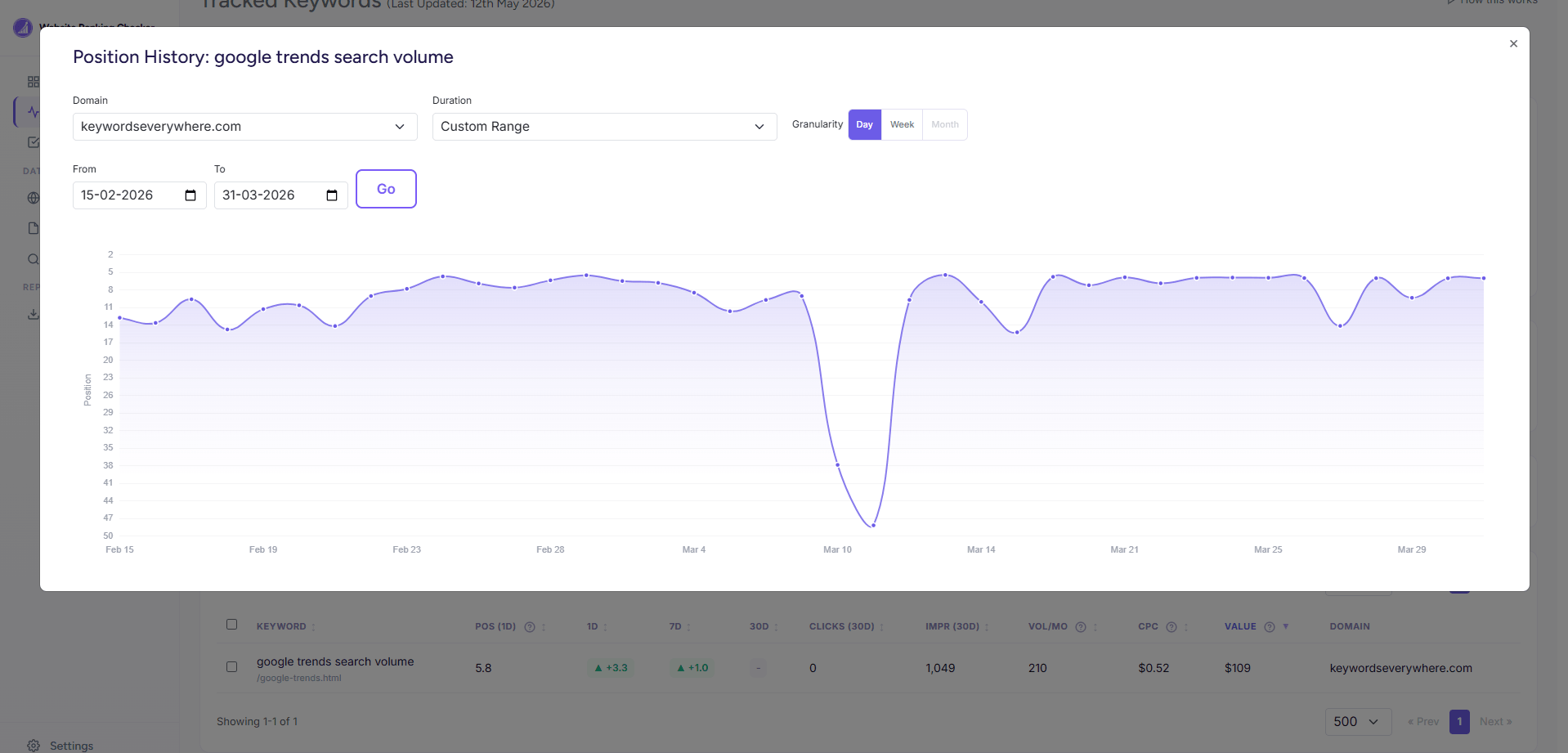
The "google trends search volume" chart from my dashboard. The cliff on March 10-11 looked like an algorithm hit. By the next morning it was back at position 9, and by week's end it was ranking better than before. The "drop" was data noise, not a ranking event.
I went back and looked at my own "position 7 to 48 overnight" story against this distribution. A 41-position drop from the top 10 is so far outside the 90th-percentile noise band that it should have meant the page was demoted. It looked alarming because it was. But "alarming" doesn't mean "real." Most of the time when a top-10 keyword spikes that hard in one day, it's a partial-day sample, a feature swap, or a brief query-routing change. The complete reversal within 48 hours confirmed exactly that.
When daily tracking is actually worth it
Given the noise floor, daily tracking earns its keep on a narrow set of keywords and a narrow set of moments. Specifically:
Your money keywords. Probably 5-30 queries that drive 80% of your revenue or leads. These deserve daily eyes because the cost of missing a real drop is high. Everything else can wait until weekly.
The first two weeks after publishing or republishing. New and refreshed pages are volatile. Daily tracking during the first 14 days tells you whether the page is converging to position 8 or position 28. After two weeks, switch to weekly.
Confirmed algorithm update windows. When Google announces a core update, or when MozCast or Search Engine Roundtable flag heavy SERP volatility, switch on daily for your important keywords for the duration of the update. Then switch off again.
Active reputation management. A brand crisis, a name dispute, a competitor running a hit piece. Daily until it's resolved.
Trending or seasonal queries during their peak. A keyword tied to a one-time event ("Black Friday deals 2026") needs daily during the event and zero tracking afterwards.
If you're not in one of those buckets, weekly is probably enough. Possibly less.
When weekly is enough (which is most of the time)
This is where most "daily rank tracker" listicles lose me. They assume every keyword you track is a money keyword. The reality, for most sites I've seen, is something like:
- 10-30 keywords that matter a lot
- 100-500 keywords that matter a little
- 1,000-10,000 long-tail keywords that mostly track themselves
The first bucket gets daily. The second gets weekly. The third gets monthly.
If you set up a tool the same way (or set tags and check different views at different cadences), the noise stops drowning the signal. You read fewer alerts. The ones you do read mean something. Your relationship with the dashboard gets healthier.
How to actually do daily rank tracking
Four practical options, from "free, basic" to "paid, sophisticated."
Method 1: Google Search Console. GSC's data refreshes daily, sometimes with a 2-3 day lag. Open Performance, set the date range to "last 28 days," compare to "previous 28 days," and you'll see which queries are gaining or losing position. The UI doesn't push alerts at you, but you can check it daily in 60 seconds, and the data is free and accurate. The limits to know: average position is impression-weighted, the query list caps at 1,000 per request, and history maxes out at 16 months. For most small-site daily tracking, GSC is plenty. If you want the deeper background on GSC's "Average Position" metric and the other ways to check rank, I wrote about the five honest methods and method 3 there is the full GSC walkthrough.
Method 2: Spot-check incognito. Pick your 5 most important queries. Each morning, open an incognito window, search them, scroll until you find your URL. Note the position. Takes about three minutes total. This is shockingly underused. It's also the only method that tells you what an actual human sees, not what Google's data center logs say a human sees.
Method 3: Free GSC-powered rank trackers. If you've connected GSC and want daily snapshots stored as history, alerts on real changes, and per-keyword position charts (which GSC's UI doesn't give you), that's what a GSC-powered tracker layers on top. I built Website Ranking Checker for this, free for Keywords Everywhere users. There are others worth knowing about: Wincher has a free tier with crippling limits, SE Ranking has a 14-day trial, Mangools SERPWatcher has trial access. Free vs trial vs freemium matters when you're picking; the honest cost of "free" elsewhere is usually a 10-30 keyword cap.
Method 4: When paid is actually worth it. Agencies tracking 500+ keywords across multiple clients with location-and-device granularity should pay. AccuRanker, Semrush Position Tracking, Ahrefs Rank Tracker, and SE Ranking all do this well. Pricing is in the $30-200/month range, with the better ones charging per tracked keyword. The honest pitch for paid: you're buying daily snapshots across many sites in many locations, plus SERP feature tracking. The honest catch: you're paying for data that for your own site is already in GSC.
The "real signal" alert framework
This is the section to bookmark.
If you're going to track anything daily, the alert system matters more than the data source. A bad alert system gives you 30 emails a week and trains you to ignore them. A good alert system gives you 2 emails a week and they're both worth opening.
The flat-threshold approach (alert me when any keyword changes by N positions) doesn't work. Set N too low and you drown. Set N too high and you miss real drops on your top keywords.
The fix is tiered thresholds. Specifically:
- Positions 1-10: alert at 3+ positions of movement
- Positions 11-30: alert at 5+ positions of movement
- Positions 31+: alert at 10+ positions of movement
Why those numbers? Each one is calibrated to "above the 75th percentile of normal noise at that tier." From the table earlier, the 75th percentile of daily movement is 1.98 at positions 1-10, 3.62 at positions 11-30, and 6.74 at positions 31+. The thresholds (3, 5, 10) sit just past each, so they fire on moves that are statistically unusual rather than statistically expected.
The other piece is relative impact. A 3-position drop from position 3 to position 6 costs you roughly half your clicks (because the click-through-rate curve is steep at the top). A 3-position drop from position 33 to 36 costs you almost nothing. So even if both were "above the noise floor," only the first deserves a notification.
I run these thresholds on my own tracked keywords. They produce, on average, two to four real signals a week from a list of 200 tracked queries. Two of those signals usually turn out to be reversible noise on a longer timeline (like my "google trends search volume" Wednesday). One usually turns out to be a real algorithm shift or competitor move worth a response.
Tired of getting paged for noise? The 3/5/10 thresholds above are exactly what Website Ranking Checker uses by default for alert emails. You can tune them per user, or leave them where they are. Free for Keywords Everywhere users.
Common mistakes when tracking daily
These are the patterns I see most often when people set up daily tracking for the first time and then quietly stop using it after six weeks.
- Tracking too many keywords. Past a certain point, noise dominates. I'd cap daily at 30-50 keywords for most sites. Everything else goes on a weekly schedule.
- Setting a flat alert threshold. "Alert me when any keyword moves by 5" is the single biggest reason people stop reading the alerts. Use tiered thresholds (or use a tool that does).
- Ignoring the device split. Desktop and mobile rankings move on different floors. Aggregating them obscures both. If a keyword is at position 4 on desktop and 11 on mobile, the "average position 7" GSC shows you is a lie.
- Treating average position as your rank. It's a useful directional metric, but it isn't where any individual user sees you. A keyword with average position 6 might be sitting at position 3 for half your impressions and position 12 for the other half. The average smooths out the bimodal distribution.
- Reacting to single-day drops without checking the 7-day trend. Always pair the daily number with a weekly view. If yesterday was bad but the week is fine, do nothing.
- Not tagging keywords by priority. Money keywords, supporting keywords, and aspirational keywords don't deserve the same attention. Tag them. Set different thresholds (or different cadences) per tag.
FAQ
- Is daily rank tracking worth it for a small blog?
- For most small blogs, no. Weekly with GSC is enough. The exception is during the first two weeks of a new post, or during a known Google algorithm update. The cost-benefit on a paid daily rank tracker for a blog under 10,000 monthly impressions almost never works out.
- How accurate are daily rank trackers compared to Google Search Console?
- GSC is more accurate for your own site because it reads from Google's own logs (every impression on every query). Paid trackers are scraping a few sample SERPs per day from data-center IPs, then approximating. For competitor tracking, paid trackers are necessary (GSC only shows you your own data). For your own site, GSC's data is the truer signal.
- Do rank trackers slow my site or hurt my SEO?
- No. Rank trackers operate externally to your site. They don't add scripts, they don't hammer your server, they don't change how Google sees your pages. The myth conflates rank tracking with on-site monitoring tools; they're different.
- How often does Google actually update its rankings?
- Continuously. Named "core updates" happen every 2-4 months. Smaller ranking adjustments happen all day, every day. Plus SERP features (videos, images, knowledge panels) get shuffled on a near-hourly basis. This continuous churn is part of what creates the noise floor.
- Should I track desktop and mobile rankings separately?
- Yes, if your traffic split between them is meaningful. The two SERPs can diverge significantly, especially for queries with local intent. If you only see the aggregate, you'll miss problems that are device-specific.
- What's the cheapest way to track rankings daily?
- GSC is free and updates daily. If you want alerts and per-keyword history layered on top, the cheapest path is a free GSC-powered tracker like the one we built. If you need competitor tracking too, the cheapest serious option is usually SE Ranking's lowest paid tier, around $40/month at the time of writing.
- Can I do daily rank tracking just with Google Search Console?
- For your own site, yes. GSC's data refreshes daily (with a 2-3 day lag). You won't get push alerts, and you won't get per-keyword history charts beyond 16 months, but you'll get accurate daily position data for every query Google saw your site appear for. For most small-to-mid sites this is plenty. The reason to add a tracker on top is alerts, history, and the time it saves you compared to manually clicking through GSC every morning.
Get alerts that actually mean something
Website Ranking Checker pulls daily snapshots from your Google Search Console and only emails you when a keyword crosses the real signal threshold for its position tier. No noise. Free for Keywords Everywhere users.
Track my keywords free