

How to Check Your Website's Ranking on Google: 5 Methods (And Which One You Should Actually Use)

Last week I checked my website's ranking for "keyword cannibalization" on three different tools.
I got three different answers.
Semrush told me I was at position 8. AccuRanker said position 11. My own Google Search Console said the average was 14.6.
The data wasn't wrong. The ranking is just genuinely different on every search.
Personalization, location, device, and time all distort the result. There is no single number called "your rank."
What there is, is a distribution. Depending on what you actually want to learn, different methods are better at measuring different parts of it.
I'll walk you through 5 ways to check your website's ranking on Google, what each one is honestly good for, and which one you should pick based on your situation.
- Rank is a distribution, not a number. Personalization, location, device, and time all distort it.
- Five methods to check rankings, each good for different situations: incognito search, browser extensions, Google Search Console, paid rank trackers, and GSC-powered hybrid trackers.
- GSC is the most accurate signal you can get for your own site, but its UI has real limits (16-month history, no daily snapshots, no alerts).
- Paid rank trackers scrape SERPs from data centers, which means location and device are approximated, not measured. Most blogs don't need them.
First, the honest answer: there is no single "true" rank
When you search for "best running shoes" on your phone in San Francisco at 3pm, Google considers:
- Your location (city-level, sometimes more specific)
- Your device (mobile vs desktop)
- Your search history (signed-in vs signed-out)
- The freshness of recent SERP shuffles (Google rotates results)
- Live SERP features (sometimes there's a video carousel, sometimes not)
When I run the same query 10 minutes later from Mumbai, I see different results.
A rank tracker that tells you "you're position 7 for best running shoes" is implicitly answering a much more specific question. Like: "in Chicago, on desktop, signed out, in a sample taken at 6am on a Tuesday from a data-center IP." That number is real. It just isn't the answer to "where does my page rank."
What you're actually after, in most cases, is one of these:
- A trend. Am I going up or down over time?
- A distribution. Most days I'm 5-9, occasionally 12, never below 18.
- A snapshot for a specific user segment. On mobile in the UK, where am I?
- A gut check. Did the algorithm update kill me yesterday?
The 5 methods below answer these questions differently. Pick the one that matches what you actually want to know.
Method 1: Google it incognito
The simplest check.
Open an incognito window. Sign out of any Google accounts. Type the keyword. Scroll until you find your URL. Note the position.
That's it. Free, fast, works for any keyword in any country.
The trick for less-personalized results: add &pws=0 to the end of the search URL to disable personalization. To check from a specific country, add &gl=us (or &gl=in, &gl=uk, etc). To check from a specific city, you can append &uule=... with a base64-encoded location string, but it's fiddly.
When this works:
- You want to gut-check a single keyword in 30 seconds.
- You just published a new page and want to know if it's indexed.
- You're testing whether a SERP feature (image pack, FAQ, video carousel) is showing.
Why this method lies:
- It's a sample of one. Your second incognito search 5 minutes later may show a different result.
- It can't tell you what you ranked yesterday or last week. There is no history.
- Even with
pws=0, your IP location influences the SERP. - It doesn't scale. Checking 50 keywords manually takes an hour and is error-prone.
I use Method 1 all the time. I never use it as my primary tracker.
Method 2: Free browser extensions
While you're already searching on Google, browser extensions can overlay rank-related data directly onto the SERP.
The popular ones:
- Keywords Everywhere (full disclosure, I built this one). Shows search volume, CPC, and competition data on every Google search. Adds tracked keyword positions if you connect your GSC.
- MozBar (free version). Shows page authority and domain authority for every result on a SERP. Useful for sizing up the competition.
- SEO Minion (also one of mine). Highlights your domain on the SERP automatically. Useful for spotting yourself when scrolling a long results page.
These are excellent for live exploration. You're researching a keyword, and the extension tells you who's ranking, what the volume looks like, and where your domain sits.
When they help:
- You're doing keyword research and want context without leaving the SERP.
- You want a glance-and-go answer, not a tracked report.
- You don't want to context-switch between Google and a separate tool.
Their honest limit:
- Extensions still rely on you running searches manually.
- There is no time history. They show you "right now," not "trending over weeks."
- The data they show is often sampled from third-party sources, which means there's a delay or approximation.
If you're an SEO learning by exploring, these are great. If you want a tracker, they are not it.
Method 3: Google Search Console
This is where the conversation usually ends, and for good reason.
Google Search Console (GSC) is Google's own report of how your pages are performing in Google search.
It is the most accurate signal you can get for your own site. It is free. It updates daily.
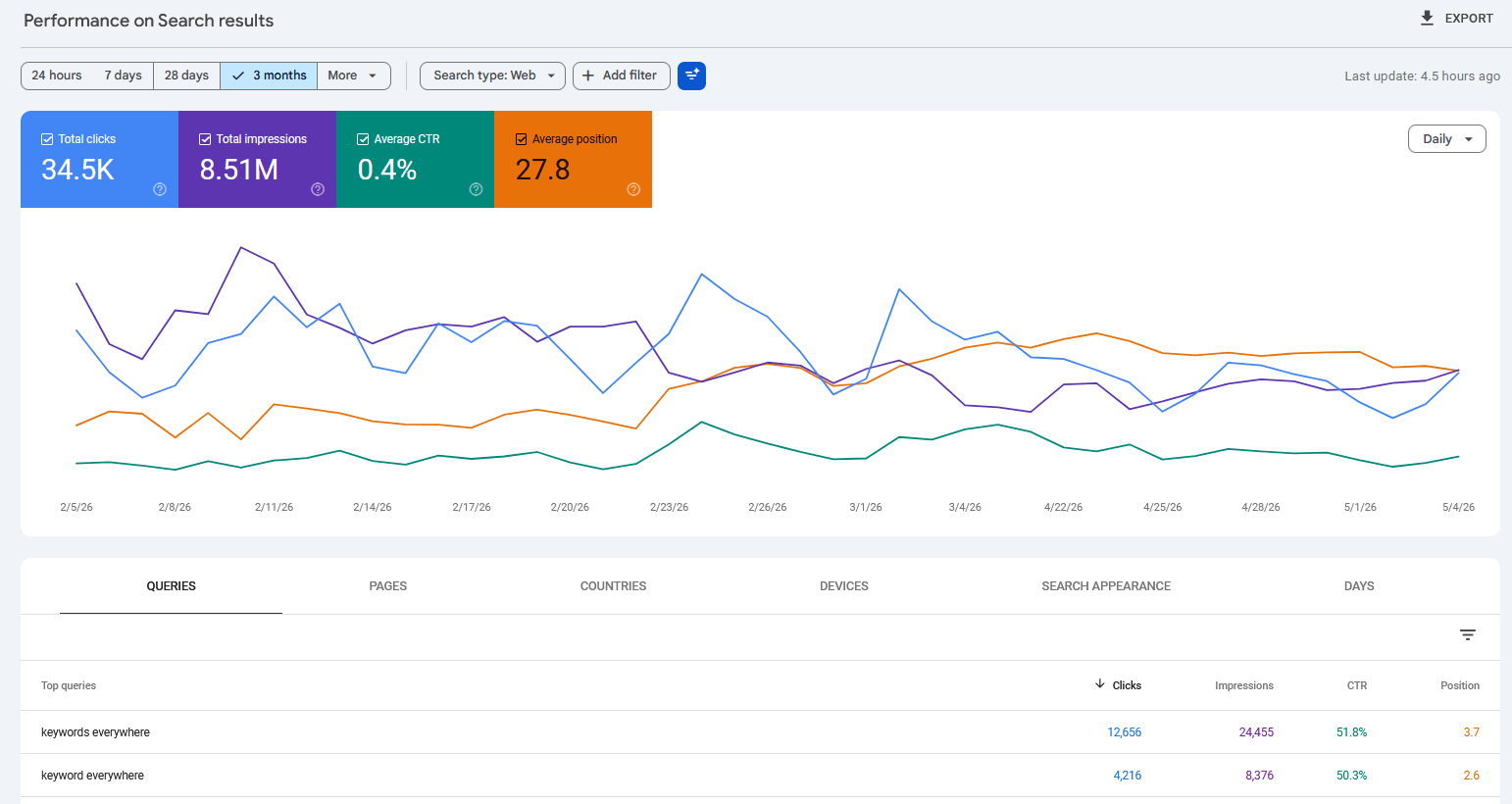
The default GSC Performance dashboard. The four tiles at the top show total clicks, total impressions, average CTR, and average position for the selected date range. The chart and Queries table below use the same range.
The basic walkthrough:
- Go to search.google.com/search-console.
- Pick the property for your website.
- Click Performance in the left nav.
- You'll see four tiles at the top: total clicks, total impressions, average CTR, average position.
- Below them, switch between Queries, Pages, Countries, Devices, Search Appearance, and Dates.
To check your rank for a specific keyword:
- Click "+ Add Filter" at the top.
- Choose Query, then "Exact query."
- Type the keyword.
- Look at the Average Position number for that filtered view.
One thing to know before you read that number: GSC's Average Position is impression-weighted. Every time your page appeared in the SERP for that query, its position is folded into the average. The next section explains why that matters.
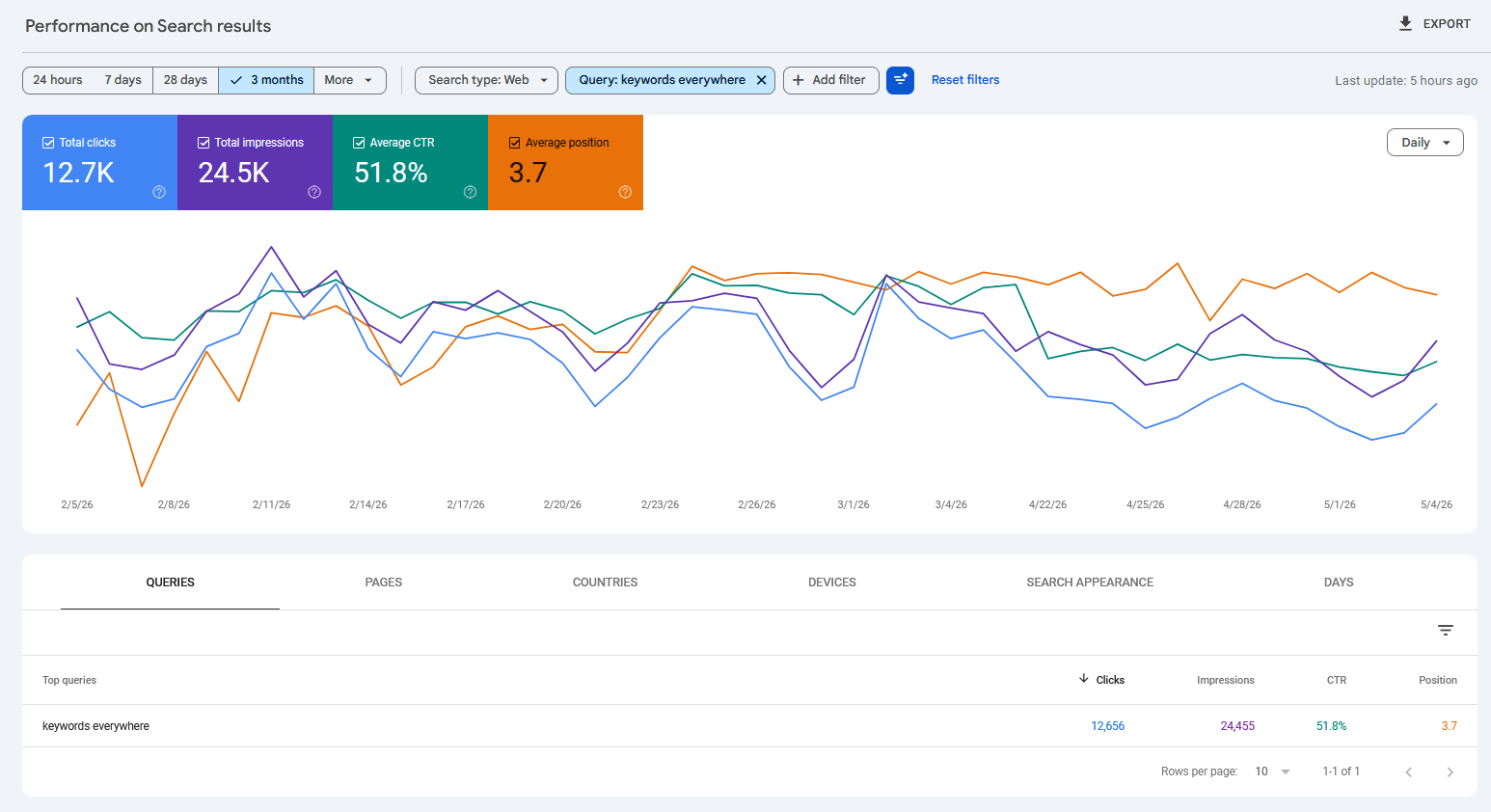
After applying a Query filter, the same dashboard recalculates: the four tiles now reflect only that one query, and the chart and table show its trend over time.
The Average Position trap:
The "Average Position" number is averaged across every impression of that query. Three things make it misleading:
- It includes impressions where you appeared on page 5 with a single impression. A bad-luck impression at position 47 can pull your average from 4 to 8 if your good impressions are sparse.
- It averages mobile and desktop together. Filter by Device if you want them separated.
- It averages all your pages together. If two of your pages compete for the same query (more common than you'd think; see keyword cannibalization), one's good rank gets dragged down by the other's bad rank.
The fix: always filter to a specific country, device, and date range when reading Average Position. The number changes meaningfully every time you do.
GSC's real limits:
- 16-month history cap. GSC only shows the last 16 months. Anything older is gone.
- No per-day rank snapshot. GSC gives you the position averaged over the period you select, not "where was I on Tuesday at 2pm."
- No alerts. GSC won't tell you when a key page drops 10 positions. You have to log in and notice.
- ~1,000 query cap per filter. GSC anonymizes long-tail queries below an unspecified impression threshold.
- No competitor data. Only your own site.
When GSC alone is enough:
- You are tracking your own site's overall performance.
- You only check rankings weekly or monthly, not daily.
- You don't need alerts on individual keyword movements.
- You don't care about competitor benchmarking.
For most blog owners and small site operators, this is enough. The fancier methods below are for cases GSC doesn't cover.
Tired of clicking through GSC filters by hand? Website Ranking Checker connects to your GSC and runs the filtering automatically: daily snapshots per keyword, per-country and per-device breakdowns, position-change alerts, and a permanent history that survives GSC's 16-month rollover. Free for Keywords Everywhere users.
Method 4: Paid rank trackers
The big names are AccuRanker, Semrush Position Tracking, Ahrefs Rank Tracker, SERPWatcher (Mangools), and SE Ranking.
They all do roughly the same thing.
How they actually work:
Paid rank trackers don't have a special pipe into Google. They scrape the SERP from data centers, simulating searches from various locations and devices. Some are more honest about this than others.
This means:
- Location is approximated. "New York" probably means "from a data center in the eastern US." Not actually from a New York address.
- Device is approximated. "Mobile" usually means "with a mobile user agent string." Not necessarily a real iPhone.
- They can't see what's personalized for actual users.
- When SERP features (ads, image packs, video carousels, AI overviews) reshuffle results, the scraper has to interpret what counts as "position 1."
When paid rank trackers help:
- Tracking competitor sites, which GSC can't show you.
- Daily snapshots with alerts on big movements.
- Granular per-country, per-device, per-language tracking across hundreds or thousands of keywords.
- Agency reporting with branded white-label exports.
What they get wrong:
- The position they show often differs from what you'd see in your actual incognito search, because the data center IP isn't where your audience is.
- Ad-heavy SERPs distort. Some trackers count "organic position 1" as "below the ads"; others count it as the absolute slot. Rules differ between products.
- Cost: $30-200 per month. For a single site owner tracking 50-200 keywords, this is real money.
My honest take:
Paid trackers are useful for agencies tracking competitors and for sites with very high keyword counts where alerts matter. For most blogs, they overlap heavily with what GSC already gives you, just dressed up with charts and alerts.
If you have not used GSC seriously, fix that before paying for anything else.
Method 5: GSC-powered rank trackers (the free hybrid)
There is a fifth category, and it's where my own tool sits.
GSC-powered rank trackers pull data from Google Search Console (so the underlying data is the same data Google sees) and add the things GSC's UI doesn't give you: daily snapshot history, position-change alerts, permanent retention from the day you connect, multi-domain views, and side-by-side comparison.
One honest limit: a GSC-powered tracker can't recover historical data from before you connected it. GSC itself shows the last 16 months on a rolling basis, so the day you connect is the start of your permanent archive. A tracker preserves every snapshot from that point on.
You get GSC's accuracy. You skip the manual filter-and-read workflow. The data is genuinely yours, not scraped estimates.
I built Website Ranking Checker on this pattern. It's free for Keywords Everywhere users and uses your existing GSC connection.
Method 5 isn't magic. It's just GSC plus persistence and visualization.
The 5 methods at a glance
| # | Method | Cost | Accuracy for your own site | History | Competitor data | Best for |
|---|---|---|---|---|---|---|
| 1 | Incognito search | Free | Single sample, biased by IP | None | No | One-off keyword checks |
| 2 | Browser extensions | Free | Live SERP overlay, single sample | None | Yes* | Live SERP exploration while researching |
| 3 | Google Search Console | Free | Most accurate (Google's own data) | Last 16 months (rolling) | No | Tracking your own site, weekly or monthly |
| 4 | Paid rank trackers | $30 - $200 / mo | Approximated (data-center scraping) | 1+ years (depends on plan) | Yes | Agencies, competitor tracking, high keyword counts |
| 5 | GSC-powered hybrid | Free for KE users | GSC accuracy with daily snapshots | Permanent from connect date | No | Daily/weekly tracking with alerts |
Which method should YOU use?
30 seconds, zero setup. Don't open a tool for one query.
You're learning by browsing. Live overlays beat tracked reports here.
Free, accurate, weekly check is plenty. Don't overcomplicate it.
You need history. Methods 1 and 2 don't go back in time.
You need competitor data, country/device granularity, and white-label exports.
GSC's accuracy without the manual filter-and-read workflow.
Most readers of this article want Method 5 if daily or weekly tracking matters, or Method 3 if monthly is enough.
Common mistakes when checking your rankings
Most of these come from treating rank as a single number rather than a distribution.
- Trusting one number as "your rank." A single observation, even from GSC, is one slice of a much wider distribution. Always look at trends over a week or longer, not single days.
- Reading GSC Average Position without filters. Unfiltered, the number averages every impression across every device, country, and date in your range. Filter to one query, one country, one device, and one period before drawing conclusions.
- Daily-checking your way to anxiety. Day-to-day variance is mostly noise (positions move 2-3 spots either way for non-algorithmic reasons). Weekly checks catch real movements with far fewer false alarms.
- Trusting paid rank trackers' geographic claims. "Rank from New York" almost always means "rank from a data center in the eastern US." It's an approximation, not a real local rank.
- Treating SERP feature changes as ranking changes. When a video carousel, AI overview, or shopping module appears above the organic results, your visible position drops without your page changing position in the index.
- Comparing your incognito search to a friend's. Two people in different cities, on different devices, with different IPs, will see different SERPs. You can both be right and disagree.
The personalization and location caveat
Two SEOs can disagree about your rank, both in good faith, and both be right.
When I search "keyword cannibalization" from my Mumbai office, I get a different SERP than my colleague searching the same term from a data center in Virginia. Even with both of us in incognito mode and pws=0, the data center IP is different, the cached results are different, the SERP shuffles are different.
This is the day-to-day noise floor of rank tracking.
A useful frame: positions vary 2-3 spots either side of the "true" position on any given day for non-algorithmic reasons. If you saw position 6 yesterday and position 9 today, that's probably noise, not a drop. If you saw position 6 last week and position 18 today, that is signal.
When in doubt, check the trend over 7 to 14 days. One day's number is less reliable than seven days of averages.
FAQ
- What's the difference between average position and actual position?
- Average position is the impression-weighted average across every search where your page appeared. Actual position is what someone sees on a single search at a single moment. Average position smooths out noise; actual position is one observation. They almost never match exactly.
- Can I check my rank from outside the US?
- Yes. Method 1 (incognito with the
&gl=country parameter) is the closest a single user can get without paying. Method 4 (paid rank trackers) lets you specify country and city. GSC shows your actual impressions filtered by country, which is the most honest answer for "where do I rank for users in country X." - Why does my rank change minute-to-minute?
- Google rotates results to test which arrangement gets better engagement. Personalization, A/B tests, fresh content scoring, and SERP feature swaps all reshuffle the order on a near-continuous basis. The number you see at 9am is a snapshot, not a stable truth.
- Can paid rank trackers be more accurate than GSC?
- Almost never, for your own site. Paid trackers are scraping; GSC is reading from Google's own logs. The exception is if you specifically need to know what users in a different country or city see, which GSC won't show you in the same granularity.
- Does Google penalize you for checking your own rankings?
- No. Searching for your own keywords doesn't affect rankings. The myth comes from a real concern: rank-tracking tools that hammer Google with thousands of automated searches per day can get the tool's data center IP rate-limited. That's the tool's problem, not yours.
- How often should I check my rankings?
- For most sites, weekly is plenty. Daily checking causes more anxiety than insight, because day-to-day variance is mostly noise. The exception is during an algorithm update or after a major site change, when daily checks help you spot real damage fast.
Skip the manual GSC lookup
Website Ranking Checker pulls daily snapshots from your Google Search Console and keeps every one of them, so when GSC's 16-month window rolls over, you still have your full history from the day you connected. Free for Keywords Everywhere users.
Connect Google Search Console