


Here's a question I asked about our own sites this morning: "Which tracked keywords dropped the most this week, and is anything in the quick wins report worth pushing instead?"
Ten seconds later I had the answer: three keywords named with their position changes, a note that two of them were within normal volatility, and four quick-win candidates with their impressions, sorted.
I didn't open a dashboard. I asked Claude, and Claude asked our rank tracker.
Every answer in that exchange already existed in the tool, the way every answer always exists in your tools: behind six clicks, two filters, and a mental join across three screens. The data was never the bottleneck; the interface was.
That's what this article is about: the newest way to use a rank tracker is to talk to it, it works today, it's free, and the setup takes five minutes. We built one of the first MCP servers in the rank-tracking category, so this is both the concept explained plainly and the exact setup guide.
- MCP (Model Context Protocol) is the open standard that lets AI assistants like Claude query your tools directly: connect once with a token, then ask questions in plain English.
- Our MCP server exposes six read-only tools: your domains, dashboard, tracked keywords, position history, and all eight opportunity reports, conversationally.
- Setup is five minutes: mint a token in Settings, add the connector in your assistant, ask your first question.
- The security model is strict by design: read-only (it can't change anything), scoped to your account, revocable any time, and it never spends your KE credits.
Six clicks or one question
The dashboard workflow for "what dropped this week": open the app, select the domain, open Tracked Keywords, sort by 7-day change, scan, cross-reference anything alarming against its position history. Six clicks if you know exactly where you're going, more if you don't.
The conversational workflow: ask.
Neither replaces the other: dashboards are still better for browsing, monitoring, and the weekly ritual. But an enormous share of real tool usage isn't browsing, it's a specific question with a specific answer: What moved? Which domain? Since when? Is it worth acting on? For those, the question IS the interface, and clicking through screens to assemble an answer a machine could assemble is just legacy behavior.
What MCP actually is
MCP, the Model Context Protocol, is an open standard (started by Anthropic, adopted broadly) that gives AI assistants a uniform way to query tools: a standard port, like USB for data.
A tool that ships an "MCP server" publishes a small set of capabilities ("list the tracked keywords", "get the position history for keyword X"). An assistant that speaks MCP (Claude does, and the client list keeps growing) can then call those capabilities mid-conversation, weave the results into its answer, and chain them: your "what dropped and what should I push instead" question becomes two tool calls and a synthesis, invisibly.
The key properties for a non-developer: no code (connection is a URL and a token), no exports (the assistant reads live data), and the tool decides what's exposed (ours exposes reads, never writes).
What you can ask
Our server exposes six tools; here's what they sound like as questions.
The portfolio overview (domains, dashboard): "How are my sites doing this week?" "What's my Search Score trend and what moved it?" "Any alerts I should care about today?"
The drop investigation (tracked keywords, keyword history): "Which keywords fell the most this week, and are the drops within normal volatility?" "Show me the position history of keyword X for the last quarter: did the March update touch it?" "Which of my money keywords are trending down over 30 days?"
The opportunity hunt (opportunities, the eight reports): "What's in my quick wins report for domain X with volume over 500?" "Any new cannibalization issues?" "Which pages does the decay report say are dying, worst first?"
Condensed from real usage:
That last one is where this heads: the one-page report's "what moved and why" block, drafted by asking.
The 5-minute setup
- Mint a token. In Website Ranking Checker: Settings → MCP Access → create token. Copy it immediately (we store only a hash; it's shown once). Tokens are named, revocable, and you can hold up to ten.
- Add the connector to your assistant. In Claude: Settings → Connectors → add a custom connector with our endpoint URL (websiterankingchecker.com/mcp) and your token as the bearer credential. In Claude Code: one
claude mcp addcommand. Any MCP-capable client follows the same shape: endpoint plus token. - Ask your first question. "List my domains" is the hello-world; "what dropped this week?" is the real one.
The endpoint doubles as documentation: open it in a browser and you'll find the tool list and example prompts.
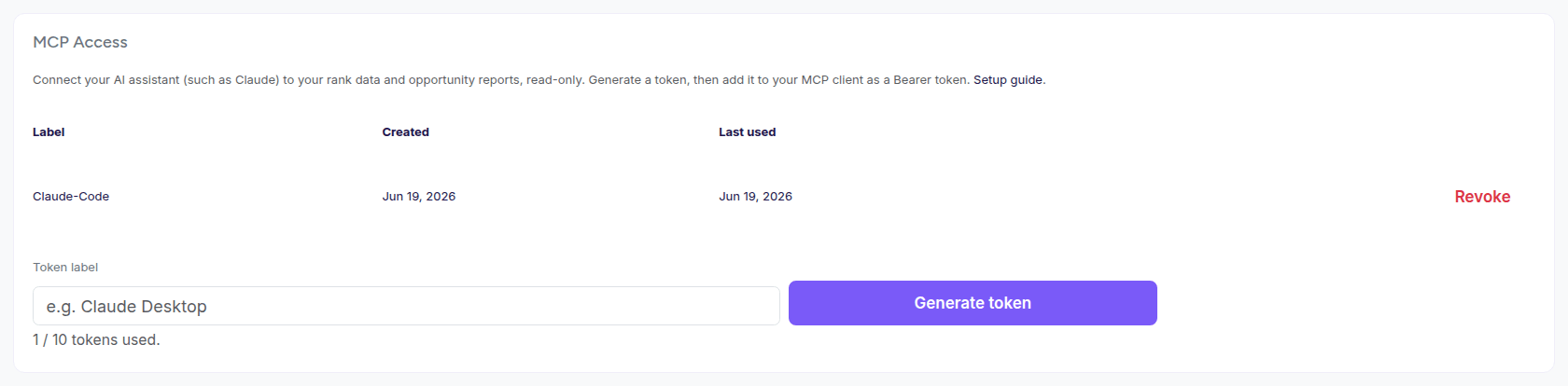
Tokens are minted in Settings, shown once, and revocable individually. Treat them like passwords.
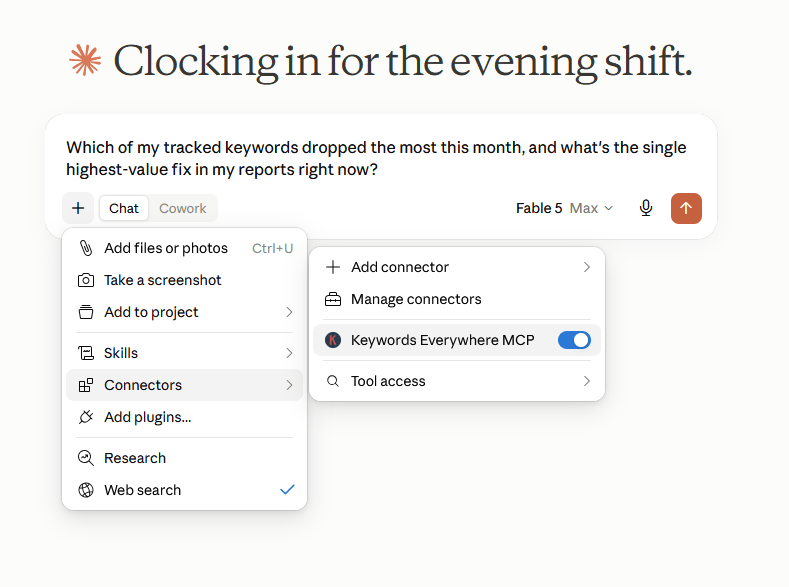
Connector on, question typed: from here the answers come from your own tracked keywords, not from Claude's memory.
The security model, plainly
Connecting an AI to your business data deserves plain answers:
It's read-only, structurally. The server exposes no write operations. The assistant cannot add or delete keywords, change settings, disconnect domains, or alter anything: those capabilities don't exist at the endpoint.
It's scoped to you. The token maps to your account; every query is constrained to your own data. Tokens are named and individually revocable in Settings the moment you want one gone.
It never spends your credits. The tools read stored data only. No call path triggers Keywords Everywhere API usage, so an enthusiastic assistant asking a hundred questions costs you nothing.
It's rate-limited per token, so runaway automation can't hammer anything.
What it can NOT do is the honest summary: modify, purchase, connect, disconnect, or see anyone else's data. The worst case of a leaked token is someone reading your ranking reports until you revoke it: a real reason to treat tokens like passwords, and a bounded one.
Why we built it
Partly because we could see the pattern coming: the four routes to programmatic rank data were converging on a fifth that isn't programmatic at all: conversational access as the default interface for questions, with dashboards for monitoring.
Partly because it fits how this tool already thinks: we're built on the Search Console API, everything is pre-computed daily into reports, and letting an assistant read those reports was the natural next door.
And partly, honestly, because using it is the argument. The first time you ask "what changed this week and what should I do about it" and get a grounded answer with your own numbers in it, the dashboard-only workflow starts feeling like visiting the bank teller to check your balance.
Reports become conversations. Reviews become questions. The tools that survive that shift are the ones whose data is worth talking to.
Try the first question today: mint a token in Settings → MCP Access, connect Claude, and ask what dropped this week. Five minutes, zero credits, revocable any time.
FAQ
- What is MCP?
- The Model Context Protocol: an open standard that lets AI assistants query external tools directly during a conversation. A tool ships an MCP server exposing specific capabilities; you connect your assistant with a URL and token; the assistant can then read that data to answer your questions in plain language.
- How do I connect Claude to my Search Console data?
- Via a tool that both reads GSC and speaks MCP: in Website Ranking Checker, mint a personal access token under Settings, then add a custom connector in Claude with the /mcp endpoint and the token. Your tracked rankings, history, and reports become queryable in conversation. Five minutes, no code.
- Is it safe to connect an AI assistant to my SEO data?
- The exposure is bounded by the server's design: ours is read-only (no write operations exist), scoped strictly to your account, rate-limited, and revocable per token. The assistant can read your ranking data and nothing else; it cannot change settings, spend credits, or touch other accounts.
- Can the AI spend my Keywords Everywhere credits?
- No. The MCP tools read stored data only (report caches and ranking history); no tool call can trigger a KE API request. Unlimited questions cost zero credits, by design.
- What questions can I ask?
- Anything the six tools cover: portfolio and dashboard summaries, tracked keyword lists with filters, per-keyword position history over any period, and all eight opportunity reports. Practical examples: "what dropped this week," "quick wins with volume over 500," "position history for keyword X since March."
- Does it work with assistants other than Claude?
- The protocol is open, so any MCP-capable client can connect with the same endpoint and token. Claude is the reference experience today; check your preferred client's support for remote MCP servers with bearer authentication.
Your rank data, conversational, in five minutes
Mint a token in Settings, add the connector to Claude, and ask your first question. Six read-only tools, your whole tracked portfolio, zero credits spent, revocable any time. The dashboard will still be there; you just won't need it for questions. Free for Keywords Everywhere users.
Set up MCP access