


Last month, our sites appeared in Google for 15,211 different search queries.
Open Search Console's Performance report and try to export that list, and you'll hit the ceiling every SEO eventually hits: the UI hands you 1,000 rows.
The other 14,000 queries exist. Google has them. They're just behind a door labeled "Search Analytics API," and most site owners never open it, because everything written about that door is either Google's own reference docs or a Python tutorial that assumes you wanted to become a data engineer.
Here's the version I wish existed when we started: our rank tracker pulls Search Console data for every user, every day, through this API. It is our core infrastructure. So this is the practitioner's map: what's actually behind the door, the five ways in (three involve zero code), and the operational gotchas the docs undersell.
- The UI shows you a sample; the API has the census. 1,000 rows in the interface versus every disclosable query via the API (our month: 15,211).
- Five access rungs: UI export (free, capped), Looker Studio (free, no code), bulk export to BigQuery (heavy, complete), the API (flexible, some code), or tools built on the API (no code, opinionated).
- If you build: fetch day-by-day around the 25K-row cap, expect a 2-3 day data delay, and know that query+page is the expensive dimension combination.
- Most people shouldn't code this. The right ending is usually Looker Studio for dashboards or a GSC-powered tool for the workflow.
The 1,000-row ceiling (and what's behind it)
Search Console's Performance report is a genuinely good interface sitting on top of far more data than it shows.
The UI caps the queries table (and its CSV export) at 1,000 rows per view. Filters help you slice beneath the cap, but the full inventory, every query your site appeared for above Google's privacy thresholds, is only fully reachable programmatically.
For a small site, 1,000 rows might BE the census. For anything with real history, the tail beyond row 1,000 is exactly the long-tail inventory where the quiet opportunities live: individually small queries, collectively a large share of your reality (42% of our clicks).
The good news: "programmatically" doesn't have to mean "with code." There are five doors, and only one requires an IDE.
The five rungs of access
Rung 1: UI + CSV export. Free, instant, capped at 1,000 rows per filtered view. Fine for spot checks and small sites. Its real limit isn't rows, it's workflow: no history beyond 16 months, no joins, everything manual.
Rung 2: Looker Studio connector. Google's free dashboard tool has a native Search Console connector: charts and tables over your data, shareable, zero code. It reaches deeper than the UI table, though it shares the API's dimension quirks. The right answer for "I want a dashboard, not a database." (Where it fits in reporting.)
Rung 3: Bulk data export. GSC can stream your complete, unsampled data into BigQuery daily (Google's setup doc): every query, including long-tail rows the API's thresholds trim. It's the census of censuses, and it's heavy: a cloud project, storage costs, SQL, and no backfill (it starts collecting from setup day). For enterprises and data teams.
Rung 4: the Search Analytics API. The subject of this article (the reference): request/response access to the same performance data, with your choice of dimensions, up to 25,000 rows per request. Free, generous quotas for a single site, some code required.
Rung 5: tools built on rung 4. Rank trackers (ours included), SEO platforms, and dashboards that did the API work so you don't. Zero code, opinionated workflows, and the honest trade: you get their feature set, not raw SQL.
What the API unlocks
Concretely, versus the UI:
The full query inventory. Paginate past 1,000: pull every query row Google will disclose. Our 15,211-query month took a few dozen requests.
Dimension combinations the UI won't cross. Query + page + country + device in one pull: "which queries hit which page, split by device" is one request instead of forty manual filter dances.
Daily granularity at scale. Per-day rows for every keyword, which is what makes real position history and update forensics possible. The UI charts daily aggregates; the API hands you the underlying series.
Programmatic joins. Once it's data, you can join it: to volumes (what we do), to your CMS, to revenue. This is where the API stops being an export tool and becomes infrastructure.
What it does NOT unlock: data Google withholds everywhere. Anonymized (privacy-threshold) queries stay hidden at every rung, the 2-3 day delay applies to everyone, and history starts 16 months back no matter how you ask. The API is a bigger window on the same building.
The builder's field guide
The lessons from running this at fleet scale, the ones the docs technically mention and practically undersell:
Fetch day-by-day. The 25K-row cap is per request, and a busy site's month blows past it invisibly: you get 25,000 rows and no error. Request one day at a time (our pattern) and completeness stops depending on your site's size.
Respect the 2-3 day delay. Fresh data lags reality. Build pipelines to target "3 days ago," not "yesterday," or your freshest day will be permanently, mysteriously thin.
Query+page is the expensive combination. Google's short-term "load" quotas price dimension combos differently, and query+page requests are the costly kind. If you're pulling both regularly for a big property, space the calls; a burst of them is how you meet the quota errors.
Quota errors need backoff, not retries-in-a-loop. A 403 quota response that gets hammered turns into a longer outage. Wait it out (minutes, not milliseconds) and resume. Ask me how we know.
The OAuth scope is read-only. webmasters.readonly reads reports and can't touch your site or settings, which is also what makes granting it to tools a reasonable risk.
Averages need weighting. If you aggregate API rows yourself, position must be impression-weighted, or your numbers will drift from the UI's and you'll spend an afternoon learning why (the blend math).
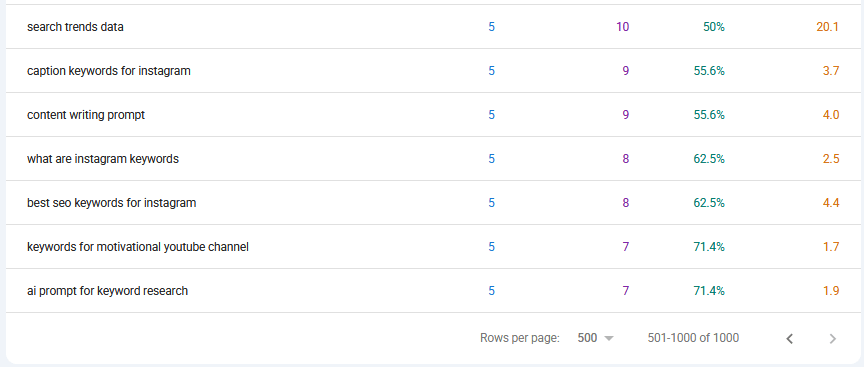
The ceiling in its natural habitat. Everything below row 1,000 requires one of the other four rungs.
The no-code endings
Honest recommendations by destination:
You want charts: Looker Studio, an afternoon, free.
You want the complete raw archive and have a data team: bulk export to BigQuery.
You want the workflow (tracked keywords, daily history beyond 16 months, alerts, opportunity reports): a GSC-powered tracker. Ours does exactly the day-by-day, dimension-aware, weighted-average work this article describes, continuously, for free, because we already wrote the code.
Rung five, in practice: Website Ranking Checker runs the Search Analytics API for you daily: full query inventory, weighted positions, years of history, tracking and alerts on top. Free for Keywords Everywhere users.
And one teaser for where this is heading: the newest way to "query" your Search Console data involves no dashboards at all: you connect an AI assistant and ask questions in plain English. We've built that door too; it gets its own article soon.
Common mistakes
Five API-consumer mistakes.
- Trusting one big date-range request. Silent 25K truncation makes totals wrong without errors. Day-by-day, always.
- Comparing your API sums to the UI without weighting positions. Impression-weight or diverge.
- Building against yesterday's data. The delay makes "yesterday" permanently incomplete. Target day-3.
- Ignoring the anonymized-query gap. Your clicks-by-query won't sum to your total clicks; the difference is privacy-thresholded queries. Expected, not a bug.
- Writing code you didn't need. If your endpoint is a dashboard or a tracked-keyword workflow, rungs 2 and 5 exist. The API is for needs the shelf doesn't stock.
FAQ
- What is the Google Search Console API?
- The Search Analytics API gives programmatic access to the same performance data as Search Console's UI: queries, pages, clicks, impressions, CTR, and positions, with your choice of dimensions and up to 25,000 rows per request. It's free and uses a read-only OAuth scope.
- Is the Search Console API free?
- Yes. It has usage quotas (per-site, per-user, and short-term load quotas), but they're generous for single-site use; you pay nothing for the calls. Bulk export to BigQuery, by contrast, incurs normal cloud storage and query costs.
- How do I get more than 1,000 rows out of Search Console?
- The UI and its export cap at 1,000 rows per view. The API paginates far beyond it (25,000 rows per request, repeatable), Looker Studio's connector reaches deeper for dashboards, and the BigQuery bulk export streams everything. Tools built on the API do the pagination for you.
- What are the Search Console API's limits?
- 25,000 rows per request (paginate or fetch day-by-day), data delayed 2-3 days, 16 months of history, privacy-thresholded queries withheld, and rate quotas including a short-term load quota where query+page dimension requests are the most expensive kind.
- What's the difference between the API and the bulk data export?
- The API is request/response: you ask for slices when you need them, within row and quota limits. Bulk export streams your complete daily data into BigQuery, including long-tail rows the API's thresholds trim, but requires a cloud project, incurs storage costs, and only collects from setup day forward.
- Do I need to know how to code to use Search Console data properly?
- No. Looker Studio covers dashboards without code, and GSC-powered tools cover tracking workflows (daily history, alerts, reports) without code. The API is for custom pipelines; the newest no-code route is connecting an AI assistant to your data and asking questions directly.
All of this, already built
Website Ranking Checker is the Search Analytics API turned into a workflow: day-by-day fetching, weighted positions, every query preserved daily, history kept for years past GSC's window, plus tracking, alerts, and reports on top. The code from this article, running for you, free with your KE subscription.
Skip to rung five