


Across our own sites, we track about 2,000 keywords.
Yesterday, 653 of them moved up. 1,061 moved down.
If you saw those numbers without context, you'd think the site was on fire. It isn't. That's what a completely normal Tuesday looks like when you actually measure rankings at scale: positions breathe, constantly, and most of the movement means nothing.
That's the double truth about keyword tracking that this guide is built on.
You can't do serious SEO without tracking, because rankings are where every content decision eventually shows up, and you can't remember 500 positions in your head.
And tracking done naively, one keyword, one incognito search, one panic per wobble, is worse than not tracking at all.
So here's the complete version: what tracking is actually for, which keywords deserve a slot, the three ways to track (a spreadsheet, Search Console, and dedicated trackers, honestly compared), and the 15-minute weekly ritual that turns position data into decisions instead of anxiety.
- Track to answer three questions: is the site trending the right way, what dropped that matters, and what's within striking distance of page 1.
- Track 25-150 keywords deliberately (money terms + striking distance + a brand canary), not every query you've ever appeared for.
- Spreadsheets break around 25 keywords, GSC is accurate but has no alerts, and rank trackers automate both; GSC-powered ones do it with Google's own data, free.
- Whatever you use: daily data, weekly decisions, tiered thresholds (3/5/10 positions by range). Movement without thresholds is just weather.
What tracking actually answers
Strip away the dashboards and keyword tracking exists to answer three questions.
Are we trending the right way? Not "did we move today", but is the 30-day line pointing up? This is the report-card question, and it's the one your boss or client actually cares about.
Did anything drop that matters? The insurance question. A money keyword sliding from 4 to 9 costs real revenue every day nobody notices. Catching it same-day instead of next-quarter is most of tracking's ROI. What to do when it fires is the rankings-drop triage.
What's within reach? The offense question. Keywords sitting at position 11-15 are one push from page 1, and they're invisible unless something is watching them. This is the quick wins method, and it's where tracking pays for itself.
Every feature of every tracking setup should serve one of those three. Anything else is decoration.
Which keywords to track (and how many)
Your site appears for far more queries than you think (our smallest site: 464 in a month). You should not track all of them.
Track three groups:
Money keywords (10-50). The queries that map to revenue: product terms, service + city, high-intent comparisons. If one of these moves 3 positions, you want an email about it.
Striking-distance keywords (10-100). Everything relevant sitting at position 8-20. These are your growth backlog, and the group that changes most month to month. Refill it quarterly from GSC's Queries report.
A brand canary (2-5). Your brand name and variants. Not because they need optimizing, but because a brand keyword dropping is a smoke alarm for something structural (indexing, a penalty, a hack), and because you need brand traffic split out before any other number makes sense.
That's 25-150 keywords for most sites, and the count matters less than the deliberateness. A tracked list you chose is a strategy; auto-tracking everything is a landfill.
One honest caveat: your tracked list needs refreshing. Queries shift phrasing, new pages create new targets, seasons rotate. Book 15 minutes a quarter to prune and refill from your real query data (mining GSC for keywords is the method).
Method 1: the spreadsheet
Everyone starts here, and it's genuinely fine at small scale.
The template that works (copy the structure):
| Column | What goes in it |
|---|---|
| Keyword | One per row |
| Target page | The URL that SHOULD rank for it |
| Priority | money / striking / brand |
| Volume | Monthly searches, from your keyword tool |
| Week of Jan 6 | Position that week |
| Week of Jan 13 | Position, next column, and so on rightward |
| Change | Formula: this week minus last week |
| Notes | "Rewrote title Jan 20": the attribution column everyone skips |
Every Monday: look up each keyword's position, type it in, eyeball the Change column. Where do positions come from? Not incognito searches (here's why), but from Search Console: Performance report, filter by query, read the position. Honest, slightly tedious, free.
The spreadsheet breaks in four predictable ways:
- Volume. At 10 keywords, Monday costs 10 minutes. At 50, an hour you'll start skipping.
- No history depth. Miss three Mondays and your chart has holes exactly when something interesting happened.
- No alerts. The spreadsheet only knows what happened when you fill it in. Drops age a week before you see them.
- Manual attribution. The Notes column dies first, and without it you can't connect changes to causes.
When you feel any of those, you've outgrown the sheet, not failed at it.
Method 2: Google Search Console directly
GSC is the most accurate free source of ranking data that exists, because it's not checking rankings, it's reporting them: the real average positions your site held across every search that showed it.
The workflow: Performance report, Queries tab, filter or search for your tracked keyword, read position, impressions, clicks, and CTR. Add a country or device filter when you need the split instead of the blend.
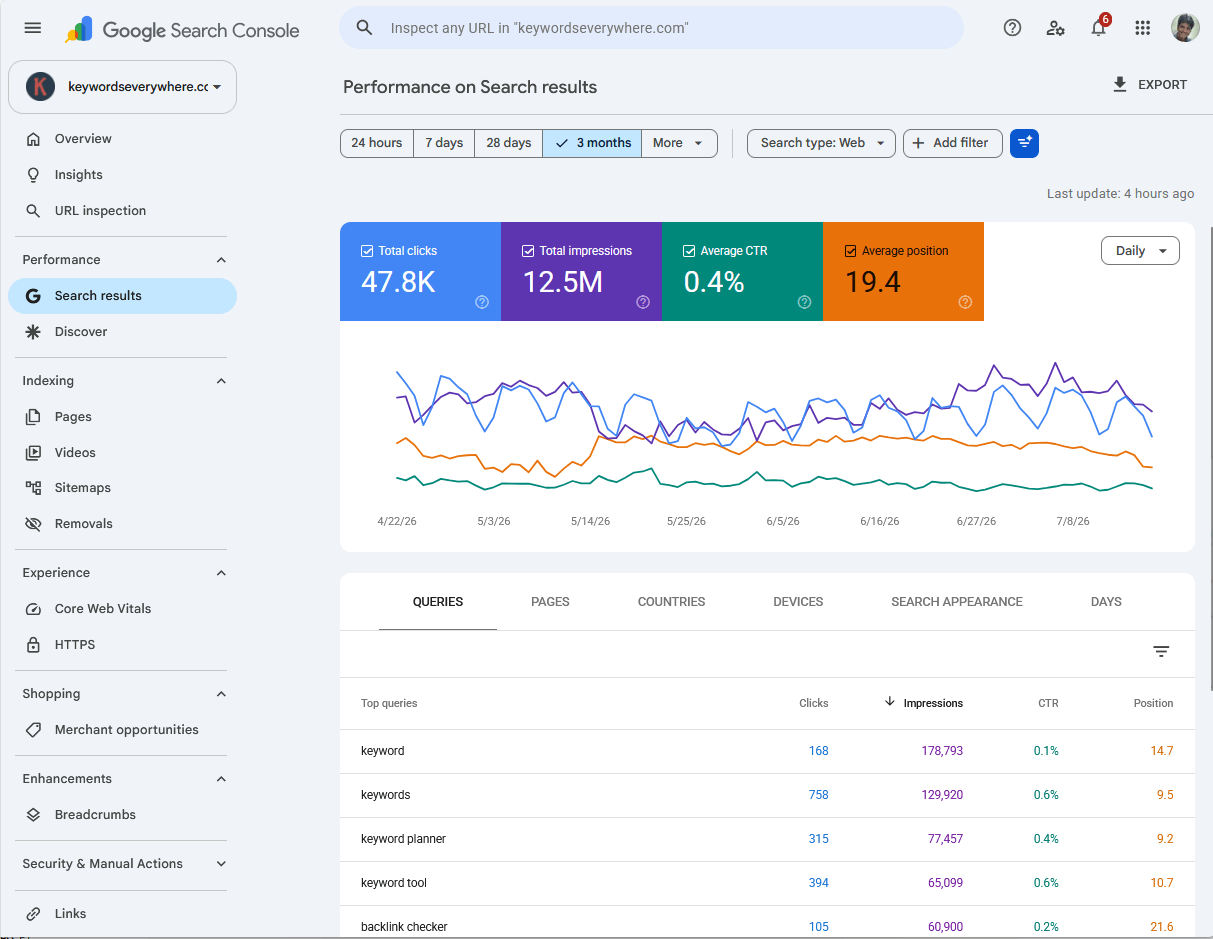
The manual loop: find each keyword in the Queries tab, read the position, repeat. Accurate, free, and entirely alert-free.
What GSC gives you free: truth (real positions, not one location's sample), every query you appear for, and 16 months of history.
What it doesn't give you: a clean daily series per keyword without clicking around, alerts of any kind, tracking-list curation, or history past 16 months. And its average position is a blend across devices and countries that needs careful reading (the full story on GSC's limits).
GSC alone is a complete answer for a small site you check monthly. For anything you check weekly or want alerts on, it's the data source, not the workflow.
Method 3: a rank tracker
A tracker automates the loop: it records positions on a schedule, keeps the history, computes the changes, and emails you when something clears a threshold.
The honest split within the category (full comparison here):
Scraper-based trackers (AccuRanker, SE Ranking, Wincher, most of the industry) search Google from data centers and record what they see. Strengths: any keyword, including ones you don't rank for yet, and competitor tracking. Costs: real money ($30-200/mo), and each check is one location's sample rather than your true average.
GSC-powered trackers (ours, and a few others) read your Search Console data instead: the real averages across every impression. Strengths: Google's own numbers, no per-check costs (ours is free), daily snapshots and alerts layered on data you already own. The honest limit: your own site only, and only queries you already appear for.
If you need competitor positions, pay for a scraper. If you need YOUR positions, tracked accurately with history and alerts, the GSC-powered route is better data for no money. (If you're a Keywords Everywhere user, that combination is built for you.)
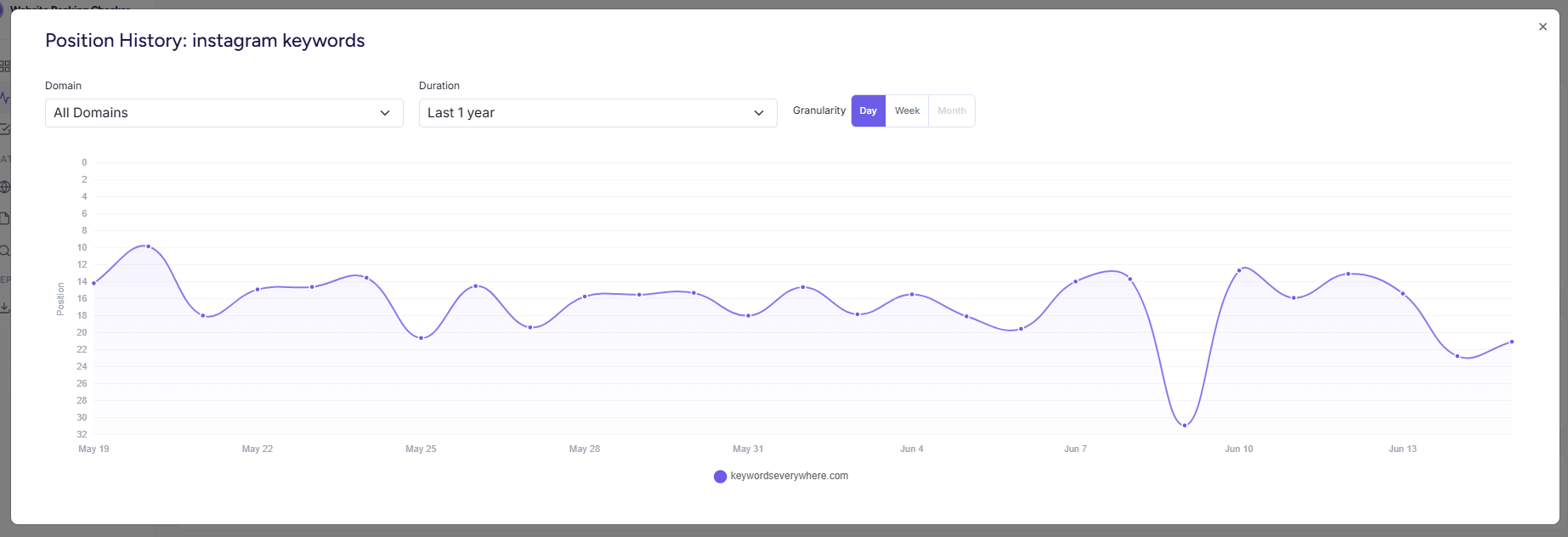
What automation buys you: a daily position line per keyword, kept for years, with nobody typing anything on Mondays.
Cadence and thresholds
Collect daily, decide weekly. Daily data catches drops fast and makes charts readable, but daily decisions burn you out on noise. The 653-up-1,061-down Tuesday from the intro is why: at any scale, something is always moving.
Act on tiered thresholds. Our defaults, tuned on our own data: a move of 3+ positions matters in the top 10, 5+ matters at 11-30, 10+ matters below that. Smaller moves are weather (the noise floor math). Sustained beats big: 3 positions held for 3 days outranks 12 positions for one day (the triage).
Weekly is fine for stable sites. If your content ships monthly and your niche is calm, a weekly check answers all three questions. Daily tracking earns its keep during content pushes, migrations, and algorithm updates.
The weekly 15-minute review
The entire point of the machinery. Ours, honed to a ritual:
- Movers first (3 min). Biggest gains and drops this week. Gains: anything worth doubling down on? Drops: run the triage on anything that cleared a threshold.
- Striking-distance scan (5 min). Sort tracked keywords by position, read the 8-15 band. Pick ONE to push this week: internal links, title refresh, content gap (the quick-wins playbook).
- Decay glance (2 min). Any tracked page trending down over 30 days? Flag it for the decay checklist.
- Log it (5 min). Three lines: what moved, what you did, what you expect. Future-you needs the attribution.
Fifteen minutes, once a week, and tracking becomes the thing it's supposed to be: the feedback loop for everything else you do.
Prefer the loop pre-built? Website Ranking Checker runs it for you: daily snapshots from your GSC, movers on the dashboard, quick wins and decay pre-computed as reports, alerts when thresholds trip. Free for Keywords Everywhere users.
Common mistakes
Six ways tracking setups go wrong.
- Tracking everything. 2,000 auto-tracked keywords produce noise proportional to the count. Track deliberately; browse the rest in GSC when curious.
- Reading daily moves as verdicts. Below the threshold for its range, a move is weather. The Tuesday numbers again: 1,061 drops, almost all meaningless.
- Tracking without target pages. If you don't know which URL should rank, you can't spot cannibalization or fix the right page.
- One blended number per keyword. Mobile-vs-desktop and country splits change the story (the device gap). Track the aggregate, diagnose with the splits.
- Never refreshing the list. A tracked list from 2024 measures a strategy you no longer have.
- Tracking rankings but never acting. The review ritual is the product. Data without the Monday 15 minutes is a subscription to anxiety.
FAQ
- How do I track keyword rankings for free?
- Two honest free routes: Google Search Console (real positions for every query you appear for, checked manually) or a GSC-powered tracker like Website Ranking Checker (free for Keywords Everywhere users), which adds daily snapshots, history, and alerts on top of the same data. Free scraper-based checkers exist but cap you at a handful of keywords.
- How many keywords should I track?
- 25-150 for most sites: 10-50 money keywords, 10-100 striking-distance keywords (positions 8-20), and 2-5 brand terms as a canary. Deliberate selection beats volume; refresh the list quarterly from your real query data.
- How often should I check keyword rankings?
- Collect daily, decide weekly. Daily data catches drops early and makes trends readable, but act only on moves that clear a threshold for their range (3+ positions in the top 10, 5+ at 11-30, 10+ below) and hold for several days.
- Can I track keyword rankings in Google Search Console?
- Yes, and it's the most accurate free source: Performance report, Queries tab, filter to your keyword, read the average position. Its limits: no alerts, no curated tracking list, an averaged position that blends devices and countries, and 16 months of history.
- What's the difference between a scraper-based and a GSC-based rank tracker?
- Scrapers search Google from data centers and record what one location sees; they can track any keyword including competitors', and cost $30-200 a month. GSC-based trackers read the positions Google reports for your own site: real averages across all searchers, free or close to it, but limited to your own queries.
- Do keyword rankings change every day?
- Yes, constantly. Across roughly 2,000 keywords we track, a third moved up and half moved down on a single ordinary day. Daily movement is normal; sustained, threshold-clearing movement is signal.
Keyword tracking that sets itself up
Connect Google Search Console and Website Ranking Checker starts tracking daily positions for the keywords that matter, with history, tiered alerts, and the quick-wins and decay reviews pre-computed. The 15-minute weekly ritual, mostly automated, free for Keywords Everywhere users.
Start tracking free