

A Rank Tracker Built for Keywords Everywhere Users (From the Team That Runs KE)

I help run Keywords Everywhere, and for years the same question has landed in our support inbox a few times a week.
It arrives in different words, but it's always this: "I can see the search volume for every keyword right on Google. But how do I know where I actually rank for them?"
And for years, our honest answer was slightly embarrassing: you need another tool for that.
Keywords Everywhere is an overlay. It enriches whatever page you're looking at with volumes, CPC, and competition data. It has never crawled Google to check positions, and it never will, because that's a fundamentally different machine.
So our users, over a million of them on the extension, would go bolt a rank tracker on top. Usually one that costs $30 to $100 a month. Almost always one whose dashboard proudly displays... search volume and CPC. The data they already own through KE.
Paying twice for the data you have, to get the one thing you're missing, bothered me enough that we eventually built the missing half ourselves.
This article is the answer we now give to that support question: what KE deliberately doesn't do, the three ways to add rank tracking to a KE workflow, and why the cheapest one is also the most accurate one for your own site.
Full disclosure up front: we built the tool this article ends at, it's free for KE subscribers, and I'll state its real limits in plain sight, the same way I did when I refused to rank it in our own free-tracker comparison.
- Keywords Everywhere shows you volume, CPC, and competition anywhere on the web, but it does not and cannot tell you where your site ranks.
- Most KE users who want rank tracking pay $30-200/mo for a scraper-based tracker that re-sells them the volume data they already have.
- The better fit: a tracker that reads positions from your own Google Search Console and pulls volume/CPC through the KE subscription you already pay for. That's Website Ranking Checker, and it's free.
- Credit math is boring on purpose: about 1 credit per tracked keyword per month, only for keywords you explicitly track.
What Keywords Everywhere does well (and what it deliberately doesn't)
Keywords Everywhere does one job: wherever you are on the web (Google, YouTube, Search Console, a competitor's site), it overlays the numbers you'd otherwise have to look up: monthly search volume, CPC, competition, and trend history.
It answers "is this keyword worth anything?" at the moment you meet the keyword.
Here's what it deliberately does not answer:
- Where does my site rank for this keyword?
- Where did I rank last month?
- Which of my pages ranks for it?
- Did anything drop this week that I should know about?
Those are rank tracking questions. Answering them requires either scraping Google every day (location-biased, and the reason trackers cost real money) or reading the ranking data Google itself hands site owners through Search Console.
An overlay extension can't do either job well, so KE never pretended to. But that leaves the question our support inbox keeps asking: what should a KE user bolt on?
The 3 ways KE users add rank tracking
Option 1: a full SEO suite (Ahrefs, Semrush). Excellent tools, and the right call if you need what only they do: competitor keyword gaps, backlink data, site audits at scale. But as a rank-tracking add-on for a KE user they're overkill twice over: entry plans start around $129/mo, and much of what you're paying for (keyword databases, volume data) duplicates your KE subscription.
Option 2: a standalone rank tracker (AccuRanker, Wincher, SERPWatcher, and friends). Purpose-built position trackers, typically $30-100/mo (AccuRanker starts around $224). They work by scraping Google from data centers, which means every position is a sample from one location. And the volume and CPC columns in their dashboards are, again, data you already own via KE.
Option 3: a Search-Console-powered tracker. Instead of scraping Google from outside, read the positions Google reports to you as the site owner: real average positions across every country and device, for every query your site appears in. Layer KE's volume and CPC on top through the API subscription you already have. Cost: zero, plus the KE credits you'd be spending on those keywords anyway.
The catch with option 3 is symmetrical and worth saying clearly: Search Console only reports queries where your site appeared. A GSC-powered tracker cannot track a competitor's rankings, and it can't tell you about keywords you don't rank for at all yet. If competitor tracking is the job, you want option 1 or 2 and should pay happily.
But if the question is the one our inbox actually gets, "where do I rank for my keywords, and is it getting better or worse?", option 3 answers it with better data than the scrapers, for free.
I've written before about why GSC's data beats a scraped SERP for your own site, so I'll keep the argument short here: scrapers sample one location on one device; Search Console averages every real impression your site got, everywhere.
How the KE-native way works
Website Ranking Checker is our implementation of option 3, built specifically for KE users.
The division of labor:
- Google Search Console provides the truth: which queries showed your site, at what average position, with how many impressions and clicks, updated daily.
- Your KE subscription provides the context: monthly volume, CPC, and a value estimate for every keyword you track, so you can tell a position-3 ranking on a $0.10 keyword from a position-12 ranking on a $4 keyword.
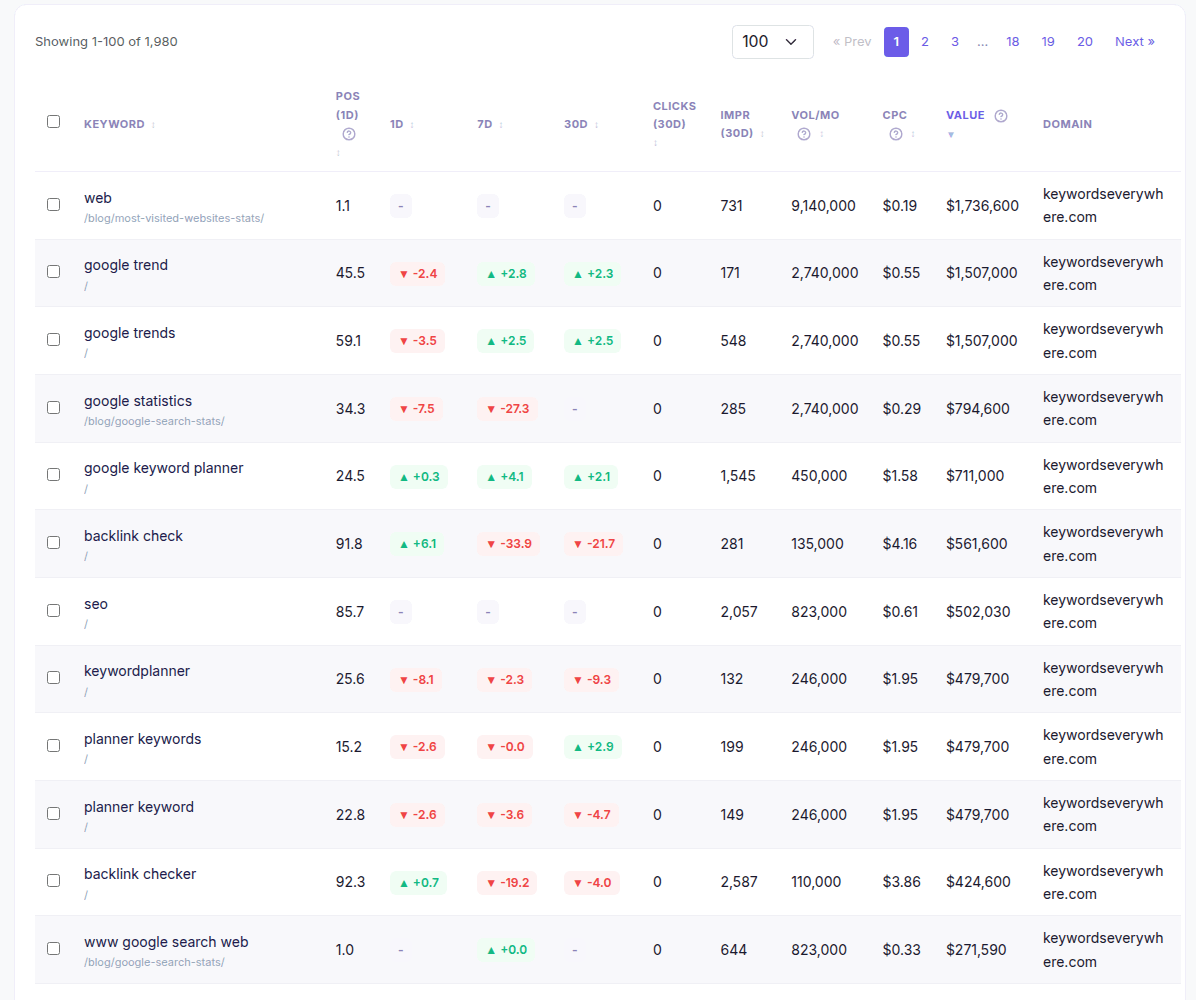
The working result: Search Console positions and clicks on the left, your KE volume, CPC, and value data on the right, one row per tracked keyword.
The credit model is designed to be boring:
- Volume and CPC are fetched only for keywords you explicitly track, never for the thousands of queries the tool merely displays from GSC.
- Metrics refresh roughly monthly (volumes don't move faster than that), so a tracked keyword costs about 1 credit per month.
- Track 500 keywords, spend roughly 500 credits a month. The 100K-credit KE plans barely notice.
Everything else in the tool (the 8 opportunity reports, position history, daily alerts) runs on GSC data alone and costs no credits at all.
The 2-minute setup
- Log in with your KE API key. No new account, no password. Your key is in the KE settings page; paste it once. This is also how the tool knows your plan and credits belong to you.
- Connect Google Search Console. One OAuth consent screen, read-only scope. If your site is verified in GSC, its data starts flowing within minutes, with about 75 days of history backfilled automatically (and the full 16 months following behind).
- Pick keywords to track. Open the Queries view, which lists every real query your site appears for, sorted by clicks. Tick the ones that matter and hit Track. Or let onboarding auto-track your top 100 by clicks and prune later.
From there it runs itself: daily position snapshots, tiered alerts when something meaningful moves, and the KE metrics appearing on your tracked list.
If you have a KE subscription, you already have everything the setup needs. Log in to Website Ranking Checker with your API key, connect Search Console, and your keywords are tracking before your coffee cools.
Looking for a Keywords Everywhere alternative instead?
Some of you landed here from a search for "keywords everywhere alternative", and some of you genuinely need one, so here's the honest version.
Replace KE when your need has outgrown what an overlay can be:
- You need competitor keyword research (keywords they rank for and you don't): Ahrefs or Semrush, no way around it.
- You need backlink data or technical audits: same answer.
- You want one subscription that does everything: a suite, priced like one.
Keep KE (alone or alongside a suite) when your work is keyword-first: volumes at the moment of discovery, on any site, at credit prices a suite can't touch.
We're relaxed about this comparison, enough that we maintain our own list of Keywords Everywhere alternatives on the KE site, with the honest case for each. And if what you're actually shopping for is a free rank tracker, I wrote a comparison of those where I refused to rank our own tool, for reasons explained there.
What no alternative on any of those lists will do, though, is the specific combination this article is about: your Search Console positions and your KE metrics in one place, for free. That combination only exists because we run both halves.
Before you connect: the honest catches
Three limits, stated the same way I'd state a competitor's.
It needs a KE subscription. The tool is free because it runs on the credits you already have. No KE account, no tool. If you're reading this as a KE user, you're already covered.
It only tracks keywords your site appears for. GSC data is first-party by nature. You can't point it at a competitor's domain, and a brand-new site with no impressions yet has nothing to track on day one. (Every keyword your site has any presence for is there, though, usually far more than people expect: I've written about what that looks like the first time you check.)
GSC data runs 2-3 days behind. Google delivers Search Console data on a delay, so "today" in the tool is really "a couple of days ago". Daily granularity is intact; real-time it is not. If you need this-second SERP checks, that's what one-off checkers are for.
If none of those three is a dealbreaker, the trade is straightforward: better position data than scraping, the KE context you already pay for, and a $0 line item.
FAQ
- Does Keywords Everywhere track keyword rankings?
- No. Keywords Everywhere is an on-page overlay that shows search volume, CPC, competition, and trend data wherever you browse. It doesn't crawl Google or record positions. For rank tracking, KE users can connect Website Ranking Checker, a free companion tool we built that reads positions from Google Search Console and enriches them with KE metrics.
- Is there a free rank tracker for Keywords Everywhere users?
- Yes. Website Ranking Checker is free for anyone with a Keywords Everywhere subscription. It tracks daily positions from your own Google Search Console data, keeps position history, sends alerts, and shows KE volume, CPC, and value for every tracked keyword, spending roughly 1 credit per tracked keyword per month.
- How many KE credits does rank tracking use?
- About 1 credit per tracked keyword per month. Metrics are fetched only for keywords you explicitly track and refreshed roughly every 30 days. Browsing your queries, reports, and position history costs no credits at all.
- What is the best alternative to Keywords Everywhere?
- It depends on why you're replacing it. For competitor keyword research and backlinks, Ahrefs or Semrush. For a like-for-like free overlay, Keyword Surfer is the closest, with a smaller dataset. We keep an honest comparison on the KE site. If the missing piece is rank tracking rather than a replacement, a GSC-powered tracker adds it without replacing anything.
- Can I track competitor rankings with a GSC-based tracker?
- No. Search Console only reports data for sites you own and have verified. That's the honest trade of the GSC approach: perfect first-party data, zero third-party visibility. If competitor position tracking is a hard requirement, use a scraper-based tracker alongside.
- Is connecting Google Search Console safe?
- The connection uses Google's OAuth with a read-only scope: the tool can read your Search Console reports and nothing else. It can't modify your site, your GSC settings, or your Google account, and you can revoke access any time from your Google account's security page.
Your Keywords Everywhere subscription already includes a rank tracker
Connect your Google Search Console, pick the keywords you care about, and get daily positions, history, and alerts with your KE volume, CPC, and value data beside them. Free with your existing KE subscription, and about two minutes to set up.
Set up your free rank tracker