


A few months ago I almost dropped a keyword from my tracking list because Search Console told me it wasn't worth the effort.
The keyword was "instagram keywords." Search Console showed it sitting at an average position of 16.5, with a 4.2% click-through rate. Page two, mediocre clicks. The kind of number you glance at and scroll past.
So I almost scrolled past it. Then I split the same query by country, and the single number fell apart.
In India, which sends us the most impressions for that query, we rank #8. First page. A 9.2% click-through rate, and 99 of the keyword's 111 total clicks.
In the United States, the second-biggest market for the query, we rank #25. Page three. Zero clicks from more than 900 impressions.
Position 16.5 was the average of a first-page winner and a third-page flatline. It was a rank we held in neither country. Search Console had quietly merged two completely different realities into one forgettable number, and that number told me to do nothing.
That is the problem with using Search Console as a rank tracker. Not that its data is wrong, its data is the most accurate you can get, but that the headline number it shows you, average position, is a blend. And a blend can hide the exact thing you needed to see.
This article is about that gap: why Search Console has the truest ranking data anywhere and the worst interface for tracking it, the limits that actually bite when you try, why the obvious fix (a scraped rank tracker) got worse in 2025, and how to track properly from the data you already trust.
- Search Console has the most accurate ranking data there is, but its headline "average position" blends every country, device, and page into one number you may rank at nowhere.
- Its real limits as a rank tracker: that blended average, no daily history you can chart, no alerts when a keyword drops, and only 16 months of data.
- The fix isn't a scraped rank tracker (those got pricier and less reliable when Google removed the 100-results parameter in 2025). It's a tracking layer on top of the Search Console data you already trust.
Search Console has the truest ranking data, and the worst interface for it
Every other way of checking your rank is, at bottom, a guess.
A scraped rank tracker sends a bot to load a search results page from one location, on one device, at one moment, and reads off where you appear. It is a sample of one. A browser extension does the same thing from your chair, with your search history coloring the results. Even typing the query into an incognito window only tells you where you rank for that search, in that place, right then.
Search Console is different in kind. It does not sample the SERP and guess where you are. It reports the impressions and clicks Google actually served to real people, across all their devices and locations, for the queries you actually appeared in. There is no estimation step. It is the closest thing to ground truth you can get about where your site shows up in Google.
That is why, when people ask me where to start with rank tracking, the honest answer is almost always "Search Console." It is free, it is first-party, and it is true. (If you want the full menu of options and how they stack up, I wrote a whole piece on how to check your website's ranking.)
So here is the catch, and it is the whole reason this article exists.
Search Console was built to report your search performance, not to track your ranks over time. Those sound like the same job. They are not. Reporting performance means rolling everything up into clean summary numbers. Tracking ranks means watching specific keywords move, day by day, segment by segment, and getting told when something changes. The Search Console interface is excellent at the first job and barely attempts the second.
The result is a tool with the best data and an interface that actively hides it from you. The single biggest way it does that is the number it puts front and center: average position.
Why "average position" is a trap
Average position is exactly what it sounds like. For a given query, over the date range you picked, Google takes the position you appeared at on every single impression and averages them.
That averaging sounds harmless. It is not, because it collapses four different dimensions into one number.
It blends devices. Your desktop rank and your mobile rank for the same keyword can be wildly different, and average position smears them together.
It blends countries. Where you rank in the US, India, and the UK for one query can span thirty positions, and they all go into the same average.
It blends pages. If two of your own pages rank for the same query, their positions get averaged, which not only distorts the number but can hide a cannibalization problem you would want to know about.
It blends time. A range-averaged position over 28 days tells you nothing about whether you were climbing or falling inside that window.
Go back to "instagram keywords." The number Search Console showed me was 16.5. Here is what that 16.5 was actually made of.
In India, position 8, earning 99 clicks at a 9.2% click-through rate. In the US, position 25, earning zero clicks from over 900 impressions. The "16.5" was the weighted midpoint of a page-one win and a page-three dead zone, and it described our ranking in neither place.
And it wasn't only countries. Split the same keyword by device and it blurs again: position 14 on mobile, where most of the impressions and almost all of the clicks were, against position 24 on desktop. Two more numbers the average had folded away.
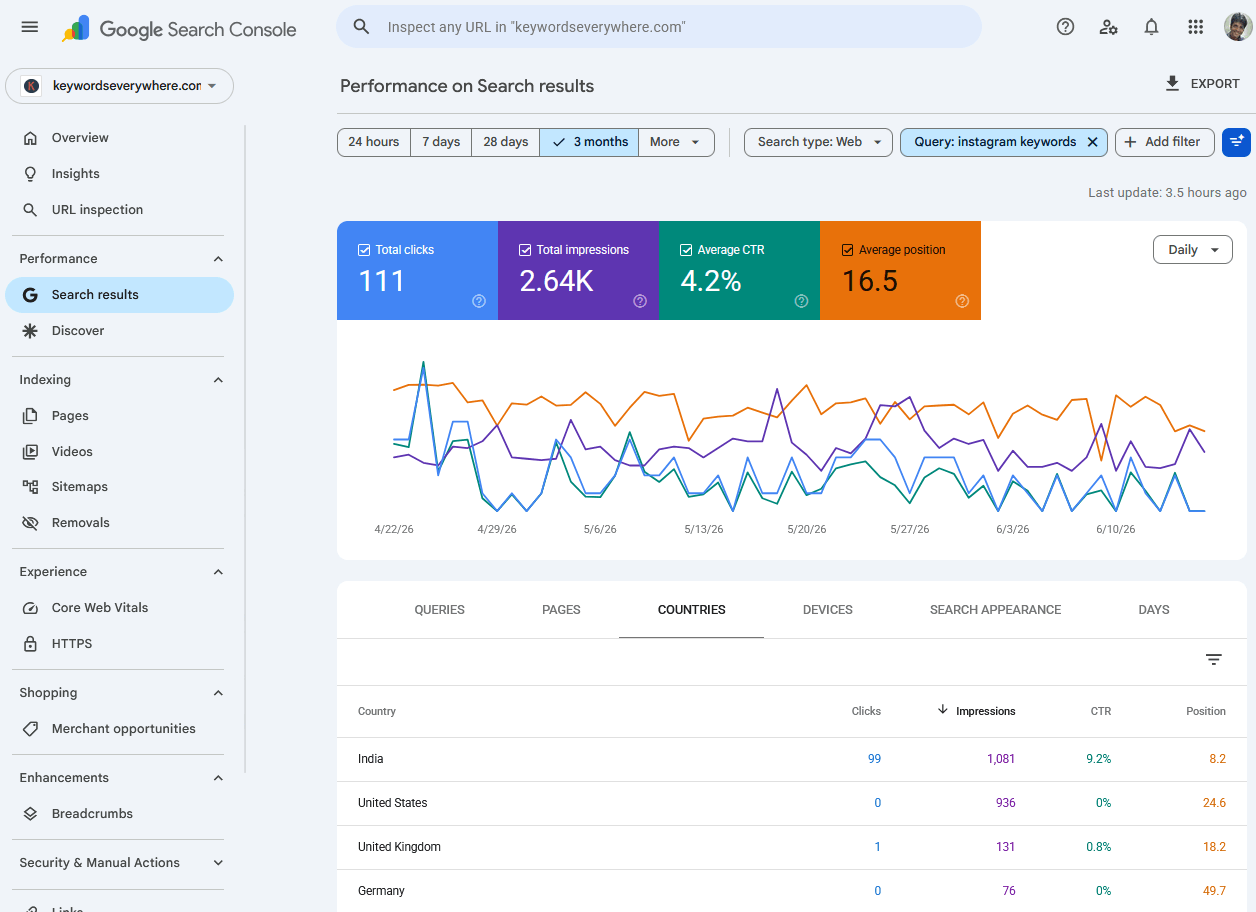
The same query, filtered by country in Search Console: position 8 in India and 25 in the US, hiding behind a single average of 16.5.
This is not a rare edge case. When we looked across our own portfolio of sites, 32% of keywords had a mobile-versus-desktop position gap of three or more, and 17% had a gap of five or more. (That is the same dataset behind our piece on why mobile rankings differ from desktop.) For roughly a third of keywords, the single "average position" is a number the keyword does not actually hold on either device, before you even add the country and page blending on top.
So is Search Console's position data accurate? Yes, completely. That is the part people get wrong when they call it inaccurate. The underlying data is real. The average is an accurate summary of a blend. The problem is that an accurate summary of a blend is often useless for deciding what to do, because the action you would take for "we are #8 in our biggest market and #25 in our second" is nothing like the action you would take for an honest, everywhere-position-16 keyword.
Doing this split by hand for every keyword gets old fast. Pulling the per-device and per-country position for each query, every time, is most of what we built Website Ranking Checker to do automatically. Free for Keywords Everywhere users.
The limits that actually matter for tracking
The averaging trap is the big one, but it is not the only way Search Console resists being used as a rank tracker. Most articles on this list the wrong limitations first, they lead with "it only covers Google, not Bing" or "no local rankings," which barely matter if you are tracking your Google rankings. Here are the ones that actually bite a tracking workflow, in the order they will hurt you.
The blended average. Covered above. Every headline number is a roll-up, and you have to manually filter by device and country to see the real picture, every time, for every keyword.
No daily snapshots you can chart. Search Console shows you a number for a date range, not a clean daily series you can watch move. You can compare two periods, but you cannot easily pull up one keyword and see where you were each day for the last ninety days. It does not store and chart positions per keyword the way a tracker does. The data exists; the interface won't draw you the line.
No alerts. Search Console will never tell you a keyword dropped. If one of your money keywords falls off page one overnight, you find out only if and when you happen to go looking. For something you are supposed to be monitoring, that is a strange gap, and it is the single feature people most expect a "rank tracker" to have.
The 16-month wall. Search Console keeps about 16 months of data, then it is gone. You cannot chart a two-year or three-year trend, which is exactly the horizon over which content decay and slow ranking erosion actually show up. Once the window rolls past, that history is unrecoverable.
There is one more category of limit I will mention only to set it aside: Search Console also can't give you search volume, CPC, or competitor data. Those are real, but they are research limits, not tracking limits, and they belong to a different job. I covered them in the piece on using Search Console for keyword research. For tracking, the four above are what matter.
Why a scraped rank tracker isn't the answer
When people hit these limits, the reflex is to go buy a dedicated rank tracker. It feels like the obvious upgrade: a tool built for exactly this, with daily positions, charts, and alerts.
Here is the thing most of those tools don't advertise. The vast majority of them get their positions by scraping. A bot loads the search results for your keyword and records where you appear. That is the "rank" they show you. It is an estimate from a single automated search, with none of the first-party truth Search Console has.
And as of late 2025, that approach got materially worse.
In September 2025, Google removed the ability to load 100 search results on a single page, the num=100 parameter that scrapers had quietly depended on for years. Search Engine Land covered the fallout in a piece bluntly titled "Google Search rank and position tracking is a mess right now." To keep seeing results beyond page one, third-party trackers suddenly needed roughly ten times as many queries, which is to say roughly ten times the cost, and many of them returned incomplete or inaccurate data while they scrambled to rebuild.
The same change rippled into Search Console itself. A lot of accounts saw desktop impressions drop sharply and average position jump in late 2025. The leading explanation, from SEO analyst Brodie Clark, is that a wave of those phantom desktop impressions had been scrapers all along, and removing the 100-results page simply stopped Google from counting them. If that read is right, and Google hasn't fully confirmed the mechanics, then the change actually made Search Console's data cleaner, by stripping out bot noise that had been inflating it for years.
Put those together. The moment scraped rank tracking became least reliable and most expensive is the same moment Search Console's first-party data arguably got more trustworthy. Abandoning the truest data you have for an estimate, right when the estimate got shakier, is exactly the wrong trade.
A better way: track from the data you already trust
So if Search Console has the right data and the wrong interface, and scraped trackers have the right interface and the wrong data, the fix isn't to pick one. It is to put the missing interface on top of the right data.
That means keeping Search Console as your source of truth, and adding the layer it never had: positions stored every single day per keyword, a real history chart you can watch over months and years, threshold alerts so a drop comes to you instead of waiting to be found, and a built-in split by device and country so you never act on a blend again.
That layer is the tool we built. Website Ranking Checker connects to your Search Console data, snapshots your tracked keywords daily, charts each one's full position history well past the 16-month wall, and alerts you when something moves enough to matter, all from your real Search Console numbers, never a scrape. It is free for Keywords Everywhere users.
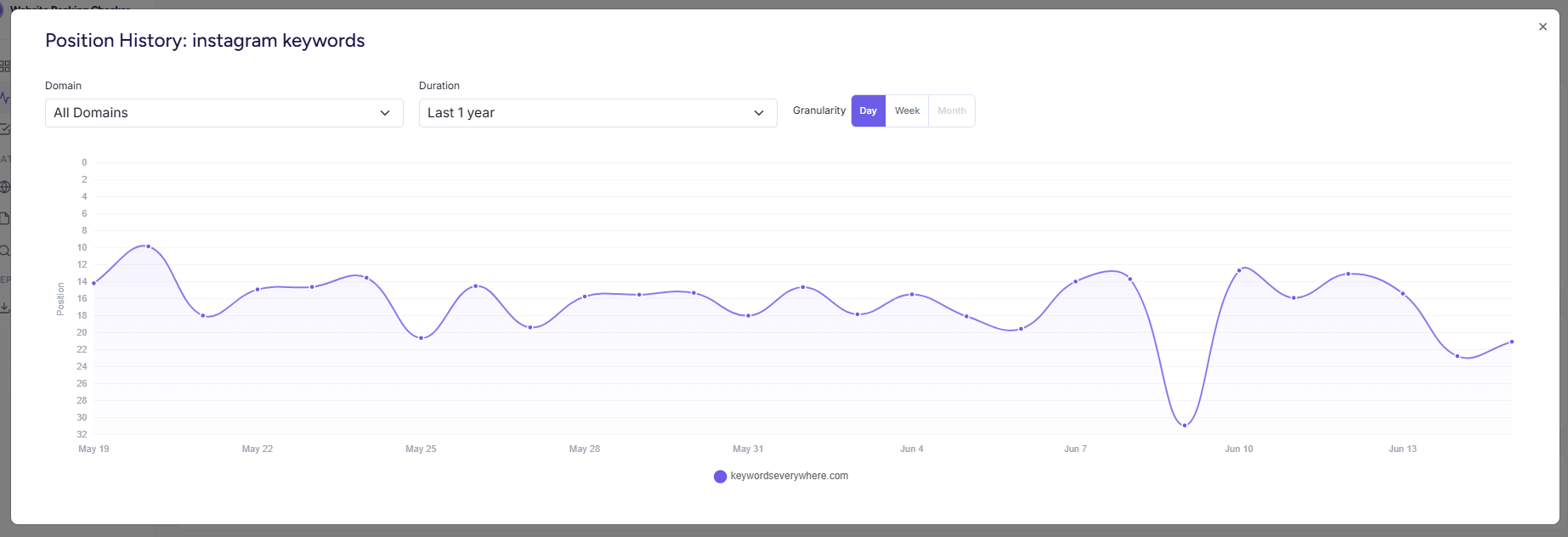
The same keyword's daily position history in Website Ranking Checker: the line Search Console has the data to draw and won't, one keyword every day, instead of one blended average.
Now the honest part, because this article is useless if it just pivots into a pitch.
A dedicated scraped tracker still does two things Search Console and a layer on top of it cannot: it can show you where your competitors rank, and it can track SERP features (the snippets, packs, and boxes around the results). If you genuinely need competitor positions or SERP-feature monitoring, layer a scraped tool on for that specific job. But track your own rankings from Search Console's truth, because for your own positions, first-party data beats an estimate every time.
One thing this article deliberately won't settle is how often to track, daily versus weekly, and how to tell a real move from day-to-day noise. That is its own question, and acting on every one-position wobble is a classic mistake. I worked through the whole signal-versus-noise problem in daily rank tracking: is it actually worth it.
How to track rankings in Search Console manually
You don't need our tool, or any tool, to start tracking better today. You just need to stop trusting the headline average. Here is the free, in-Search-Console version.
Turn on Average Position, then immediately stop trusting it as one number. In Performance, under Search results, enable the Average Position metric. That is the standard advice, and it is where most guides stop. The real skill is the next step.
Split every keyword by device and country before you judge it. Use the device and country filters on any query that matters before you decide it is a winner or a write-off. The "instagram keywords" lesson took thirty seconds to uncover this way: one filter turned a forgettable 16.5 into a clear instruction (defend India, fix the US). Make that split a reflex, not an afterthought.
Use the date-comparison mode for change, and know its limit. Compare two periods to approximate movement over time, but remember you are comparing two range-averages, not reading a daily series. It will tell you "down since last month," not "started dropping on the 14th."
Export to Sheets on a schedule to build the history Search Console won't keep. Because of the 16-month wall, the only way to hold a long trend manually is to export your query data regularly and stack it yourself. A monthly export into a spreadsheet is a poor-man's history table.
This works. It also stops scaling the moment you are tracking more than a handful of keywords, because there are no alerts, every check is manual, and you are maintaining a spreadsheet to paper over the history gap. That is the point where a tracking layer earns its place, but the manual version will take you a long way first.
Common Search Console rank-tracking mistakes
- Trusting the blended average position. The single biggest one. Never judge a keyword on its all-devices, all-countries average without splitting it first. The average is where nothing ranks.
- Reading a range-average as today's rank. "Average position 12 over the last 28 days" is not "I rank 12th right now." It is a smear across four weeks that could be hiding a steady climb or a slow slide.
- Acting on one-position moves. A keyword bouncing between 6 and 8 is almost always noise, not signal. If you are reacting to every wobble you are chasing ghosts, see the noise-floor discussion for how big a move has to be before it means anything.
- Switching to a scraped tracker right now. Reaching for a scraping tool in late 2025, just as the
num=100change made scraping pricier and patchier, trades your most reliable data for your least reliable, at the worst possible time. - Forgetting the 16-month wall until it's too late. By the time you want last year's trend, it is already gone unless you exported it. Set up the export before you need the history, not after.
- Treating one query's average as one page's rank. If two of your pages rank for the same query, the average hides it, and what looks like a single mediocre position can be two pages quietly competing with each other. That is cannibalization, and the blend will mask it.
FAQ
- Can I use Google Search Console as a rank tracker?
-
You can, and its data is the most accurate source available, but its interface isn't built for it.
The headline "average position" blends every device, country, page, and date into one number, it stores no daily per-keyword history you can chart, it sends no alerts, and it keeps only about 16 months of data.
You can track manually by filtering each query by device and country and exporting regularly, but it doesn't scale past a handful of keywords without a tracking layer on top.
- Why is my average position in Search Console different from where I actually rank?
-
Because it is an average across every impression, spanning all your devices, all countries, all of your pages that appear for the query, and the whole date range.
If you rank #8 in one country and #25 in another, your average might be 16.5, a position you hold in neither. Split the query by device and country to see the real numbers.
- Is Google Search Console's rank data accurate?
-
The underlying data is the most accurate you can get, because it is the real impressions and clicks Google served, not a scraped estimate.
What feels inaccurate is the average position, which is an accurate summary of a blend. The data is right; the single rolled-up number just hides the variation underneath it.
- Does Search Console show daily rankings or rank history?
-
Not in a usable way. It shows a number for whatever date range you select and lets you compare two periods, but it won't draw you a daily position line for a single keyword over time, and it discards data older than about 16 months.
To get a true daily history chart you need to export the data yourself or use a tool that stores it for you.
- How far back does Google Search Console keep ranking data?
-
About 16 months. After that the older data drops off and can't be recovered.
That is why you can't chart multi-year trends in Search Console, and why long, slow ranking erosion is hard to spot there.
- Why did my Search Console impressions drop and average position jump in late 2025?
-
In September 2025 Google removed the ability to load 100 search results per page (the
num=100parameter).The leading explanation is that a large share of deep-position desktop impressions had been generated by rank-tracking scrapers using that parameter, and removing it stopped those phantom impressions from being counted. Many accounts saw desktop impressions fall and average position rise as a result, which most likely means the data got cleaner, not worse.
Track your real rankings, not a blended average
Website Ranking Checker stores your Search Console positions every day, charts every keyword's full history past the 16-month wall, and alerts you when one drops, split by device and country so you never act on a blend. Free for Keywords Everywhere users.
See your real rankings