

AI-Style Queries: The Questions People Now Ask Google About Your Site (And the Third of Your Clicks Google Hides)

Last week I was scrolling the query list for keywordseverywhere.com and stopped at this one:
how accurate are backlink analysis tools?. my location is united states.Look at the punctuation. A question mark, then a full stop, then a sentence about where the searcher lives.
No human types that into a search box. That is the tail end of a prompt, the context an assistant appends before it goes looking, and it arrived in Google Search Console as a query our site had appeared for, 25 times in a month.
It was not alone. "what are the best tools for keyword research in seo?. my location is united states." "best tool to check keyword difficulty (in united states. be sure to reply in english)". Same shape, same boilerplate, different question.
Once I started counting, two things became clear, and they point in opposite directions.
First: on our biggest site, 2.1% of the distinct queries we appear for are ten words or longer, and together they carry 0.3% of impressions. The prompt-shaped tail is real, and it is thin.
Second: 24.1% of our impressions and 33.4% of our clicks in the same 30 days came from queries Google shows nobody. Not thin at all.
This article is about both. What the visible AI-style queries look like, why the hidden ones are the bigger story, how to find yours in Search Console, and what to do once you have them. We also shipped a report that does the finding for you; it gets one screenshot and a section, and everything else here works without it.
One thing up front, because the name invites the wrong assumption: nobody can see AI Mode or AI Overview queries. Not you, not us, not the paid tools. What follows is the closest thing Google reveals.
- Prompt-shaped queries (10+ words, full sentences, sometimes with "my location is..." still attached) are a real but thin slice of what you rank for: about 2% of distinct queries and under 1% of impressions on our sites.
- The big number is hidden: 24.1% of impressions and 33.4% of clicks on our portfolio come from anonymized queries Google never lists, and those clicks convert better than the visible ones.
- Find yours in Search Console with a regex filter for 10+ word queries plus the question-word filter, or open the AI-Style Queries report (Learn / Compare / Act, Track per row, no credits to look).
- Act by bucket: answer Learn questions on the page that already ranks, put a real comparison table under Compare queries, route Act queries to pricing, track the rows with impressions, and never write a page per query.
What an AI-style query actually is
An AI-style query is a search that reads like a sentence said to a person, not a keyword string typed at a machine.
"best crm for small business" is a search. "what are the best practices for internal linking with long-tail keywords in mind?" is something you would say out loud, and it showed up 577 times in 30 days for a page of ours sitting at position 63.
Our working definition is deliberately strict: ten words or more, fifty characters or more, no search operators, no pasted junk. Shorter questions ("how to check rankings") read as ordinary searches and always have; only the long tail credibly resembles the way people now talk to assistants.
Here is how long the tail is on keywordseverywhere.com, 18,636 distinct queries in 30 days:
Half of everything we rank for is three or four words long, which is where search has lived for twenty years.
The ten-plus bucket is 2.1% of queries and 0.3% of impressions. On www.domcop.com it is 1.8% and 0.5%. On our six small sites it rounds to zero, which is why a small site can open this report and legitimately see nothing yet.
Four shapes keep recurring inside that bucket.
The full question. "what are some tips for creating high-quality content that targets long-tail search queries?" (483 impressions, position 77). "how can i create content that performs well across query fan-out scenarios?" (409 impressions, position 13). Complete sentences, often with the question mark left in.
The chained comparison. Four products in one breath, "x vs y vs z vs w for the job". These are shortlists, typed in full, and they sit in the Compare bucket for a reason.
The instruction with the boilerplate still attached. The ". my location is united states." rows, and the "(in united states. be sure to reply in english)" rows. Nobody is talking to Google there; something is relaying.
The research phrase with a year range. "how to optimize for google featured snippets 2025 or 2026" (112 impressions). "google adsense policy on ai generated content 2025 or 2026" (97). A human wants the current answer; a system asks for both years to be safe.
Look at the positions as much as the queries. Many of the long questions we appear for sit at 20 to 80, which means the page is adjacent to the answer rather than being the answer. That gap is the opportunity, and I will come back to it.
Where they come from
There are two sources, and Search Console cannot tell you which one produced a given row.
The first is people. Voice search, the AI Mode box, and plain habit have taught a lot of searchers to type the whole thought. If you have ever pasted a question into a search box the way you would send it to a colleague, you have produced one of these.
The second is software searching on a person's behalf. Assistants that run web searches behind their answers, Google's own AI Mode (the technique Google describes as query fan-out, one prompt broken into many sub-queries), and search-enabled chat tools all issue searches that look exactly like the third shape above.
The boilerplate is the tell. "my location is united states" is context an assistant appends so the results are localized. "be sure to reply in english" is an instruction to a model, not to a search engine. Both arrived in our query list verbatim. So did "how can i create content that performs well across query fan-out scenarios?", which is about as on the nose as a query can get.
I cannot prove which system issued which query, Search Console does not label the source, and I would distrust anyone who claims they can.
It matters less than it sounds. Whichever source produced the row, the impression was counted against a real position, the page that appeared is the page that gets read or quoted, and the question tells you what the person behind the machine wanted.
Whether you get the click is a separate question, and a harder one. I covered that side for AI Overviews specifically in AI Overviews and your traffic: how to measure the hit.
The bigger number: the queries Google hides
Now the part that is not thin.
Search Console withholds some queries on purpose. If a query was made by very few people, Google treats listing it as a privacy risk and drops it from the query table. The impressions and clicks still count in your totals; the query text is gone. Google's documentation calls these anonymized queries, and the Performance report mentions them in a footnote most people scroll past.
The footnote never says how much. So we measured it.
The method is simple once you see it: pull your property's totals by date (those include the anonymized queries) and subtract the sum of every query Google does list for the same days. The gap is the hidden share.
Across our portfolio, over 30 days: 24.1% of impressions and 33.4% of clicks came from queries Google shows nobody.
Per site, it is lumpier:
| Site | Hidden share of impressions | Hidden share of clicks |
|---|---|---|
| keywordseverywhere.com | 23.7% | 30.7% |
| www.domcop.com | 36.8% | 51.0% |
| websiterankingchecker.com | 1.2% | 75% (8 clicks in total, noisy) |
| keywordclustering.net | 3.4% | 59.5% (37 clicks, noisy) |
| Portfolio | 24.1% | 33.4% |
Two things in that table changed how I think about query lists.
The hidden share of clicks is higher than the hidden share of impressions on every site with meaningful traffic. On domcop the click-through rate of the hidden queries is 1.05% against 0.59% for the visible ones. The queries Google hides skew long, specific, and high-intent, which is exactly the shape the previous section described, and they convert better.
And if a third of your clicks arrive on queries you cannot see, every strategy that starts from the query list is working from two thirds of the picture. Not wrong, just partial, and it helps to know which third is missing.
Both numbers, for your own properties. The AI-Style Queries report shows the visible long tail grouped by intent, with the hidden share as a line at the top of the page. It reads your existing Search Console data and spends no Keywords Everywhere credits until you choose to track something.
What you can and cannot see
This is the section I would most like competitors to copy.
You cannot see AI Mode queries. You cannot see AI Overview queries. They are near-unique conversational strings, so they fall into the anonymized pool for everyone, and Google's own generative-AI performance report in Search Console, added in June 2026, shows totals without a single query. The Search Console API does not expose that report at all.
So any tool that promises a list of "the prompts people ask ChatGPT about your business" is doing one of two things: guessing from the visible long tail, or scraping something that is not your data. There is nothing wrong with the first as long as it says so.
What you can see, honestly, comes down to two instruments.
The visible long tail: the 10+ word queries Google does list, which is the nearest observable edge of prompt-shaped search and the subject of this article.
The hidden share: a single number per property that says how much of your traffic Google keeps private, which is the best proxy anyone has for how AI-shaped your audience already is.
Everything else is inference. Useful inference, sometimes, but inference.
How to find yours in Search Console
You do not need our tool for the first pass. Here is the manual version.
Open Search Console, Performance, Search results. Set the date range to the last 3 months. Click the Query filter, choose Custom (regex), and paste:
^(\S+\s+){9,}\S+$
That matches queries of ten words or more. Sort by impressions. On keywordseverywhere.com, over three months, it returns 526 rows. You will see your own version of the four shapes, plus some junk (pasted paragraphs, operator strings) that you can ignore by eye.
For a looser, question-shaped cut, swap the regex for the question starters:
^(how|what|why|which|when|where|who|can|should|does|is|are|do)\b
That one catches the short questions too, which is useful for FAQ work even if they are not prompt-shaped.
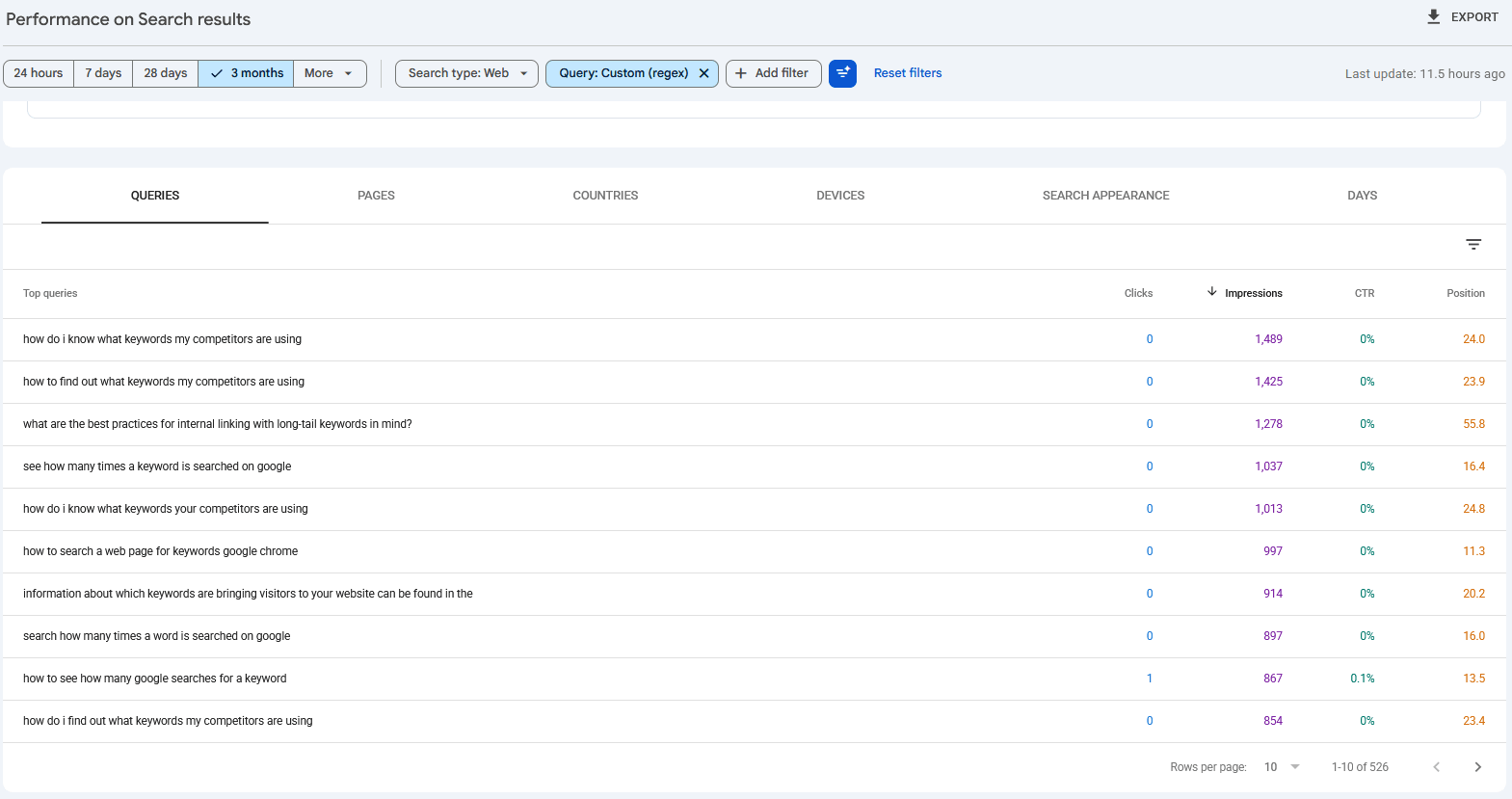
The manual version works; it just takes a regex and a coffee.
For the hidden share, Search Console gives you the pieces but not the number. The total impressions at the top of the report include anonymized queries; the query table export does not. Export the table, sum the impressions column, and compare it with the headline total for the same range. The difference, divided by the total, is your hidden share.
Or let the report do all of it.
The AI-Style Queries report (Reports, then AI-Style Queries in the app) runs the same ten-word filter over your stored Search Console data, screens out the pasted junk and operator strings, and groups what is left into three intent buckets: Learn, Compare, and Act. Each row shows position, impressions, clicks, and the landing page Google is sending people to, with a Track button so a question becomes a tracked keyword with history and alerts.
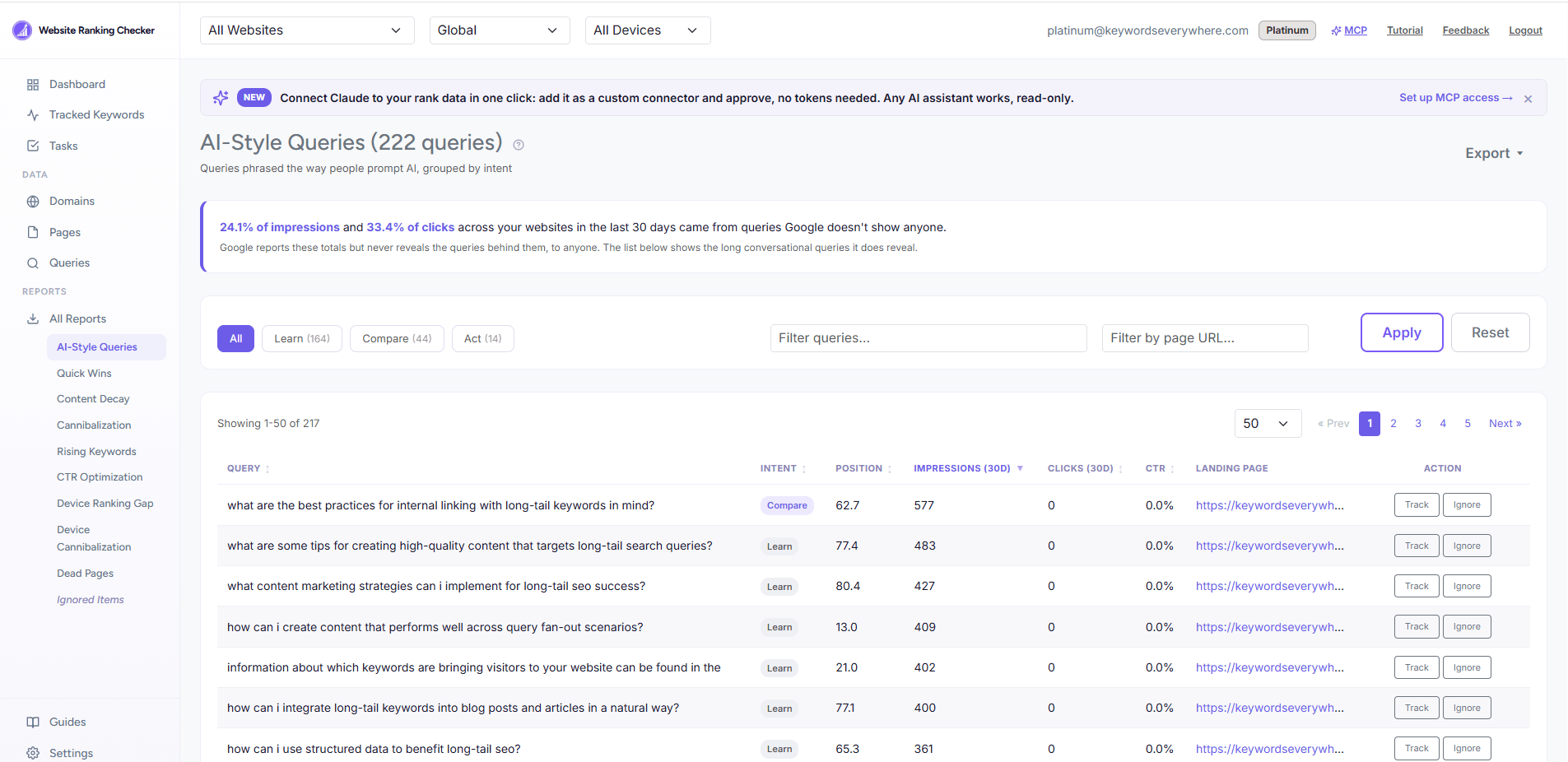
The long tail and the hidden share on one screen, built from the Search Console data you already have.
The hidden share sits at the top of the same page as one sentence, per property or across all of them.
Looking costs nothing. Tracking a row spends Keywords Everywhere credits the way any tracked keyword does, because that is when we fetch its volume and CPC. If you have connected an assistant through our MCP connector, you can also just ask it for the report.
If you want to go deeper into mining Search Console generally, the GSC keyword research guide is the broader version of this section: How to use Google Search Console for keyword research.
What to do with them
The buckets exist because each one calls for a different move.
Learn queries ("how do i...", "what is the best way to...", "should i...") want an answer, and the page that already ranks is almost always the right place to give it. Add the direct answer to the first screen of that page, add the question as a heading with a two-paragraph answer, and use FAQ markup where the question-and-answer format is genuine. A long question at position 63 is a page that is adjacent to the answer; give it the answer and watch what happens.
Compare queries (anything with "vs", "best", "top", "alternatives", "review") are shortlists. The searcher, or the assistant searching for them, is collecting options. What wins here is a real comparison table on the page already ranking, with the competitors named honestly and the differences stated plainly. If you do not have a comparison page for that shortlist, the query is telling you to build one.
Act queries ("price", "pricing", "cost", "free", "buy", "near me") want a number or a button. Check the landing page column. If a blog post is ranking for a pricing question, you are one internal link away from sending that traffic to the page that can close it.
Across all three, track the rows that have impressions. A tracked question gets daily position history and alerts, so you see whether the answer you added moved anything. The mechanics are in How to track keyword rankings.
And do not write a page per query. The long tail is long because people phrase the same need a hundred ways; the fix is the section on the page that already earns the impressions, not a hundred thin pages competing with each other. If that sentence sounds familiar, it is because it is the cannibalization problem in a new costume.
Common mistakes
- Reading the list as AI prompts. It is the visible edge of prompt-shaped search, not a log of what anyone asked an assistant. Nobody has that log.
- Chasing single-impression rows. One impression tells you the shape exists. Ten tell you the shape repeats. Work the rows with impressions and let the rest inform your FAQ writing.
- Spinning up a page per question. Thin pages that cannibalize each other are how sites lose the rankings they had. Sections on the ranking page, not new pages.
- Calling the hidden share "lost traffic". Those clicks arrived. You just do not get to see the query. Treat the number as a measure of how conversational your audience is, not as a leak.
- Ignoring the Compare bucket. It is the smallest bucket on our sites and the one closest to a purchase decision. The shortlists people type in full are the shortlists you want to be on.
- Forgetting to look at position. A perfect question at position 40 is not a win to celebrate; it is a page that should answer the question and does not yet.
FAQ
- What are anonymized queries in Search Console?
- Queries Google withholds from the query table to protect the privacy of the very few people who searched them. Their impressions and clicks still count in your totals, but the query text is not shown in the report or the API. On our portfolio they account for roughly a quarter of impressions and a third of clicks.
- Can I see AI Overview or AI Mode queries in Search Console?
- No, and neither can anyone else. Those queries are near-unique conversational strings, so they fall into the anonymized pool. Google's generative-AI performance report in Search Console shows totals without queries, and the API does not expose it. The visible 10+ word queries are the closest observable edge.
- Why do some of my Search Console queries look like AI prompts?
- Because some of them were. Phrases like "my location is united states" or "be sure to reply in english" are context and instructions an assistant attaches before it searches; when that search runs on Google and your page appears, the whole string lands in your query list. Search Console does not label which queries came from software, so treat it as a pattern, not an attribution.
- What is query fan-out?
- Google's term for how AI Mode answers a prompt: it breaks one question into many sub-queries, searches each, and synthesizes the results. Other assistants do something similar. The sub-queries look like long, specific sentences, which is one reason the prompt-shaped tail in Search Console is growing.
- How do I filter long questions in Search Console?
- Performance, Search results, Query filter, Custom (regex). Use ^(\S+\s+){9,}\S+$ for queries of ten words or more, or ^(how|what|why|which|when|where|who|can|should|does|is|are|do)\b for question starters. Sort by impressions and export.
- Should I write a page for every question I rank for?
- No. Add the answer to the page that already earns the impressions, as a section with the question as its heading. One page per question creates thin content that cannibalizes the page you already had ranking.
- Does the AI-Style Queries report spend Keywords Everywhere credits?
- Looking at it does not; it is built entirely from your stored Search Console data. Tracking a row does, the same way tracking any keyword does, because that is when we fetch its search volume and CPC.
See the questions your site already answers
The AI-Style Queries report pulls the long, conversational queries your site appears for out of your own Search Console data, groups them by intent, and shows how much of your traffic Google keeps hidden. Looking costs no credits; tracking a row works like any tracked keyword. Free for Keywords Everywhere users.
See your AI-Style Queries