


Last month I was poking around Google Search Console for one of our sites and found a query I had never seen before: "are keywords still relevant in SEO."
We were ranking fourth for it. Page one. Around 8,000 impressions over the previous 90 days.
I had never written a single sentence targeting that question. I didn't choose it, didn't research it, didn't know it existed. Google decided one of our pages answered it and started showing us, and I only found out because I went looking in the one report that tells you the truth: the queries you actually rank for.
It was also earning us almost no clicks, but that turned out to be its own lesson, and I'll come back to it.
No keyword research tool would ever have handed me that phrase. Type a seed into Keyword Planner or any of the big SEO tools and you get volume estimates for keywords you might target. You get guesses. What you don't get is the list of questions real people are already typing in and already seeing your site for.
That list exists. It's in Search Console, and most people barely touch it.
When I pulled the full picture across our own portfolio of sites, the scale of what we were ignoring was almost embarrassing. Search Console was reporting around 43,000 distinct queries we rank for, and three out of four of them sat past the first page, quietly collecting impressions we never knew about.
Here is the reframe that changed how I do keyword research. A keyword tool answers "what could I target?" Search Console answers "what am I already winning, or nearly winning?" The second question is more useful, because every answer comes pre-validated. You already rank, so Google has already decided your page belongs in the conversation. The guesswork is gone.
This article is about mining that data properly: why your own GSC data beats a keyword research tool, the four research tactics hiding in the Performance report, how to pull far more keywords out of GSC than the dashboard shows you, and the one thing GSC can't tell you (and how to fill it in).
- Google Search Console is the most under-used keyword research tool you already own: the exact queries you rank for, with real impressions, position, and CTR. No estimates, no guessing.
- It is not Keyword Planner. You don't pick keywords in GSC; you mine the demand Google has already matched to your pages, which means every keyword comes pre-validated.
- Four tactics live in one report: striking-distance queries, high-impression low-CTR queries, query-to-page mismatches, and untapped variants you never targeted.
- GSC has real blind spots (no search volume, no CPC, and a query cap that hides your long tail). Here's how to widen the view and what to layer on top.
Search Console is not Keyword Planner
Search "google search console keywords" and you'll notice something odd in the results. Half of them are about Search Console. The other half drift toward Keyword Planner, and there's a popular Google support thread of people asking how to "update their keywords" in Search Console.
That confusion is the whole reason this article needs a first section. These are two different tools doing two different jobs.
Keyword Planner, and Ahrefs, and Semrush, and every other keyword research tool, is an idea generator. You feed it a seed, it estimates monthly volume for keywords you might go after. It looks forward, at demand you don't have yet, and it guesses at the size of it.
Search Console looks backward, at reality. It doesn't suggest keywords. It reports the exact queries Google already matched your pages to: how many times you appeared (impressions), where you ranked (average position), and whether anyone clicked (CTR).
You cannot add keywords to GSC or choose which ones it tracks. That's what the people in the support thread are missing. Google assigns your queries based on what you actually rank for, and there's no box to type your target keywords into.
That sounds like a limitation. It's the opposite. The keywords in your GSC report are the only keywords in the world that come with proof attached: proof that your site can rank for them, because it already does. A keyword tool can tell you a term has 10,000 searches a month. Only Search Console can tell you that you are already one of the answers.
Why your own GSC data beats a keyword tool
For finding what to work on next, starting from your own Search Console data beats starting from a blank search box in a keyword tool. Three reasons.
First, it's intent-validated. Volume in a keyword tool tells you demand exists somewhere; it doesn't tell you that you can rank for it. A query in GSC tells you that you already do, which means you've skipped the slowest, most uncertain part of SEO: getting Google to consider your page at all.
Second, the numbers are yours, not a model's. Impressions are actual demand that reached your site, position is exactly how close you are, and CTR tells you whether your title and description are pulling their weight. It's a measurement, not a prediction, with no "volume: 1K to 10K" range to squint at.
Third, it points you at effort that pays off. A keyword tool will happily show you a 50,000-volume term you have no realistic chance at; GSC shows you a 2,000-impression query where you're sitting at position 11. One is a fantasy, the other is an afternoon's work. If you've never pulled rankings from GSC before, it's also one of the five methods I compared in the guide to checking your website's ranking on Google.
There's a real boundary, which I'll deal with later: GSC only shows demand that already reached you, with no market volume or dollar value attached. But for "what should I improve next," the answer almost always lives in data you already have.
The 4 research tactics hiding in your GSC data
Everything below comes out of the same place: Performance, then Search results, with the date range set to the last 3 months. You're not opening four tools. You're opening one report and running four passes over it.
Tactic 1: Striking-distance queries (positions 11 to 20)
These are the queries where you rank just off page 1. You've cleared the hard part, Google already ranks you, you're simply on the wrong side of the page-1 line.
To find them, add a filter on Position greater than 10 (and, if you can add a second condition, less than 21), then sort by impressions, highest first. What's left is a list of queries with real demand where you're a few positions short.
This is the single highest-ROI use of GSC research, because the gap is small and the impressions are already proven. Across our own portfolio, about a third of every page-2 keyword sat in the 11-to-15 band closest to flipping: 1,035 queries pulling roughly 591,000 impressions a month that we were barely converting to clicks.
Finding them is only half the job. Pushing a striking-distance keyword over the line takes a specific set of moves, internal links, intent alignment, a content-depth pass, which I walked through in the guide to SEO quick wins.
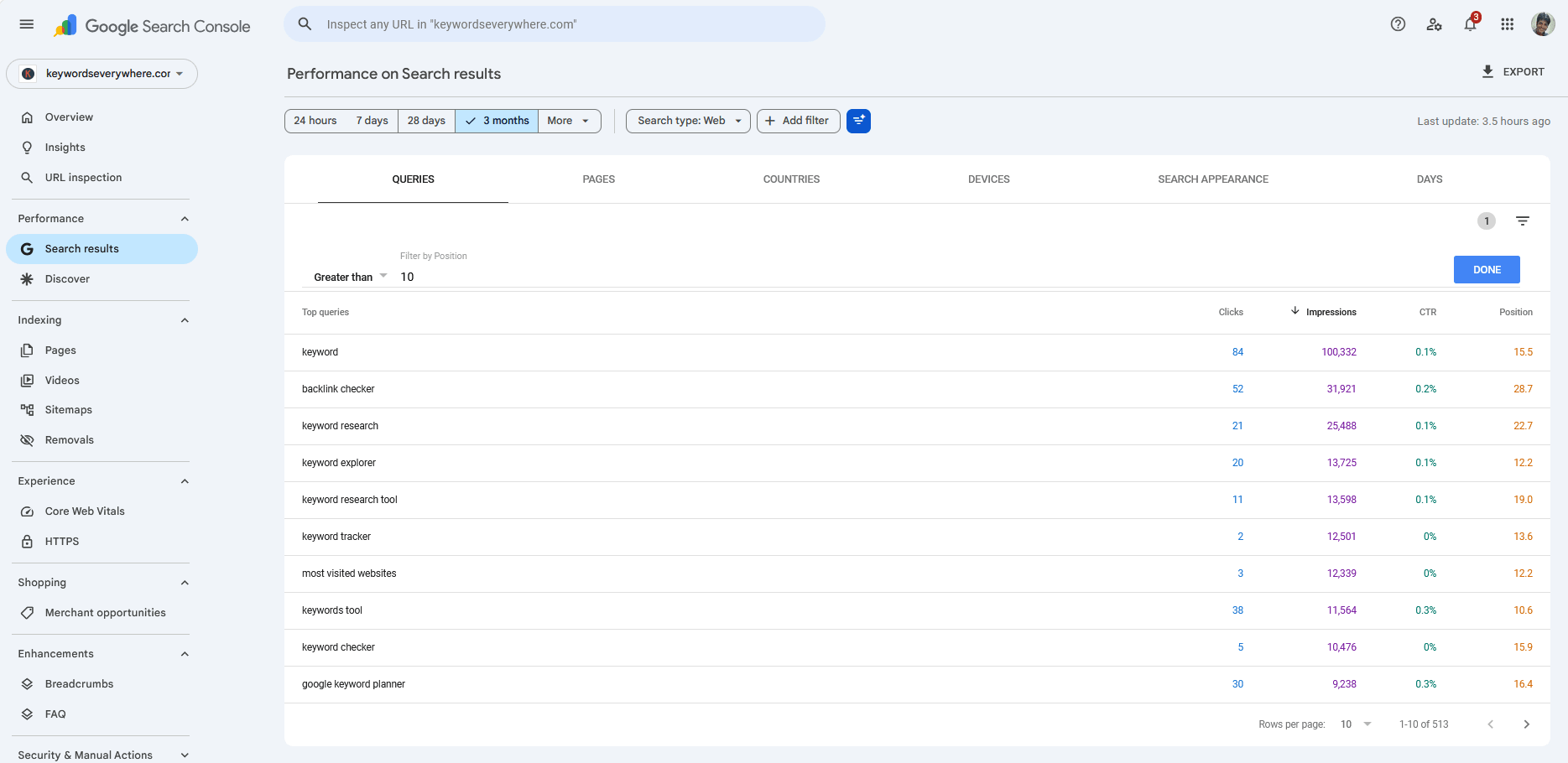
Filter to Position greater than 10 and sort by impressions, and the strikers surface: real demand, a few positions short of page 1. These are the fastest research-to-traffic wins you have.
Tactic 2: High-impression, low-CTR queries in your top 10
Now flip the filter around. Look at the queries where you already rank in the top 10, and find the ones with a click-through rate far below what that position should earn.
When a query ranks well but barely gets clicked, the opportunity isn't a better ranking. It's a better listing. The traffic is right there, and your title and description aren't claiming it.
Remember "are keywords still relevant in SEO" from the intro? Fourth on page one, about 8,000 impressions, and not one click in 90 days. That is not a ranking problem. We're already near the top. It's a listing problem, or a SERP-feature problem, an AI overview or a featured snippet sitting above us, skimming the click before anyone scrolls to our result. GSC flagged it for free. The fix is the title, the meta description, and the on-page answer, not another round of link building.
To work this tactic, filter to Position less than 11, sort by impressions, and scan the CTR column for outliers, queries clicking far below their neighbors at similar positions. There's a fairly predictable curve of what CTR to expect at each position, and I'll publish the full version of it in a future piece. For now, comparing similar-position queries against each other is enough: the laggards jump out.
Tactic 3: Query-to-page mismatches
This one comes in two flavors, and both are easy to miss until you look.
The first: the wrong page is ranking. You wrote page A to target a query, and GSC shows Google ranking page B for it instead. That's a signal, either your intended page isn't actually the best answer on your own site, or your internal links and titles are pointing Google at the wrong URL. Either way, the research tells you where to focus.
The second: several of your pages rank for one query. Filter the report to a single query, then switch to the Pages tab. If three different URLs all show up for the same term, you're splitting your own signals across them, and Google can't decide which to rank. That's keyword cannibalization, and the fix is to consolidate, not to optimize harder. I covered how to diagnose and resolve it in the guide to keyword cannibalization.
The Pages tab, used this way, is one of the most under-rated views in Search Console. The query data tells you what people want; the page data tells you whether the right URL is answering.
Tactic 4: Untapped variants (queries you rank for but never targeted)
This is the discovery goldmine, and it's where that opening number lands.
Most of the queries in your GSC report are ones you never explicitly wrote for. Long-tail phrasings, oddly specific questions, angles you would never have brainstormed sitting in front of a keyword tool. Across our sites, that was around 43,000 distinct queries, three-quarters of them ranking past page 1, almost none of them deliberately targeted.
These are gifts. Google is telling you which adjacent topics it already associates your site with, so cluster the related ones together and you have the outline for your next page, validated before you write a word. To mine them, sort the whole query list by impressions and scan for queries that don't map cleanly to a page you built on purpose.
There's a sharper version of this for content ideas: filter your queries to questions. A regex filter like ^(who|what|why|how|when|where|is|are|can|does) isolates the question queries you rank for, and questions map straight to H2s, FAQ entries, and featured snippets. This is the freshest tactic in the whole topic right now, and it's hiding behind a filter box most people never open.
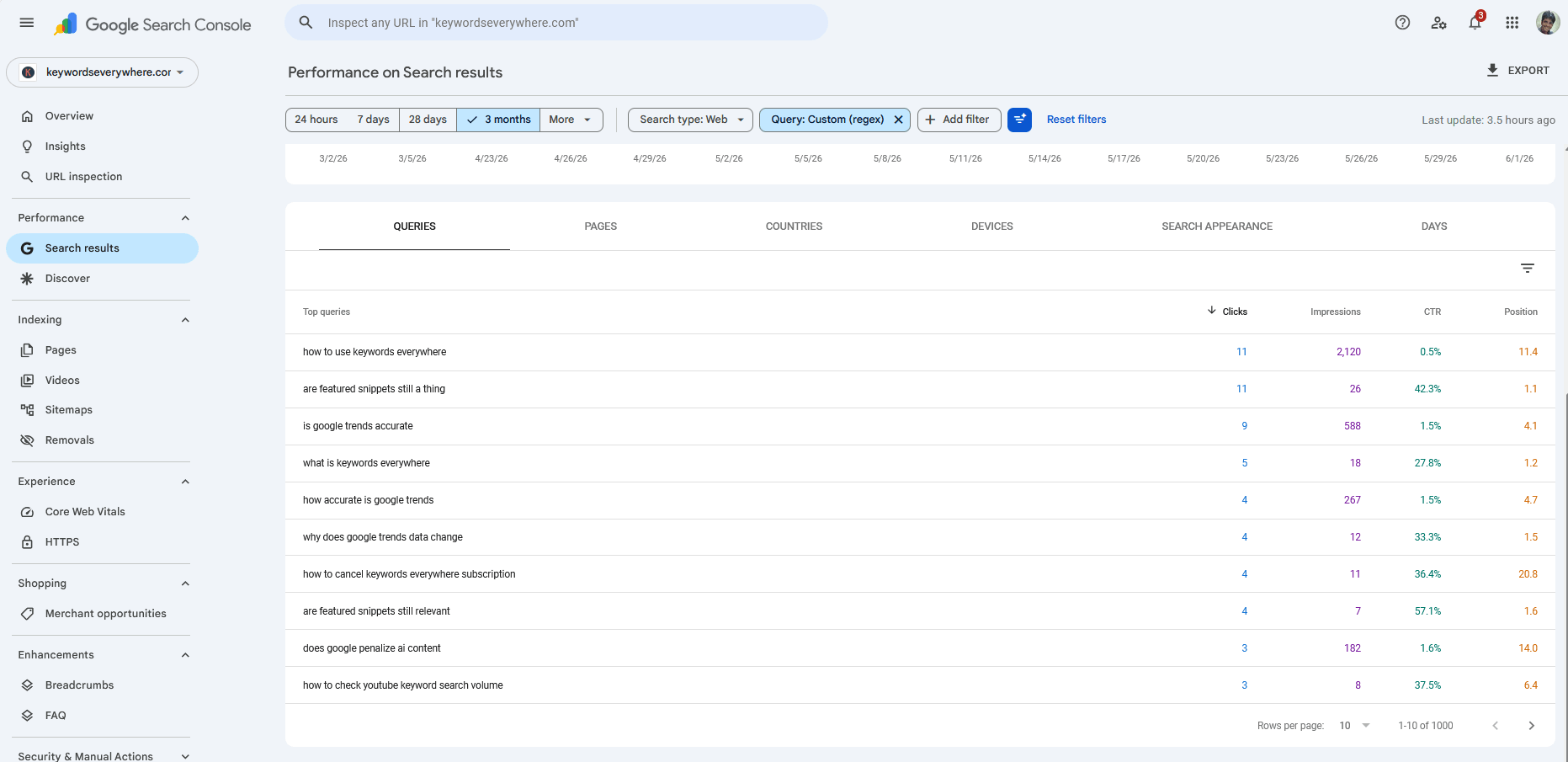
A regex filter on the Query field isolates the questions you already rank for. Each one is a ready-made heading, FAQ entry, or snippet target.
Just realized you rank for thousands of queries you never chose? Most sites do. If yours is connected to Google Search Console, Website Ranking Checker pulls every one of those queries into a single searchable list, so the variants worth targeting stop hiding in a capped, sampled dashboard.
How to pull more keywords out of GSC
There's a catch with everything above, and nobody likes to say it plainly: GSC does not show you all your queries.
The Performance report caps the table at roughly 1,000 rows and samples the underlying data to keep the interface fast. If your site gets any real traffic, you're looking at a slice. And the part that gets truncated is the long tail, which is exactly where the untapped variants from Tactic 4 live. The cap hides the most interesting research.
Four free ways to widen the view, all inside the normal UI:
First, filter by page. Instead of one site-wide query list, filter to a single important URL and pull its queries. Each page gets its own row budget, so ten pages give you ten slices instead of one.
Second, split by country and device. Run the report with a country filter, then again per device. Each segment is a fresh slice, and you'll surface queries that were buried in the global view. The device split has a bonus: it's how you spot queries that rank well on desktop and poorly on mobile, which is its own diagnosis, one I dug into in the piece on why mobile and desktop rankings differ.
Third, use regex filters. Narrowing the query set with a regex (the question pattern above, or branded versus non-branded, or a topic stem) means more of the relevant long tail fits under the cap instead of getting cut off.
Fourth, shorten the date range. A 28-day window samples differently from a 3-month window. Pull both, and you'll catch recent queries the longer window averages away.
Here's the honest ceiling, though. These tricks multiply your slices, but each slice is still capped, and the dashboard will never hand you every query, full stop. The real fixes are the Search Console API, the bulk data export to BigQuery (no row cap, but you have to set it up), or a tool that pulls your GSC data on a schedule and stores all of it, so the row cap and the 16-month history limit stop mattering.
What GSC can't tell you (and what to layer on)
Search Console is the best source of truth for what you already rank for. It is missing three things keyword research needs, and it's missing them by design, not by accident.
| What's missing | Why it matters for research | How to fill the gap |
|---|---|---|
| Search volume | Impressions are not volume. They tangle how often a query is searched with where you rank, so you can't read the size of the market from them. | Export your queries and attach real monthly volume from a volume tool. |
| CPC / commercial value | "free template" and "enterprise pricing" look identical in the impressions column. Without value, you can't tell a buyer query from idle curiosity. | Enrich each query with CPC so you can sort by what the traffic is actually worth. |
| Competitor and non-ranking queries | GSC is a mirror, not a window. It never shows queries where you don't appear at all, so it can't find entirely new territory. | Use a keyword tool or competitor research for the demand you don't rank for yet. |
The first two gaps have the same fix: enrich your GSC queries with volume and CPC. The manual version is straightforward. Export your query list from the Performance report (the export button is at the top right), then run those keywords through a volume tool, our own Keywords Everywhere, Google's Keyword Planner, whatever you use, to attach volume and CPC to each one. Now your striking-distance list can be sorted by genuine market size and commercial value, not just by impressions.
That export-and-enrich loop is exactly the chore we got tired of repeating, so we built the tool to skip it. Website Ranking Checker surfaces your Search Console queries, and the ones you track get Keywords Everywhere volume and CPC layered straight onto them, so the demand you've validated in GSC and the market size you need to prioritize it sit in the same table. It's free for Keywords Everywhere users, because it runs on credits you already have.
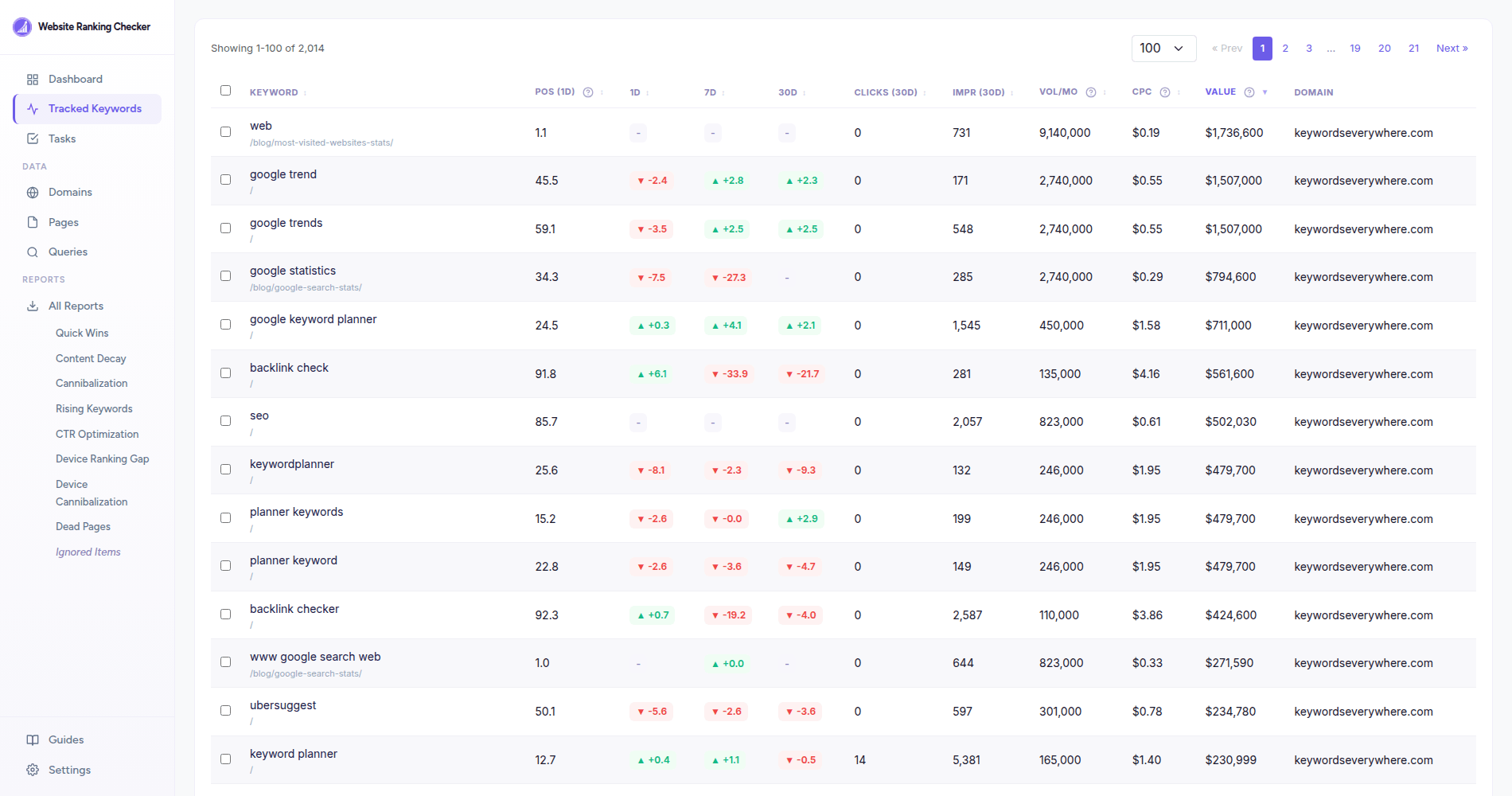
Track the queries worth pursuing and they show up with the two columns GSC never gives you: real monthly volume and CPC, plus the resulting value. That's the difference between "this got impressions" and "this is worth my afternoon."
The third gap is worth naming plainly: GSC research never replaces looking outward for keywords you don't rank for yet. Use it for what it's unbeatable at, mining and prioritizing the demand you already have, and reach for a keyword tool to expand into new territory.
A repeatable 20-minute GSC research workflow
Put the four tactics together and you get a routine, not a one-off audit. Here's the version I run.
- Open Performance, then Search results, and set the date range to the last 3 months.
- Striking distance: filter Position greater than 10, sort by impressions, and copy the top queries with real demand. (Tactic 1)
- CTR gaps: filter Position less than 11, sort by impressions, and flag the queries clicking far below their neighbors. (Tactic 2)
- Mismatches: spot-check your priority queries in the Pages tab for wrong-page or multi-page problems. (Tactic 3)
- Discovery: sort everything by impressions and skim for queries you never targeted, then run the question regex for content ideas. (Tactic 4)
- Export the combined list and enrich it with volume and CPC, then sort by whichever opportunity matters most to you: impressions, volume, or value.
- Take the top handful, striking-distance queries first since they pay off fastest, and that's your work queue for the month.
Do this monthly, not once. New queries surface constantly as Google tests your pages against fresh searches, so last month's report is already stale. Once you've picked your targets, track them so you can tell a real move from ordinary day-to-day wobble, a trap I wrote about in the piece on daily rank tracking. The compounding is the point: every pass turns up a few more validated opportunities you'd never find in a blank keyword tool.
Common GSC keyword-research mistakes
The data is honest, but it's easy to misread. Here are the mistakes I see most.
- Treating impressions as search volume. They aren't the same thing, because impressions blend volume and position together. Use impressions to rank opportunities within your own data, but get real volume before you judge the size of a market.
- Researching only the queries the dashboard shows. The table is capped and sampled, and the long tail, where the untapped variants live, is exactly what gets cut. Filter by page, segment, and regex to see more, or export in bulk.
- Optimizing the page you meant to rank, not the one that's actually ranking. Always check the Pages tab. Google often ranks a different URL than the one you built for the query. Improve the page that's in the race, not the one you wish were.
- Chasing zero-intent queries because they have impressions. A big impression count with no commercial or content value is a vanity metric. Enrich with CPC and judge the intent before you commit effort.
- Walking past CTR gaps. A top-five query bleeding clicks is GSC handing you a fix that needs no new ranking at all, just a better title and description. Don't chase position elsewhere while ignoring the free win in front of you.
- Treating GSC research as a one-time audit. The data refreshes daily and new queries appear constantly. The people who win with Search Console run the workflow on a schedule, not once a year.
FAQ
- Can you do keyword research with Google Search Console?
- Yes, and it's the most under-used keyword research you have. GSC reports the exact queries your site already ranks for, with real impressions, position, and CTR. Unlike a keyword tool, every keyword comes pre-validated: you already rank for it, so you know you can.
- Is Google Search Console better than Keyword Planner for keyword research?
- They do different jobs. Keyword Planner estimates volume for keywords you might target, which is forward-looking guesswork. GSC reports keywords you already rank for, which is validated reality. Use GSC to find what to improve next, and use Keyword Planner to find entirely new territory you don't rank for yet.
- Why doesn't Google Search Console show search volume?
- GSC reports impressions, which is how often your site appeared, not how often a query is searched. The two are tangled together with your position, so GSC can't isolate market volume. To get volume, export your queries and enrich them with a volume tool like Keywords Everywhere or Keyword Planner.
- How do I find all the keywords my site ranks for in GSC?
- Open Performance, then Search results, and look at the Queries tab. The interface caps the list at around 1,000 rows and samples the data, so to see more, filter by individual page, split by country and device, use regex filters, or set up the bulk data export to BigQuery for the uncapped list.
- What are striking distance keywords?
- Queries you rank for in roughly positions 11 to 20, just off page 1. They're the highest-ROI research find in GSC, because you already rank, so a small push can move them onto page 1. The guide to SEO quick wins covers how to move them.
- Why does Google Search Console only show about 1,000 queries?
- The Performance report limits the table to roughly 1,000 rows and samples the underlying data to keep the interface fast. It's a display limit, not your real query count, and your site almost certainly ranks for far more. Use page, segment, and regex filters, or the BigQuery bulk export, to get past it.
- How accurate are Google Search Console keywords?
- Very, because it's Google's own record of when your site appeared and where. It's the most accurate ranking data you can get for your own site. The caveats are that position is an average rather than a fixed rank, and the interface samples and caps the query list, so what you see is accurate but incomplete.
See every keyword your site already ranks for
Website Ranking Checker connects to your Google Search Console, pulls every query you rank for into one place, and enriches the ones you track with Keywords Everywhere search volume and CPC, so the opportunities GSC alone cannot surface stop hiding. Free for Keywords Everywhere users.
See my keywords free