


This spring, one of our posts on the Keywords Everywhere blog quietly fell off a cliff in slow motion.
It's a post about Instagram keyword ideas. In its best week of January it earned 440 clicks from Google. Eight weeks later it earned 44.
Ninety percent of its traffic, gone.
Here's the part that still gets me: nobody touched the page. No redesign, no URL change, no penalty, no dramatic algorithm update headline that week. The content just sat there, the same as always, while Google slowly decided it liked other pages more.
Impressions tell the story. The page went from being shown about 20,000 times a week to under 5,000. It didn't get worse at converting views into clicks. It stopped being shown.
That's content decay. It happens to most content eventually, it almost never announces itself, and by the time you notice it on a revenue chart you've usually been losing traffic for months.
The entire game is spotting it early. So let me show you what it looks like in real numbers, how to tell it apart from the things that merely look like it, and what actually brings pages back.
- Content decay is a sustained decline in a page's search traffic, usually from lost visibility (impressions), not lost clickability. Our example fell from 440 to 44 weekly clicks in 8 weeks, untouched.
- It's common, not rare: in one recent month, 40% of our portfolio pages with meaningful traffic earned at least 25% fewer clicks than the month before.
- Three patterns, three stories: a gradual slide (competitors outpacing you), a cliff (algorithm or SERP change), and a seasonal dip that isn't decay at all.
- Check monthly in GSC with compare mode and real thresholds (10+ clicks before, 25%+ drop), or automate it with a decay report built on your own GSC data.
What content decay actually is (and isn't)
Content decay is the gradual loss of a page's search performance over time: rankings slip, impressions shrink, clicks follow.
The standard definition stops there, and that's a problem, because a traffic drop alone doesn't tell you decay is happening.
Three things regularly get mislabeled as decay:
A penalty or technical failure. If a page loses 100% of its traffic overnight, that's not decay, that's an event: deindexing, a noindex tag shipped by accident, a migration gone wrong. Decay leaves a slope; incidents leave a cliff edge with zero at the bottom.
Seasonality. A page about tax deadlines dies every May and resurrects every January. That round trip isn't decay, and refreshing it in July won't (and shouldn't) bring the curve back early.
Cannibalization. Sometimes your site keeps its rankings but a different page of yours starts absorbing the query. Page A's chart looks like decay; the site-level chart is flat. That's a different problem with different fixes, and it's the first thing to rule out, because rewriting page A can't fix a problem that lives in the overlap between pages.
Real decay is a sustained, page-level decline, with the site otherwise healthy and the calendar not to blame.
One more distinction worth making: decay is almost always a visibility problem, not a persuasion problem. In our example the page's impressions fell 76%. Google showed it less. When impressions hold steady and only clicks fall, you have a different problem (usually a SERP feature or a title problem; more on that below).
The three decay patterns
After watching this across our own sites, decay comes in three shapes, and the shape is diagnostic.
Pattern 1: the gradual slide. Traffic bleeds 5-15% month over month for a quarter or more. No single bad week. This is the classic, and the usual cause is the least dramatic one: other people published better pages. Content ages in dog years in competitive niches, and most decay isn't your information going stale, it's your competition getting better.
Pattern 2: the cliff. A page holds steady, then drops 30-60% inside a week or two, then stabilizes at the lower level. This maps to an event: a core update rolled through, a SERP feature (AI overview, featured snippet, video pack) landed on your query, or a big site published head-on competition. Our Instagram-keywords post is mostly this pattern stretched over a few weeks: late January to mid-February took it from 440 weekly clicks to under 100.
Pattern 3: the false alarm. A dip that will reverse on its own: seasonality, a holiday week, a temporary SERP experiment, or plain volatility on a low-volume query. This is the one you must not "fix". A rewrite in response to noise adds risk for zero upside, because the traffic was coming back anyway.
The shape tells you where to look. A slide sends you to compare your content against the current top 10. A cliff sends you to check what changed in the SERP that week. A false alarm sends you back to bed.
Why content decays
Five causes cover nearly every real case.
1. Competitors published something better. The most common and the least flattering. Your 2023-era guide was the best page on the topic in 2023. It's competing against 2026 pages now.
2. Freshness aged out. Google demonstrably favors recently-updated content for queries where recency matters ("best X", anything with a year in it, fast-moving topics). A page that hasn't changed in 18 months sends a quiet staleness signal even when nothing in it is wrong.
3. Search intent drifted. The words people type stayed the same; what they want changed. A query that used to want a how-to now wants a tool, or a comparison, or a video. Your page still matches the old intent perfectly, which is the problem.
4. The SERP itself changed. An AI overview, featured snippet, or "People also ask" block now answers the question above you. This is the case where impressions hold but clicks fall: you rank where you always did, and it no longer matters. The fix here is different: win the feature, or target the click-worthy variant of the query.
5. You broke something quietly. An internal-links cleanup orphaned the page, a template change slowed it down, a "site refresh" thinned its content. Decay that starts suspiciously close to a site change isn't a mystery.
Notice what's not on the list: doing nothing wrong. That's the uncomfortable truth of decay, and it's why "set and forget" content strategies leak traffic.
Here's how common it is. In one recent 30-day window, 47 pages across our own portfolio had earned meaningful traffic the month before (50+ clicks). The next month, 19 of them earned at least 25% fewer clicks.
How to spot it before it's too late
You can do this manually in ten minutes a month, and you should, even if you later automate it.
The manual way (Google Search Console).
- Open the Performance report and switch to the Pages tab.
- Click the date selector, choose Compare, and set the last 3 months against the previous 3 months (or 28 days versus the prior 28 for a faster signal).
- Sort by click difference, ascending. The biggest losers float to the top.
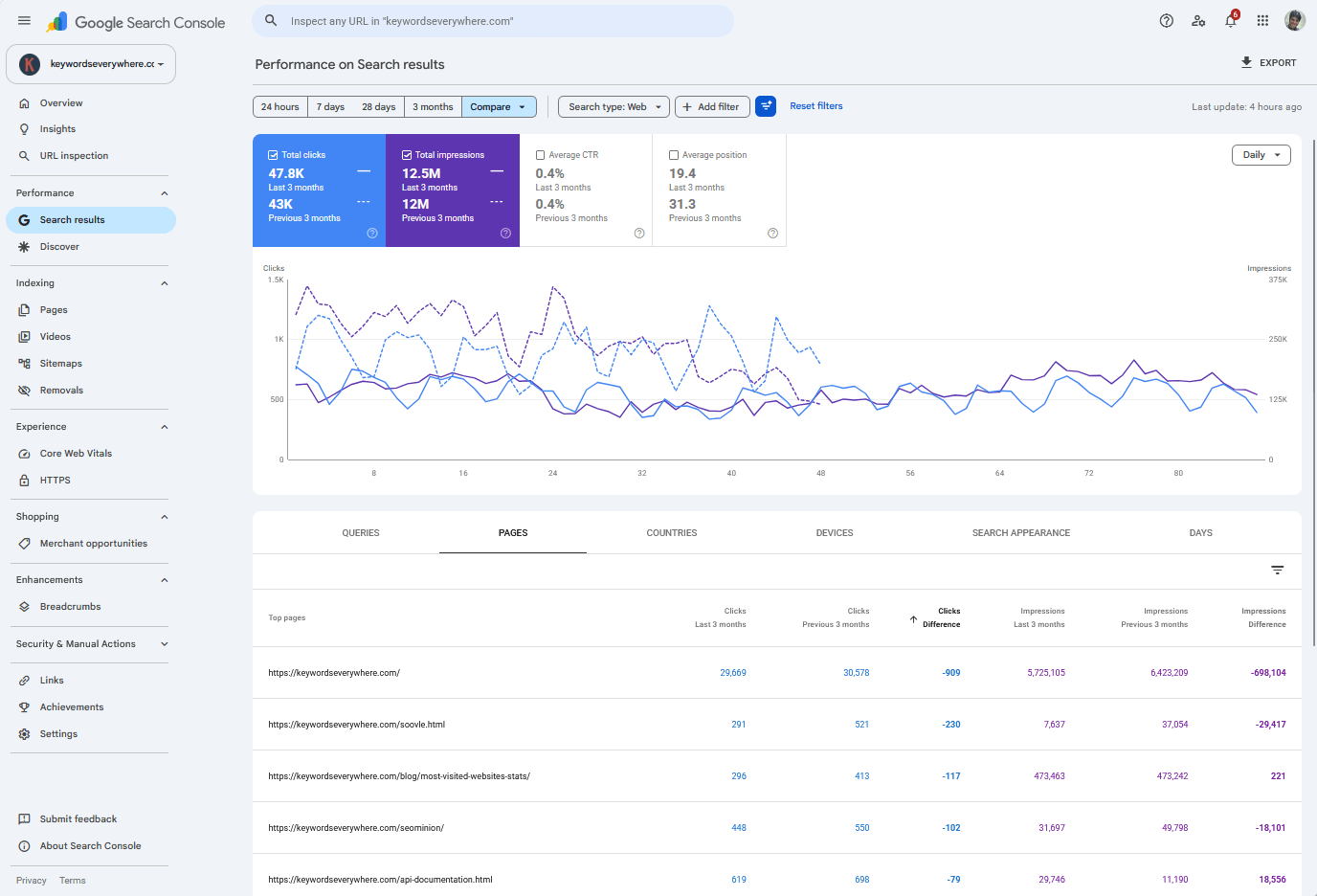
GSC compare mode is the free, manual decay detector: the biggest losers sort straight to the top.
Now apply three filters in your head, because the raw list lies:
- Ignore tiny pages. A page that went from 6 clicks to 2 is statistical dust, not a decay case. We use "more than ~10 clicks in the earlier period" as the floor in our own detector.
- Demand a real drop. Under 25% down is within normal wobble for most pages. 100 clicks to 95 is Tuesday, not decay.
- Check the same period a year ago if you can. If last July looks like this July, you've found seasonality, not decay.
For each survivor, open its query list and check impressions versus clicks: impressions down means lost visibility (patterns 1 and 2), impressions flat with clicks down means the SERP is eating your clicks (cause 4).
The automated way.
The manual check works. It's also exactly the kind of thing nobody actually does monthly by hand.
This is the check we automated first. The Content Decay report runs the same comparison across every page of every site you've connected, applies the noise floors above automatically, and ranks pages by clicks lost. It reads your own Search Console data and it's free.
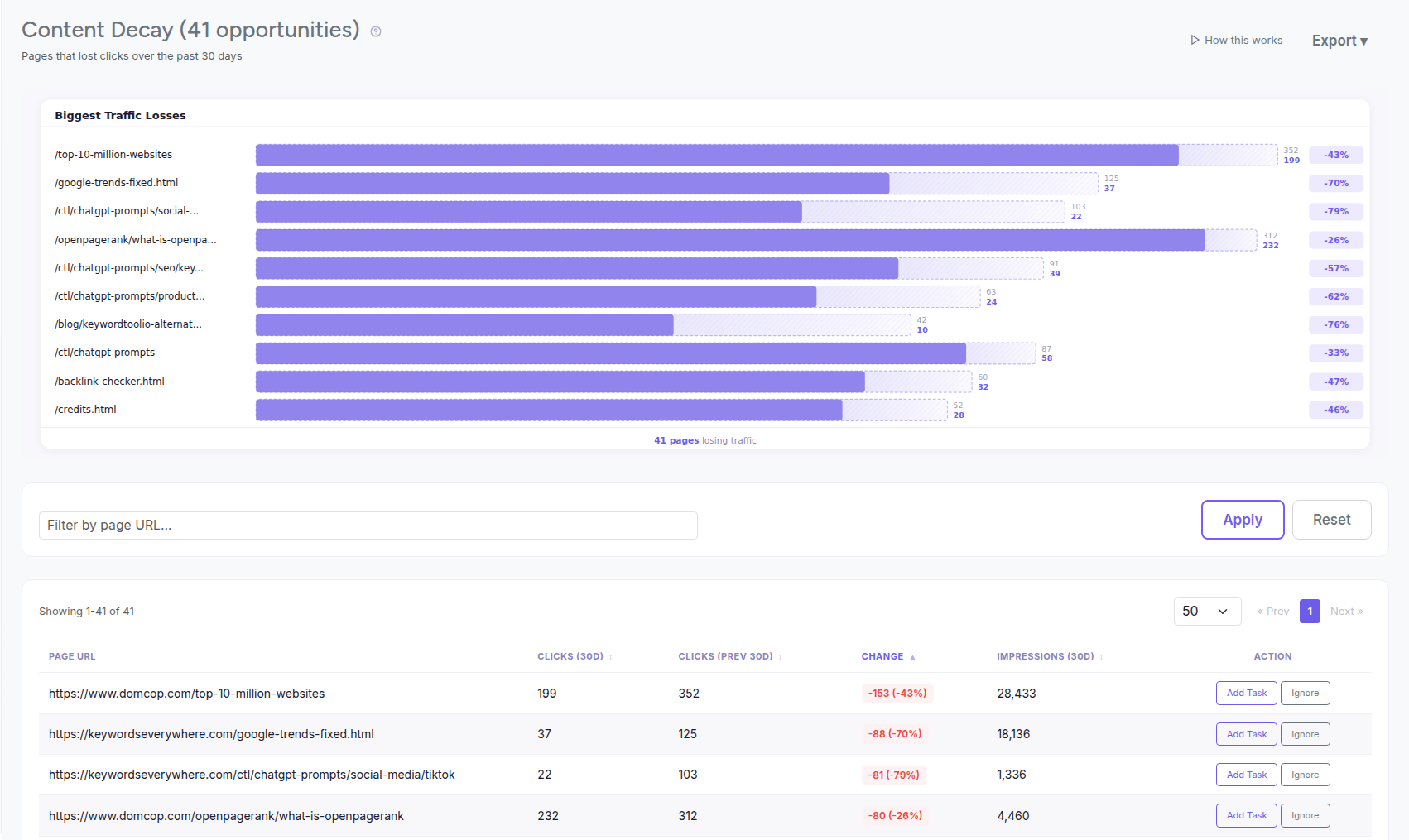
The same diagnostic, run daily across every page, with the thresholds already applied.
Either way, the output is a shortlist of genuinely declining pages. Fix them in priority order: pages with commercial value first, pages still ranking 8-20 second (they have the most recoverable upside, the same logic as quick wins), pure traffic pages after that.
The refresh playbook
Refreshing means making the page the best current answer again, not fiddling with it.
1. Re-read the SERP before you touch the page. Search the page's main queries and read the current top 5 like a stranger. What do they cover that you don't? What format are they in? This tells you whether you're facing better content, changed intent, or a new SERP feature, and everything downstream depends on which.
2. Update substance, not the date stamp. Changing "2024" to "2026" in the title while the examples stay ancient fools nobody, least of all Google. Rewrite the sections that aged: numbers, screenshots, recommendations, dead examples, broken links. Cut sections the current intent no longer wants.
3. Close the gaps. Add what the top-ranking pages cover that you skipped, in your own voice and with your own data if you have it. You're not copying the leaders; you're removing their advantages.
4. Re-link it internally. Decayed pages are often quietly orphaned: newer posts stopped linking to them. Add links from your currently-strong, topically-related pages. While you're in GSC, mine the query data for phrasings the page attracts that your headings don't use yet.
5. Republish and request indexing. Update the visible date honestly (you did real work), submit the URL in GSC, and give it 2-6 weeks. Recovery from a genuine refresh is usually visible inside a month.
Expectations: refreshes win more often than any other content activity per hour invested, but they don't win every time. A page losing to a fundamental intent shift may need a new page (or none) rather than a rewrite.
When to retire a page instead
Some pages shouldn't be saved.
The topic died (a tool that no longer exists, an event that passed). The query moved to a format you'll never win. Or the page never earned real traffic even at its peak.
For those: either consolidate them into a stronger related page with a 301 redirect (best when the old page has backlinks), or retire them properly (a 410 or 404 for true dead weight is fine; don't redirect junk to your homepage).
And then there's the end state worth watching for separately: pages that used to earn clicks and now earn zero. Not declining. Done. These are easy to miss precisely because they no longer show up in "biggest losers this month" comparisons; they finished losing months ago.
We built a separate report for exactly that state, because the treatment differs: a zero-click page with real history is either a retire-or-redirect candidate or an urgent indexing check.
Common mistakes
Most decay-fighting effort gets wasted in one of these six ways.
- Refreshing on noise. A 10% wobble or a two-week dip isn't decay. Wait for a sustained, threshold-clearing decline before you spend a rewrite on it. The same noise-floor thinking applies to daily rank tracking.
- Calling cannibalization decay. If another page of yours picked up the query, page-level charts mislead you. Check the site-level query first.
- Date-stamp refreshes. Republishing with a new date and no new substance. Freshness systems look at what changed, and thin refreshes have a way of doing nothing, or worse.
- Refreshing everything equally. Fix pages with commercial value and recoverable positions first. A page that slid from 4 to 9 is a better investment than one that slid from 40 to 70.
- Never looking at all. Decay compounds quietly. A monthly ten-minute GSC compare (or an automated report) is the entire cost of catching it early.
- Treating recovered pages as done. A refreshed page re-decays on the same schedule as everything else. Put your winners on a recurring review cadence, not a one-time fix list.
FAQ
- What is content decay in SEO?
- Content decay is the sustained decline of a page's organic search performance over time: rankings slip, impressions shrink, and clicks follow. It's usually caused by competitors publishing better content, freshness aging out, or search intent shifting, rather than by anything breaking on the page.
- How do I know if my content is decaying?
- Compare each page's clicks against the previous equivalent period in Google Search Console (Performance, Pages tab, Compare mode). A real decay case shows a sustained drop of 25% or more on a page that previously earned meaningful traffic, and isn't explained by seasonality. Impressions falling alongside clicks confirms lost visibility.
- Why is my old content losing traffic?
- The most common reason is that newer, better pages outrank it. Other causes: Google favoring fresher content on the query, search intent drifting toward a different format, SERP features absorbing clicks above you, or internal changes that orphaned the page. A single page's drop can also be your own newer page cannibalizing the query.
- How do I fix content decay?
- Re-read the current top results for the page's main queries, then update the substance: refresh outdated facts and examples, cover the gaps competitors now cover, match the current intent and format, add internal links from strong pages, and request re-indexing. Genuine refreshes typically show results within a month.
- Should I update or delete old content?
- Update pages whose topic still has search demand and whose positions are recoverable. Consolidate near-duplicates into one stronger page with a 301 redirect. Delete (or 410) pages whose topic is dead and that have no backlinks or traffic. Never mass-delete for "pruning" without checking each page's history first.
- How often should I check for decaying content?
- Monthly is the sweet spot for most sites: long enough for real trends to separate from noise, short enough to catch a slide before it compounds. High-volume publishers check biweekly. The check takes ten minutes in GSC compare mode, or zero minutes with an automated decay report.
Catch decaying pages while they're still saveable
Our Content Decay report compares every page's recent clicks against the previous period from your own Search Console data, applies the noise floors for you, and ranks pages by clicks lost. Its sibling, Dead Pages, catches the ones that already flatlined. Both free, both automatic, both running daily.
See your declining pages