

Quick Wins SEO: Find the Page-2 Keywords You Can Push to Page 1 (and the Math That Tells You Which Ones Are Worth It)

Last quarter, 12,117 people were shown a link to one of our pages on Google.
Three of them clicked.
Not three percent. Three people.
The query was "most visited websites," the page was on keywordseverywhere.com, and there was nothing wrong with it. It wasn't slow, it wasn't thin, it wasn't penalized. It was sitting at position 12.1, near the top of page 2, and almost nobody goes to page 2.
That is what a ranking on page 2 looks like in practice. You collect the impressions and you get none of the clicks.
Once I saw that one, I pulled every keyword we had parked at the top of page 2 across our portfolio of sites. There were 1,035 of them, together pulling in about 591,000 impressions a month and earning almost none of the traffic those impressions should be worth.
Here is the part that bothered me. Every "SEO quick wins" article I had ever read told me to rewrite meta descriptions and fix broken links. Not one of them told me that this single stuck keyword, and the thousand behind it, was worth more than all of that busywork combined.
This article is about that one tactic, the highest-ROI quick win in SEO, which is finding the keywords you already rank for on page 2 and nudging them onto page 1. I'll show you the exact click math from our own data, why positions 11 to 15 are the sweet spot, how to find yours free in Google Search Console in about five minutes, the five moves that actually promote a page-2 keyword, and when a page-2 keyword isn't worth chasing at all.
- The single highest-ROI SEO quick win is promoting keywords you already rank for on page 2 (positions 11-15) to page 1. The page already ranks, so you're nudging, not building from zero.
- The math is brutal and it's why this works: across our own sites, the top of page 2 converts impressions to clicks at about 1/60th the rate of the top three results. Just reaching the bottom of page 1 roughly 2.5x's the clicks.
- Target positions 11-15 specifically (not all of page 2) because they're one good move from flipping, and only chase keywords with real impressions behind them.
- You can find yours free in Google Search Console in five minutes. Then run the five-move playbook on each one, starting with the highest-impression keywords.
Why most "SEO quick wins" lists are busywork
Search "SEO quick wins" and you get twenty near-identical lists.
Fix your title tags. Rewrite three meta descriptions. Add internal links. Find broken links. Compress your images. Claim your Google Business Profile. Add schema. The same twenty tasks, reshuffled across every article.
Most of those tasks are maintenance, not wins.
There is a difference. Fixing a broken link prevents a loss. Compressing an image prevents a slowdown. These are worth doing, but they rarely add traffic on their own. They keep the lights on. They don't move the needle.
A real quick win has to clear a higher bar. It has to add measurable traffic, and it has to do it fast. By that definition there is one tactic that beats almost everything else on the list, and it's the one those articles bury at number seven and never explain.
It's promoting the keywords you already rank for on page 2.
Here is why it qualifies as "quick" when most SEO does not. The page already ranks. Google already understands what it's about, already trusts it enough to put it in front of thousands of searchers, already decided it's a relevant answer. You are not building authority from nothing. You are nudging a page that's already in the race from eleventh place to ninth. That is a much smaller job than ranking a brand new page, and the payoff is disproportionate, because of where the clicks actually live.
The page-2 cliff: what a position is actually worth
Everyone says page-2 keywords are "low-hanging fruit." Nobody shows you the fruit.
So here is the actual data. I pulled every keyword across our own portfolio of sites for the last 90 days, bucketed each one by the position it was shown at, and measured the real click-through rate for each band. This is our own data, not an industry estimate.
| Position band | Avg position | Click-through rate | What it means |
|---|---|---|---|
| 1-3 | 1.9 | 8.61% | The top of page 1. Where the clicks actually are. |
| 4-7 | 5.6 | 1.37% | Mid page 1. Still about 9x the top of page 2. |
| 8-10 | 9.0 | 0.365% | Bottom of page 1. The realistic first target for a page-2 keyword. |
| 11-15 | 12.9 | 0.145% | Top of page 2. Lots of impressions, almost no clicks. |
| 16-20 | 17.9 | 0.060% | Bottom of page 2. Effectively invisible. |
| 21+ | 43.1 | 0.024% | Page 3 and beyond. Indexed, not found. |
Look at the jump from the 8-10 band to the 11-15 band.
The click-through rate drops from 0.365% to 0.145%. That is the page-2 cliff, and it's the whole reason this tactic works. The difference between the bottom of page 1 and the top of page 2 is not a few percent. It's a factor of about 2.5. The same keyword, shown to the same number of people, earns two and a half times the clicks one position higher, simply because it crossed from page 2 to page 1.
Keep climbing and it compounds. The top half of page 1 (positions 4-7) earns about 9x the clicks of the top of page 2. The top three earn about 60x.
That 60x is worth sitting with. The first result on page 2 converts the people who see it into clicks at roughly one-sixtieth the rate of a top-three result. Your page-2 keyword is not failing because the page is bad. It's failing because it's on page 2.
(One honest note on the numbers: our real CTRs run lower than the idealized curves you'll see quoted around the web, the ones that put position 1 at 25 or 30 percent. That's normal. Real search results are full of ads, featured snippets, and zero-click answers that skim clicks off every position. What matters here isn't the absolute percentage, it's the shape, and the shape is a cliff. The tool we built models this with a 13-level expected-CTR curve, and I'll publish the full curve in a future piece. For finding quick wins, the six bands above are all you need.)
Now put the cliff together with scale.
Across our portfolio, those 1,035 keywords sitting at the top of page 2 pull about 591,000 impressions a month and earn roughly 860 clicks. If that same set were sitting at the bottom of page 1 instead, it would be worth about 2,150 clicks. In the top half of page 1, over 8,000. We would not need a single new page or a single new keyword to capture that traffic. We already rank for all of it. It's just on the wrong page.
Wondering how many you've got parked on page 2? If your site is connected to Google Search Console, the answer is already sitting in your data. Website Ranking Checker surfaces every page-2 keyword across your site, sorted by impressions, so the biggest opportunities float to the top.
Why target positions 11-15 specifically
Page 2 runs from position 11 to 20. You don't want all of it.
You want the top half, positions 11 to 15. Here's the reasoning.
Positions 11 to 15 are what the industry calls "striking distance." They are close enough to page 1 that a single good move, one strong internal link, one better-aligned title, one section of added depth, can flip them over the line. The gap is small. Your page has already proven it belongs in the conversation. You're closing a few positions, not a few pages.
Positions 16 to 20 are a different job. A page sitting at 18 usually isn't there by a hair. It's there because the top ten genuinely cover the topic better, or have more links, or match the intent more precisely. Promoting it isn't a quick win, it's a content project. Worth doing sometimes, but not on this list.
The second filter is impressions. A keyword at position 12 with twelve impressions a month is not an opportunity, it's a rounding error. There is no traffic behind it to capture, so even a perfect promotion to position 3 wins you almost nothing. We use a floor of 100 impressions before a keyword is worth a second look, and in practice the ones worth real effort have several hundred or several thousand.
So the target is precise: average position between 11 and 15, with at least 100 impressions behind it. That's your quick-win shortlist. Across our portfolio, about a third of every keyword sitting on page 2 falls into that 11-15 striking-distance band, and those are the ones we work first.
How to find your page-2 keywords (free, 5 minutes)
You don't need a paid tool for this. Google Search Console has the data, because it's your own ranking data, and it's free. If you've never pulled rankings from it before, it's one of five methods I compared in the guide to checking your website's ranking on Google.
Here's the five-minute version.
First, open Google Search Console and go to Performance, then Search results.
Second, set the date range to the last 3 months and make sure the "Average position" metric is toggled on, alongside Impressions.
Third, filter to the page-2 band. Above the table on the right, GSC lets you add a filter on Position (alongside Clicks, Impressions, and CTR). Set Position greater than 10, and if it lets you add a second condition, smaller than 16. That leaves the keywords ranking around the top of page 2.
Fourth, sort by Impressions, highest first. The queries at the top are now your biggest page-2 opportunities: real search volume, stuck just off page 1.
Fifth, skip anything with only a handful of impressions. What remains is your prioritized quick-win list.
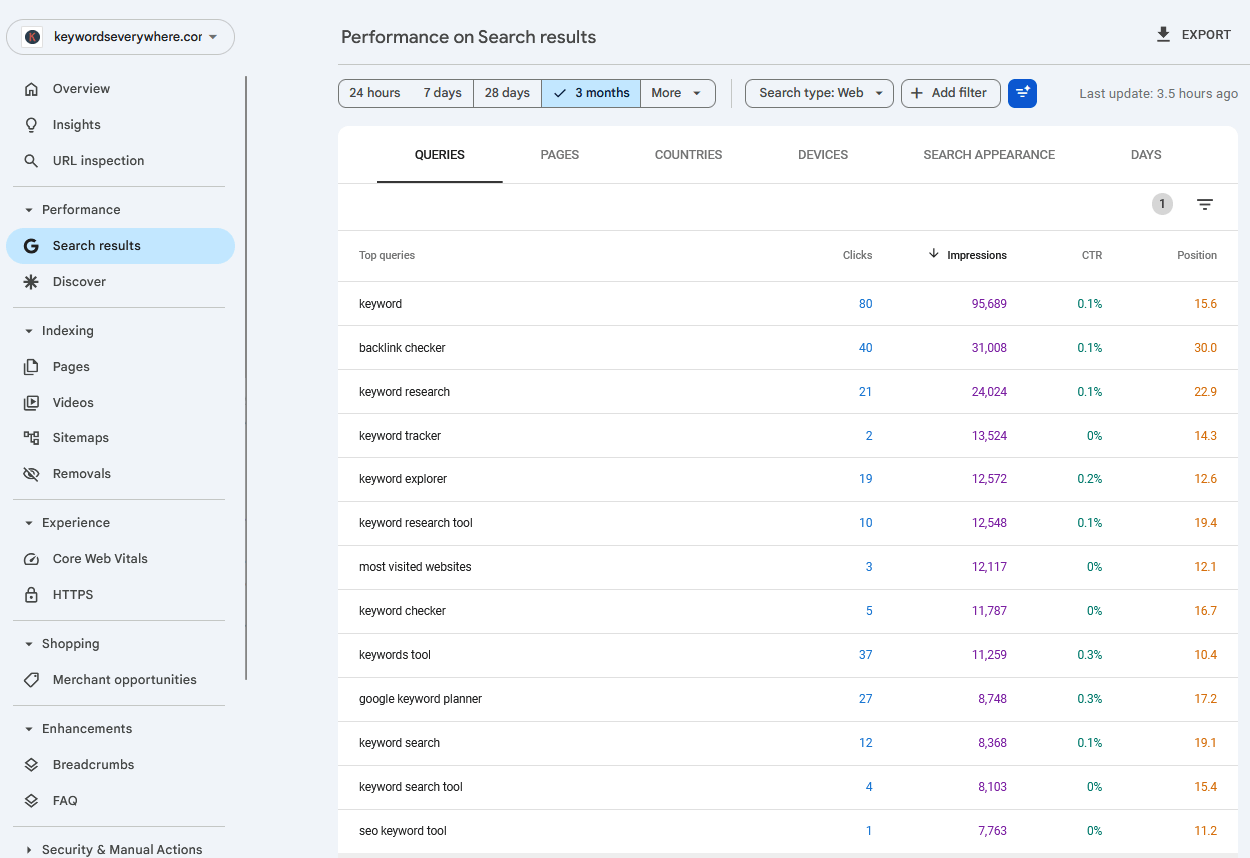
Sorted by impressions with the position column on, the page-2 strikers jump out: high impressions, position in the low teens, barely any clicks. Those are the rows to work.
That manual pass works perfectly well, and if you only do it once a quarter it costs you nothing. The catch is that it's a manual pass. You have to redo it every time, eyeball the position column yourself, and remember which keywords you were already working.
That's the part we automated. Our Quick Wins report runs exactly this query across every keyword you track, every day, and keeps the page-2 strikers in one list sorted by impressions, so you're not re-filtering a spreadsheet each week.
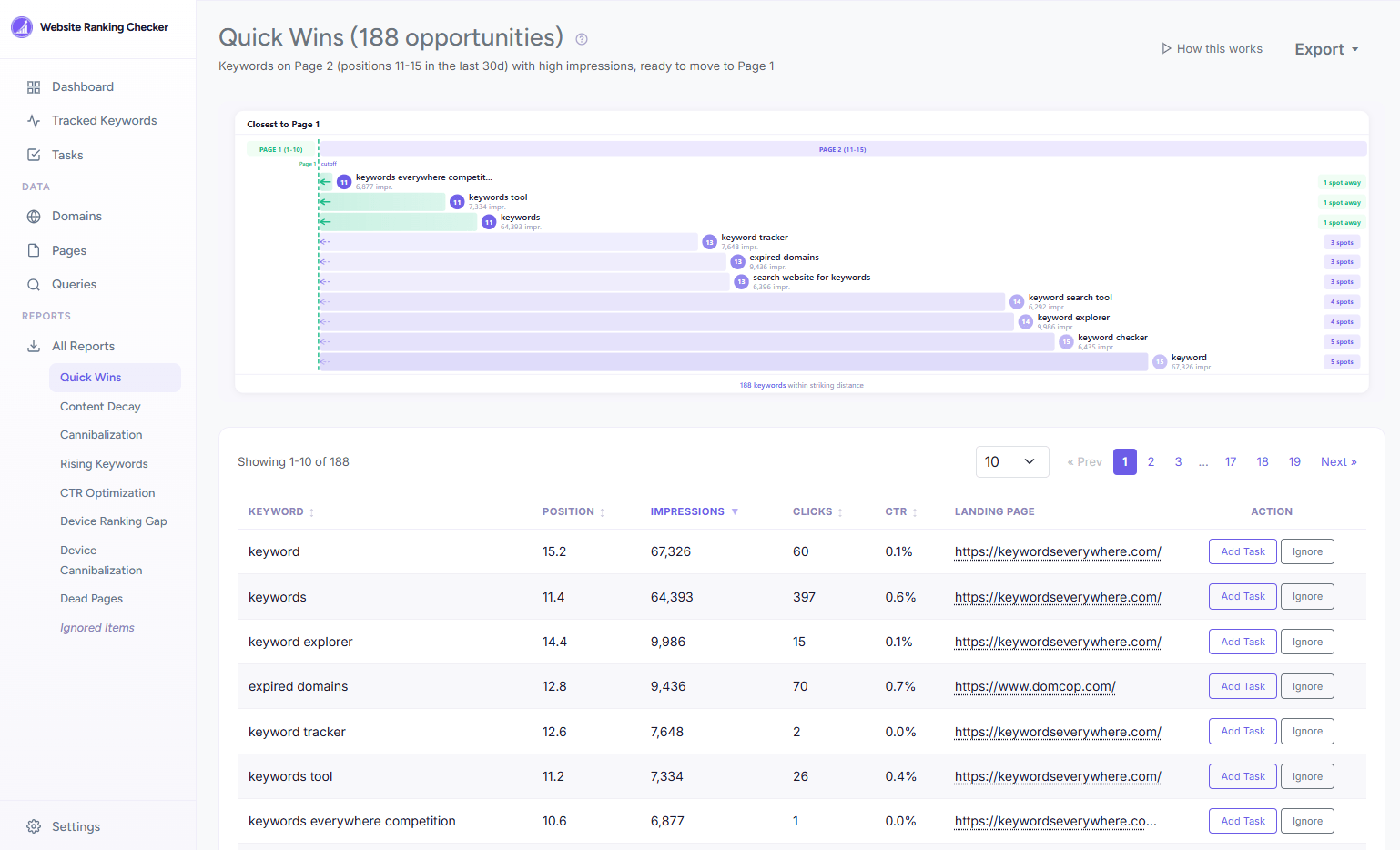
The same striking-distance keywords, found automatically and sorted by impressions. The ones at the top are where a single position gained is worth the most clicks.
One caveat before you start celebrating moves: know your noise floor. A keyword bouncing between position 11 and 13 from one week to the next hasn't "moved." That's normal day-to-day variance, and chasing it will drive you slightly mad. I wrote about how to tell real movement from noise in a separate piece on daily rank tracking. The short version: a position needs to hold its new spot for a couple of weeks before you can credit anything you did.
The 5-move playbook to push a keyword to page 1
You've got your shortlist. Here's what actually moves a page-2 keyword up, roughly in order of speed and effort.
Move 1: Add internal links from your strongest pages. This is the fastest lever you have. Find your highest-authority pages, the ones with the most links pointing to them, and add a contextual link to the page you're trying to promote, using the target keyword (or a close variant) as the anchor text. You're routing authority you already have to a page that's a few positions short. For a striking-distance keyword, a handful of good internal links is often enough on its own, and it can show within a couple of weeks.
Move 2: Match the title, H1, and intro to the actual query. Pull up the exact query the page ranks for and read your own title tag and opening paragraph against it. Page-2 keywords are very often a page that's relevant but not precisely aligned, the page is about the topic but the title is phrased for a slightly different angle. Rewrite the title and the first hundred words to answer the specific query directly. This is intent alignment, and it's free.
Move 3: Close the content gap against the current top 10. Open the pages ranking in positions 1 through 10 for your keyword and ask what they cover that you don't. A subtopic, a comparison table, a step you skipped, a question they answer and you ignore. Add the missing depth. You don't need to write more for the sake of length, you need to cover what the winners cover that you're missing.
Move 4: Earn a SERP feature. Page-2 keywords occasionally have a shortcut to visibility: the featured snippet, the People Also Ask box, an image or video result. Structure a section to win it. A clear question as a heading with a tight 40-to-60-word answer underneath, a clean numbered list, a short table, or FAQ schema. Winning a feature can pull you above results that technically outrank you.
Move 5: The one strong external link. When the four moves above aren't enough, the page usually needs an authority signal you can't manufacture internally. One genuinely relevant external link from a site in your space often does more for a striking-distance keyword than ten low-quality ones. This is the slowest and hardest move, so save it for the keywords where the impression numbers clearly justify the effort.
Work them in order. For most page-2 keywords, moves 1 and 2 alone do the job, and they cost you an afternoon, not a campaign.
When a page-2 keyword isn't worth chasing
Not every keyword on page 2 is a quick win. Some are traps. Here's how to spot the ones to leave alone.
The intent is worthless to you. A keyword can have great volume and bring traffic that does nothing for your business. If the searchers behind it will never become readers, subscribers, or customers, a better position just buys you more bounce. Position is not the goal, useful traffic is.
It's someone else's brand, or an unwinnable head term. If the query is a competitor's brand name, you'll never own it, and you shouldn't try. The same goes for enormous generic head terms where the top ten are Wikipedia, a government site, or a handful of billion-dollar brands. Remember that "most visited websites" keyword from the intro, with about 12,000 impressions and 3 clicks? It competes with Similarweb and Wikipedia. That one's a lost cause, and the trick is recognizing it as one rather than pouring effort into it. Most of your page-2 keywords won't be like that.
The trend is dying. If the topic's demand is on a long decline, promoting the page is rowing against the current. Spend the effort on something with a future.
It's actually a cannibalization problem. Sometimes a keyword won't move because you have two pages competing for it, and Google can't decide which to rank, so it ranks neither well. No amount of internal linking fixes that, because you're splitting your own signals. The fix is to consolidate the two pages, not to promote one. I covered how to spot and fix this in the guide to keyword cannibalization.
It's only a page-2 keyword on one device. A keyword can sit on page 1 for desktop and page 2 for mobile (or the reverse). That's not a promotion job, it's a device-specific problem with a different fix, usually a mobile page-experience issue. I wrote about diagnosing those in the piece on why mobile and desktop rankings differ.
Common quick-win mistakes
The tactic is simple, but there are a handful of ways to waste your time on it.
- Chasing position without impressions. A keyword at position 11 with twelve impressions a month is not a win waiting to happen. Sort by impressions, always, and let volume set your priority.
- Celebrating noise. A keyword that goes from 11 to 9 this week and back to 12 next week didn't move, it wobbled. Wait for a new position to hold for two weeks before you credit your work or move on.
- Promoting a cannibalized keyword. If two of your pages are splitting one query, adding links to one of them often makes the split worse. Consolidate first, then promote.
- Linking from pages with no authority to pass. Internal links only help if they come from pages that have link equity to share. Ten links from brand-new posts move nothing. One link from your strongest page moves the needle.
- Optimizing the wrong page. Check which URL actually ranks for the keyword before you start editing. It's common to pour work into the page you think should rank while Google is ranking a different one. Improve the page that's actually in the race.
- Treating every striking-distance keyword as equal. They are not. Impressions and intent decide the order. A keyword with 3,000 impressions and buyer intent comes before a keyword with 300 impressions and idle curiosity, every time.
FAQ
- What are "quick wins" in SEO?
- Quick wins are changes that add measurable organic traffic with relatively little effort and a short turnaround. The highest-ROI one is usually promoting keywords you already rank for on page 2 to page 1, because the page already ranks and you're only closing a small gap rather than building a new page from scratch.
- What are striking distance keywords?
- Striking distance keywords are queries you rank for in roughly positions 11 to 15, the top of page 2. They're close enough to page 1 that a single focused improvement can push them over the line, which is what makes them the best quick-win targets.
- How long does it take to move a keyword from page 2 to page 1?
- For a striking-distance keyword, the fastest moves (internal links and title or intent alignment) often show within one to three weeks. Moves that depend on new content or an external link take longer, sometimes a couple of months. Keywords sitting at the bottom of page 2 usually need a content-scale effort and shouldn't be treated as quick wins.
- What positions count as low-hanging fruit in SEO?
- Positions 11 to 15 with real impressions behind them. Lower than that (16 to 20) usually needs more than a quick fix, and a high position with almost no impressions isn't worth chasing because there's no traffic to capture even if you win.
- How many internal links does it take to move a page-2 keyword up?
- There's no fixed number, but for a striking-distance keyword a handful of contextual links from your highest-authority pages is often enough. Link quality matters far more than quantity, one link from a strong page beats ten from weak ones.
- Is it really easier to rank a keyword that's already on page 2?
- Yes. The page has already cleared the hardest hurdle, Google trusts it enough to rank it and is showing it to searchers. Closing a few positions is a much smaller job than getting a new page to rank at all, which is exactly why page-2 promotion is the most efficient use of your time.
- How do I find my page-2 keywords for free?
- Open Google Search Console, go to Performance then Search results, set the date range to 3 months, turn on the Average position metric, and sort by impressions. Look for queries with an average position between about 11 and 15 and meaningful impressions. That's your list.
Find your page-2 keywords automatically
Website Ranking Checker connects to your Google Search Console and surfaces every keyword sitting on page 2, sorted by impressions, so you can see which ones are one move from page 1. Daily. Free for Keywords Everywhere users.
Find my quick wins free