

Long Tail Keywords: You're Already Ranking for Hundreds (Here's How to See Them)

Across our sites, in one ordinary month, we appeared in Google for 15,211 different search queries.
12,739 of them, 84%, were three or more words long. Half were four-plus words. Phrases like "travel related keywords list" and "youtube channel keywords list" and "most visited websites in the world."
Here's the confession: we didn't choose those. Nobody sat in a planning meeting and targeted "travel related keywords list." Google matched our pages to those queries on its own, and now that phrase gets shown our content two thousand times a month while we rank 8th and collect almost nothing from it.
And those unchosen, many-worded queries deliver 42% of all our clicks.
That's the long tail. Not a keyword-research treasure hunt, an inventory you already own and have probably never once looked at.
Every guide to long-tail keywords starts with research tools and brainstorming. For a site with any history at all, that's backwards: your own Search Console already contains hundreds or thousands of long-tail queries with proof you can rank for them, because you already do. This article is about mining that list instead of guessing at a new one.
- The long tail is a demand distribution, not a phrase length: many rare, specific queries that collectively rival your head terms. On our portfolio: 84% of queries, 42% of clicks.
- For an existing site, skip the guessing: your GSC query list IS your long-tail research, pre-validated by the fact that you rank.
- Mine it with four filters: 3+ words, question intent, striking distance (position 8-20) with an impressions floor, and a zero-click sanity check.
- Act small: most tail queries need a section or an internal link, not a new page. Track the ones you push.
What the long tail actually is
The term comes from the shape of search demand plotted by popularity: a few huge "head" queries, then a long, flattening tail of increasingly specific ones, each small alone, enormous in aggregate.
Long-tail keywords are the queries out in that tail: more words (usually), more specific (always), less volume each, less competition, and typically clearer intent. "keyword tracker" is head; "free keyword tracker for a small blog" is tail.
Two properties make the tail worth deliberate attention:
Aggregate scale. Individually trivial, collectively huge: our 84%-of-queries number is typical, and most sites' click share from the tail surprises their owners (ours: 42%).
Intent precision. Someone searching a seven-word question knows exactly what they want. Rank for it with the exact answer and the CTR and conversion behave far better than a generic head ranking. It's also the part of search that answer boxes absorb least when the query is specific enough to need your specifics.
The classic mistake is treating "long tail" as a synonym for "long phrases." Word count correlates with tail-ness, but the defining feature is specificity of demand. Our four-word filter below is a practical proxy, not a definition.
Why "research first" is backwards for existing sites
The standard long-tail advice: brainstorm seeds, run them through a keyword tool, mine autocomplete and People-also-ask, build a list, write content, hope.
That workflow is right for one situation: a new site (or new topic area) with no data. If that's you, a research tool is the move, and since keyword research is literally our family business, I'll point you at Keywords Everywhere for it and move on.
But if your site has months of history, you have something better than research: evidence.
Every query in your Search Console data is a query Google already matches you to. No difficulty estimates, no guessing whether you can rank: you do rank, at a measurable position, with measurable demand (impressions). The only question is which of those rankings deserve investment.
Research answers "what could I rank for, maybe?" Your GSC tail answers "what am I ranking for at position 11 with two thousand impressions and zero payoff?" The second question has a to-do list attached.
Mining your tail in GSC: the four filters
Open Search Console, Performance report, Queries tab, last 3 months. Then:
Filter 1: word count. GSC's query filter accepts regex: ^(\S+\s+){3,}\S+$ matches queries with 4+ words (adjust the 3 for your cutoff). This alone splits your tail from your head.
Filter 2: question intent. Swap in ^(what|how|why|when|which|can|does|is)\b to see just the questions. Questions are the tail's most actionable genre: each is a heading (or FAQ entry) waiting to exist. The full regex toolkit is in the GSC keyword research guide.
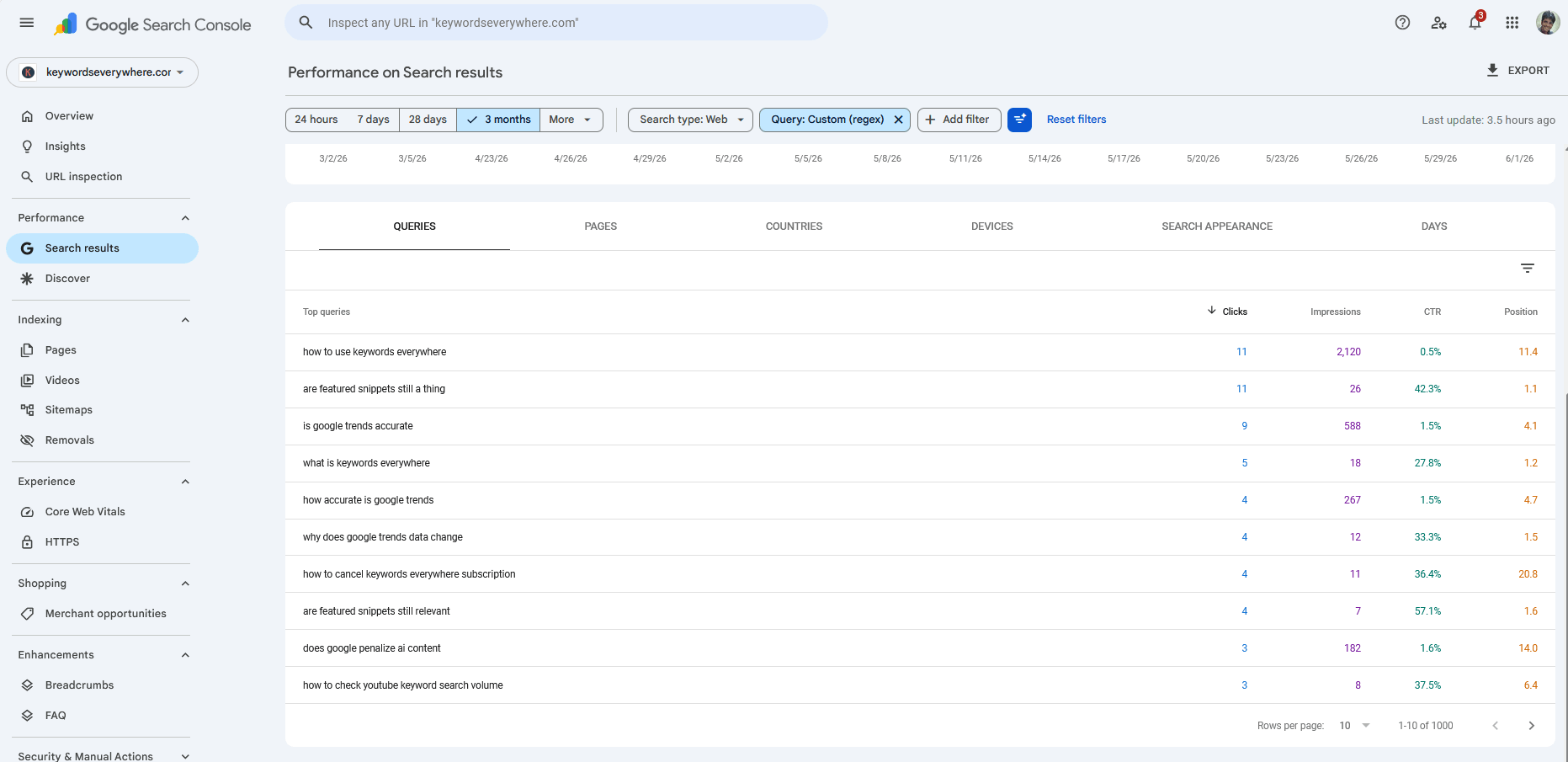
The question regex in action: your audience's FAQ, pre-ordered, sorted by demand.
Filter 3: striking distance with an impressions floor. Add a position filter of 8-20, then sort by impressions and ignore anything under ~100 impressions for the period. What remains is the money list: real demand, page-1 adjacent, provably yours. This is the quick-wins logic applied to queries you never consciously targeted.
Filter 4: the zero-click sanity check. For each candidate, glance at its CTR against what its position should earn. A specific query with healthy clicks-per-impression is worth pushing; a definitional one earning nothing at position 4 is being answered on the SERP and deserves demotion in your plans.
Fifteen minutes, four filters, and you'll have a shortlist most sites never discover they have.
Prefer it pre-filtered? The Queries view lists every query your site appears for, from your own GSC data, sortable by impressions and position, with one-click tracking. Your tail, no regex required.
Qualifying: which tail queries deserve action
Not everything that survives the filters deserves work. Three quick tests:
Business fit. "most visited websites in the world" gets shown our content 1,300 times a month at position 10.7. It's also tourist traffic with no plausible path to our product. Interesting, not actionable. Contrast "competitor keyword research tool" at position 18: exactly our buyer. The impressions don't rank the list; fit does.
The right page exists (or could). Check which URL ranks for the query. If it's genuinely about the topic, you're optimizing. If Google is stretching a vaguely-related page, you're deciding whether the topic deserves real coverage.
No cannibalization risk. If the query sits at the boundary of two of your pages, decide the canonical home first (the overlap problem), or your push will just shuffle which page ranks 12th.
Acting on them (usually not with a new page)
The move that fits most tail queries is smaller than people expect:
Add a section, not a site. A query like "youtube channel keywords list" hitting a general keywords-list page wants a dedicated H2 with the specific answer (and maybe the actual list). One heading, one tight section, often one position-band jump.
Say the words. Google matched you WITHOUT the exact phrasing; using the query's actual words in a heading and the surrounding paragraph closes the gap. This is the cheapest optimization in SEO.
Internal links with intent. Two or three links from strong related pages, anchored naturally on the tail phrase, move position-12 rankings more reliably than any other single action we've seen.
A new page only when the intent is truly distinct. If answering the tail query properly would derail the current page's job, it's a new page. Otherwise consolidation beats proliferation, always. (A hundred thin tail-pages is how sites end up in content-pruning surgery two years later.)
Then track the chosen. Whatever you push, put it in your tracked list: the whole point of acting on evidence is measuring whether the action worked.
The volume caveat
Run your best tail queries through a volume tool and many will report "0-10 searches/month," which tempts people to dismiss them.
Don't. Volume databases model the head well and the tail poorly: ultra-specific phrasings get grouped, sampled, or floored to zero, while your GSC impressions are a direct count of how many times Google actually showed you for the query. When the tools say 0 and GSC says 2,000 impressions in 30 days, believe the one that counted.
(For the research lane, where you have no impressions yet, volume tools with big databases are the right instrument, and bulk-checking candidate lists is exactly what KE credits are for. Different job, different tool.)
Common mistakes
Six tail-mining mistakes.
- Researching the tail you already own. Check GSC before any tool. Evidence beats estimates.
- A new page per tail query. Sections and headings first; pages only for distinct intent. Thin-page proliferation is future pruning debt.
- Chasing tail queries with no business fit. High impressions on tourist queries are trivia. Fit ranks the list.
- Dismissing queries because a volume tool says zero. Your impressions are the demand measurement.
- Pushing without tracking. Untracked pushes teach you nothing. Track, push, measure, repeat.
- Ignoring the questions. The question-regex list is FAQ content pre-ordered by your actual audience. The easiest content roadmap you'll ever get.
FAQ
- What are long tail keywords?
- Highly specific, individually low-volume search queries, usually three or more words, that collectively make up the majority of searches. They're less competitive and carry clearer intent than short head terms: on our own portfolio, 84% of the queries we appear for are 3+ words, and they deliver 42% of our clicks.
- How do I find long tail keywords I already rank for?
- In Google Search Console's Performance report, filter queries with a word-count regex (for example ^(\S+\s+){3,}\S+$ for 4+ words), add a position filter of 8-20, and sort by impressions. Everything above roughly 100 impressions is a pre-validated long-tail opportunity: Google already ranks you for it.
- Are long tail keywords easier to rank for?
- Generally yes: fewer sites target each specific phrasing, so competition is thinner, and a page that precisely answers the query can outrank bigger sites answering it generically. Your existing striking-distance tail (positions 8-20) is the easiest of all, since you're most of the way there.
- How many words make a keyword long tail?
- There's no strict cutoff; three or more words is the common proxy. The defining property is specificity of demand rather than length: a specific two-word query can behave like tail, and a popular five-word phrase can behave like head.
- Do long tail keywords have search volume?
- Individually small, collectively large, and volume tools systematically under-report them: ultra-specific queries get grouped or floored to zero in databases. Your Search Console impressions are a direct measurement of how often Google shows you for a query; trust them over a zero in a volume tool.
- Should I create a page for every long tail keyword?
- No. Most tail queries are best served by a dedicated section or heading on an existing relevant page, plus internal links using the query's phrasing. Create a separate page only when the intent is genuinely distinct from anything you have; thin per-query pages create cannibalization and pruning problems later.
Every long-tail query you already rank for, in one sortable list
Website Ranking Checker's Queries view lists every query your site appears for, from your own Search Console data, sortable by impressions and position, with one-click tracking for the ones you decide to push. The four filters from this article, minus the regex. Free for KE users.
See your long tail