


By the time you read this, Google has probably shipped another named update.
The first five months of 2026 alone delivered a February Discover update, a March spam update, a March core update (March 27 to April 8), and a May core update. That's a named Google event roughly every few weeks.
Which means whenever your traffic dips, there's almost always an update nearby to blame. "It was the core update" is the most available diagnosis in SEO.
It's also, quite often, wrong.
Here's the collision that makes this genuinely hard: in our own tracking data, 57% of big overnight ranking drops heal themselves within a week, untouched. Normal volatility produces scary charts weekly. Updates produce scary charts too. And both happen in the same calendar.
So the question isn't "was there an update?" There's always an update. The question is whether YOUR change was the update, and there's an actual method for answering it, which is what this article is about.
- A core update is Google recalibrating how it evaluates content overall. It's not a penalty, it doesn't target your site, and there's no specific fix to apply.
- Never diagnose during a rollout: updates take 1-2+ weeks, and mid-rollout positions are turbulence. Compare stable-before averages against stable-after averages.
- The update fingerprint is site-wide: many pages losing impressions together, starting inside the rollout window. One page dropping while the site holds is almost never "the update."
- Real recovery is content improvement measured in months, usually visible only at the next update. Anyone selling a faster fix is selling.
The most overused diagnosis in SEO
Blaming the update feels rigorous. It has a date, it has industry chatter, it has a name.
But the update explanation has a property that should make you suspicious: it's never falsified by default. Traffic down during a rollout? The update. Traffic down two weeks after? Delayed effects. Traffic down before? Pre-rollout testing, obviously.
An explanation that fits every outcome explains nothing, until you do the verification work.
And the base rates matter. Positions wobble hard on ordinary days (more than half of big one-day drops in our data recover within a week on their own). Meanwhile genuine update damage is real but concentrated: most sites come through most updates roughly flat.
So treat "the update did it" as a hypothesis, not a conclusion. Here's how to test it.
What a core update actually is
Google ships broad changes to its ranking systems several times a year and labels the big ones "core updates."
Three things to internalize, all consistent with Google's own guidance:
It's a recalibration, not a penalty. Google re-weighs what "good" looks like across all sites. Nothing targets you. There's nothing to "remove" the way you would with a manual action.
Losses usually mean relative reassessment. Your page didn't get worse; other pages got judged better under the new weighting. The competitive frame matters because it points at the fix: be better relative to the query's current winners, not "fix a violation."
There is no specific technical fix. Google's published position, consistently, is that no particular action reverses a core-update decline, and that improvement is evaluated over months. Search Engine Land's evergreen guide is worth reading, and it says what every SEO who has lived through several updates says: this is a content-quality game with a long feedback loop.
The overlay method: comparing around a rollout correctly
The single most common verification error: comparing a day during the rollout with a day before it.
Rollouts take one to two-plus weeks (the March 2026 core update took 12 days). During that window, positions are turbulence: systems are being re-weighted while you watch, and day-to-day readings genuinely don't mean anything yet.
The correct comparison:
- Mark the rollout window. Google announces start and end; the Search Status Dashboard has exact timestamps.
- Average a stable period before: the 2 weeks up to the start.
- Average a stable period after: the 2 weeks following the announced completion.
- Compare those two plateaus: per page, per keyword, and site-wide. Ignore everything inside the window.
If before-average and after-average are basically the same, the update didn't hit you, whatever the mid-rollout chart looked like. If there's a step change between the plateaus that starts inside the window, now you have a real update signature.
This is also why daily position history matters more during update season than any other time: weekly snapshots blur the exact timing that makes the overlay conclusive. GSC gives you daily grain but only 16 months of it; comparing against the last few updates needs history that outlives GSC's window.
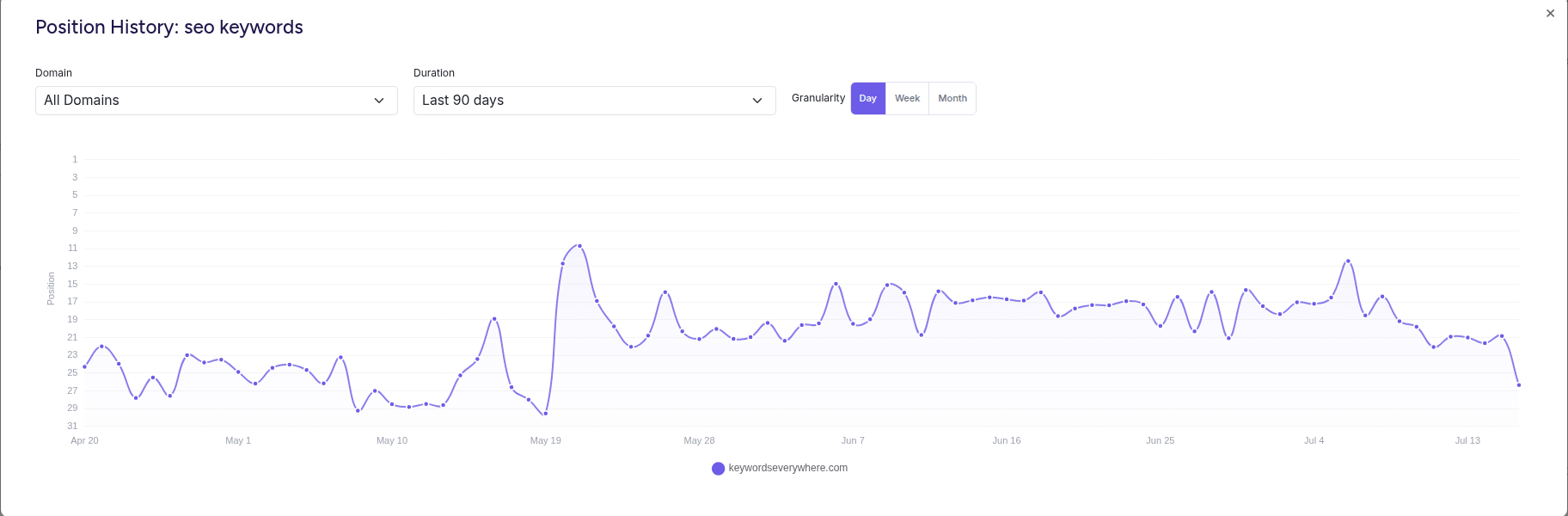
The signature the overlay method hunts for: a plateau, a step, and a new plateau that holds.
The three fingerprints
Once you have clean before/after averages, the pattern tells you which story you're in.
Fingerprint 1: site-wide reassessment. Most pages lost impressions together, a few percent to a lot, starting in the window. Non-branded queries hit harder than branded. This is what "the update hit us" actually looks like. The site got re-weighted.
Fingerprint 2: page-level losses. A handful of pages or one topic cluster dropped while the rest held. Even inside an update window, this usually isn't "the update" in any useful sense; it's those pages losing to specific competitors, which is ordinary content decay that happened to be graded during an update. The fix is page-level, not site-level.
Fingerprint 3: nothing, once you look properly. Before-and-after plateaus match. The scary chart was rollout turbulence plus normal volatility. In my experience this is the most common outcome of doing the overlay honestly, and it saves you from "recovering" from a problem you don't have.
One more split worth running regardless of fingerprint: impressions versus clicks. Updates move visibility (impressions and positions). If impressions held and only clicks fell, your problem is the results page layout, not the update (the CTR diagnosis).
If it was the update: the honest recovery playbook
You verified a site-wide step change. Here's the playbook, with honest expectations.
1. Read what Google said the update emphasized, and what the credible post-update analyses found (Search Engine Land and the usual analysts publish winner/loser patterns within weeks). Updates have themes, and your audit should aim at the current one.
2. Audit your losing pages against the winners. For your hardest-hit queries, read what ranks now. Concretely: what do the new winners have that you don't? Depth, first-hand evidence, freshness, better intent match? This is uncomfortable, and it's the actual work.
3. Improve broadly, not cosmetically. Google's guidance is deliberately un-tactical because the evaluation is holistic. Substantive rewrites of your most important losing pages, pruning or consolidating thin content, demonstrating real expertise. The decay refresh playbook applies page by page.
4. Expect the timeline to be quarters, not weeks. Meaningful recovery typically appears months later, often only at a subsequent update, when the systems re-evaluate. Plan the work like a season, log everything, and resist re-diagnosing weekly.
5. Don't burn the site down. Panic redesigns, mass deletions, and disavow spirals during update aftermath cause more damage than most updates. Change what your audit justifies, nothing else.
If it wasn't: back to the triage
The overlay said "no step change," or the damage is one page? Good news: you're in ordinary diagnostics, where the fixes are faster.
Run the four-question triage. Page-level losses route to decay, cannibalization, or a SERP-feature story. One-day scares route to patience.
The update calendar will keep producing suspects. The method keeps you from convicting the wrong one.
Prepare for the next one (it's coming)
Updates reward the prepared in a specific way: the site owners who know their baselines diagnose in an hour what takes everyone else a panicked week.
Three low-effort habits:
- Keep daily position history running on your money keywords, so the overlay is a five-minute chart-read instead of an archaeology project. (What tracking should look like in general.)
- Annotate events. When an update is announced, note the dates alongside your data. When you ship big site changes, same. Attribution dies without timestamps.
- Split brand from non-brand in your filters before the next update: update damage shows in non-brand first, and a blended view hides it.
Baselines are a setup task, not a skill. Website Ranking Checker snapshots every tracked keyword daily from your own Search Console data and keeps the history for years, so every future update window has a clean before-and-after. Free for Keywords Everywhere users.
FAQ
- What is a Google core update?
- A broad change to Google's ranking systems, shipped several times a year, that re-weighs how content is evaluated overall. It isn't a penalty and doesn't target individual sites; pages gain or lose as the definition of the best result shifts.
- How do I know if a core update affected my site?
- Compare a stable two-week average before the rollout started with a stable two-week average after it completed, ignoring the rollout days themselves. An update hit looks site-wide: many pages losing impressions together, starting inside the window. One page dropping while the site holds is usually decay or a competitor, not the update.
- How do I recover from a core update?
- Audit your hardest-hit pages against what now ranks, then improve content substantively: depth, accuracy, first-hand expertise, intent match. Google states there's no specific fix; improvement is evaluated over months and often recognized at a subsequent update.
- How long does core update recovery take?
- Months. Meaningful recovery commonly appears three to six months after sustained improvements, frequently coinciding with the next core update. Week-scale recoveries are usually rollout turbulence settling, not recovery.
- Should I make changes during an update rollout?
- No. Mid-rollout data is unreliable, so you'd be reacting to turbulence, and changes made during the window make attribution impossible afterward. Wait for the announced completion, run the before-and-after comparison, then act.
- Where do I see when Google updates happen?
- Google's Search Status Dashboard lists rollouts with start and end timestamps, and Search Engine Land maintains a running history. Annotate those dates against your own traffic data; the overlay comparison does the rest.
Have your baseline ready before the next update
Website Ranking Checker keeps daily position history for every keyword you track, from your own Search Console data, for years instead of GSC's 16 months. When the next rollout is announced, the before-and-after read is a five-minute chart instead of a forensic dig. Free for Keywords Everywhere users.
Start your baseline