


Somebody asks me this almost every week: "where does my website rank on Google?"
And every week I have to give the same slightly annoying answer.
It depends on who's searching.
I can prove it with one of our own keywords. One informational keyword we rank for shows an average position of 16.5 in Google Search Console. In India, that same keyword sits around position 8. In the United States, it sits around position 25.
Three different answers. Same website, same keyword, same day. All of them true.
So when you type your favorite keyword into Google, scroll until you find yourself, and write that number down, you haven't found "your rank." You've found one sample: your location, your device, your search history, at that exact moment.
The good news is that a real answer exists, it's free, and Google will hand it to you directly.
This article walks through the quick-and-dirty ways to check where you show up, then the proper way, and what to do once you can finally see it.
- There is no single "true" rank. Your position varies by the searcher's country, city, device, and history, sometimes by 15+ positions for the same keyword.
- Incognito searches and free rank checkers are fine for a quick look, but they only show you one sample of a wide range.
- The real answer is in Google Search Console: it reports your average position across every real search that showed your site, for free.
- Once you connect GSC you'll discover you rank for far more searches than you thought. Our smallest site showed up for 464 different queries in one month.
The honest answer: there is no single rank
When you ask "where does my website rank," Google hears a different question than the one you asked.
You're imagining a scoreboard: one keyword, one list, one position with your name on it.
What actually exists is millions of individual searches, each assembled on the spot for one specific person, in one specific place, on one specific device.
Your site appears at a slightly (or wildly) different spot in many of those.
So "where do I rank" is really "where do I rank, on average, across all the real searches that happened." That average is a real, useful number. It's just not the number you see when you google yourself.
Keep both ideas in your head and everything below makes sense.
Why your friend sees a different Google than you do
Three variables do most of the damage.
Location. Google reshuffles results by country and even by city, hard. That keyword of ours ranking 8 in India and 25 in the US isn't an edge case. If your customers are spread across countries, you effectively have a different rank in each one.
Device. Mobile and desktop results genuinely differ, and a site that's clunky on phones can sit several positions lower on mobile for the exact same query. We measured this across 4,792 keywords on our own sites and about a third had a meaningful gap. The full breakdown is in why your mobile rankings differ from desktop.
Personalization and history. If you visit your own website every day (you do), Google has noticed. When you search, it quietly favors sites you already know. This is why you often rank 2-3 spots "better" on your own laptop than anywhere else, and why checking your rank while logged in to your Google account flatters you.
On top of those three, SERP features (ads, maps, AI answers, "People also ask" boxes) push the organic results around, so position 3 on one search sits physically lower on the page than position 3 on another.
None of this means ranking is random. It means a single spot-check is a bad measuring tool.
5 ways to find out where you rank
Here's the full menu, from fastest to most useful.
1. Google it in an incognito window. Open a private window, search your keyword, count down the results until you find yourself. Free and instant. But incognito only strips your cookies, not your location or device, so you're still seeing one biased sample. Good for "roughly page 1 or page 3?", wrong for tracking.
2. Ask a friend in another city. Genuinely useful, and most people never think of it. If your customers are in Mumbai or Chicago and you're not, ask someone there to search and send a screenshot. You'll sometimes be shocked by the difference. Obviously doesn't scale past two friends.
3. Use a free one-off rank checker. Tools like Seobility's rank check let you paste a keyword and a domain and get a position back. They search from a data center in a location you pick, so they're less biased than your own browser. Still a single sample, no history, and most cap you at a handful of keywords. I graded these in the honest free rank tracker comparison.
4. Google Search Console. Free, from Google itself, and based on every real search that showed your site rather than one test search. This is the one to actually set up, so it gets its own section below.
5. A rank tracker on top of GSC. Once you outgrow checking one keyword at a time, a tracker gives you daily positions, history, and alerts. Paid ones scrape Google; GSC-powered ones read your real Search Console data. If you want the full decision tree between all five approaches, that's its own article.
| Method | Cost | What you get | The catch |
|---|---|---|---|
| Incognito search | Free | One sample, your location | Biased, manual, no history |
| Friend in another city | Free | One sample, their location | Doesn't scale |
| One-off rank checker | Free | One sample, chosen location | No history, keyword caps |
| Google Search Console | Free | Average across all real searches | 2-3 day delay, averages need reading right |
| GSC-powered tracker | Free (ours) / paid | Daily positions, history, alerts | Needs GSC connected first |
The real answer lives in Google Search Console
Google Search Console is a free dashboard where Google reports how your site actually performed in search: which queries showed it, where it ranked on average, and how many people clicked.
Not estimates. Not one test search. The real logs.
If you don't have it yet: go to search.google.com/search-console, add your site as a property, and verify you own it (through your domain registrar or a small HTML file). Data starts accumulating within a couple of days.
Then open the Performance report and turn on "Average position."
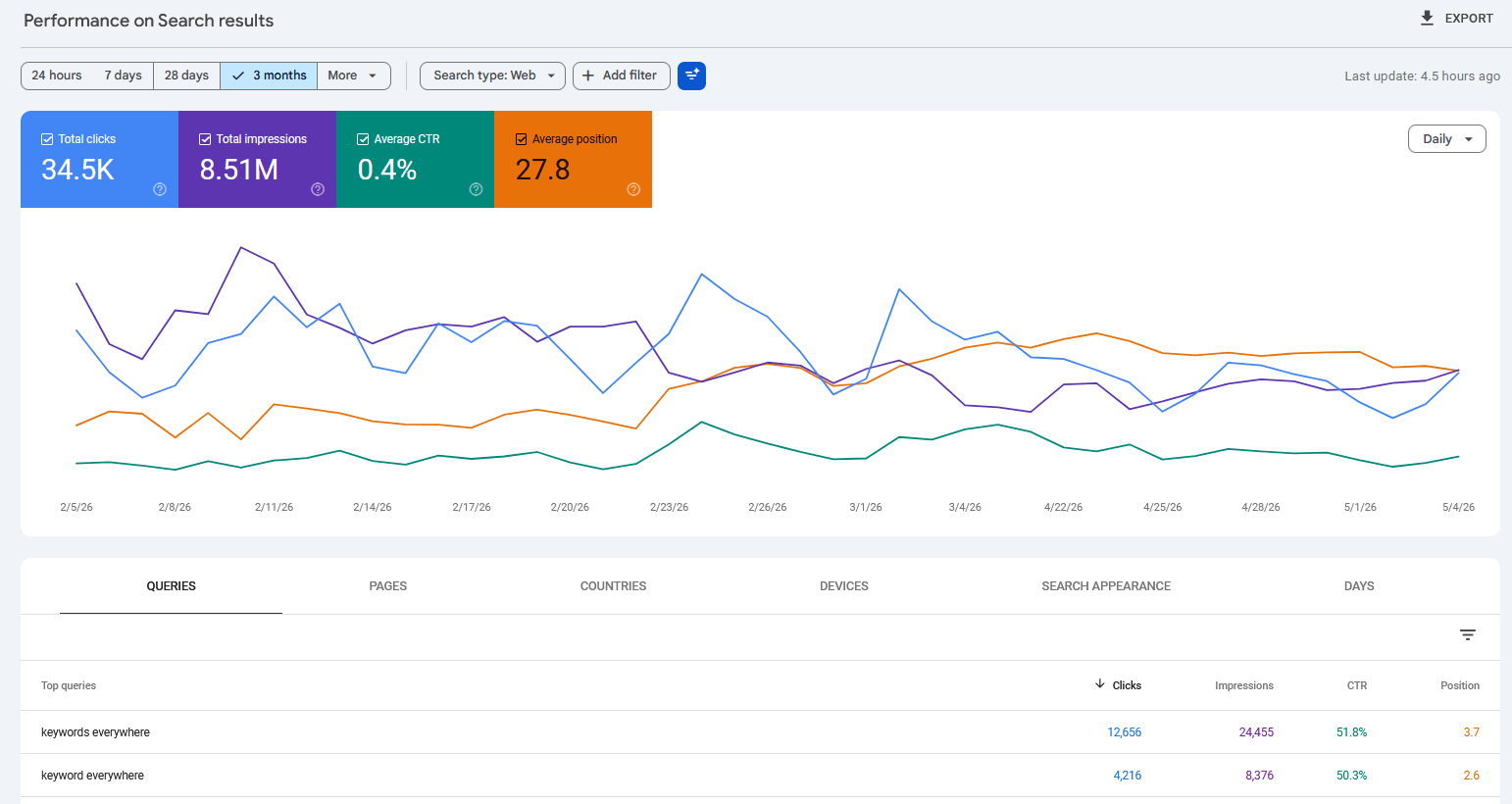
The Performance report is the honest scoreboard: clicks, impressions, CTR, and average position for every query that showed your site.
Click any query in the table below the chart and you'll see your average position for that specific search, plus how many times you appeared (impressions) and how many clicks you got.
That position is averaged across every real search that showed your site: every country, every device, every searcher. Which makes it the most honest single number that exists for "where do I rank."
Want to see the location effect from earlier with your own data? Add a country filter and compare.
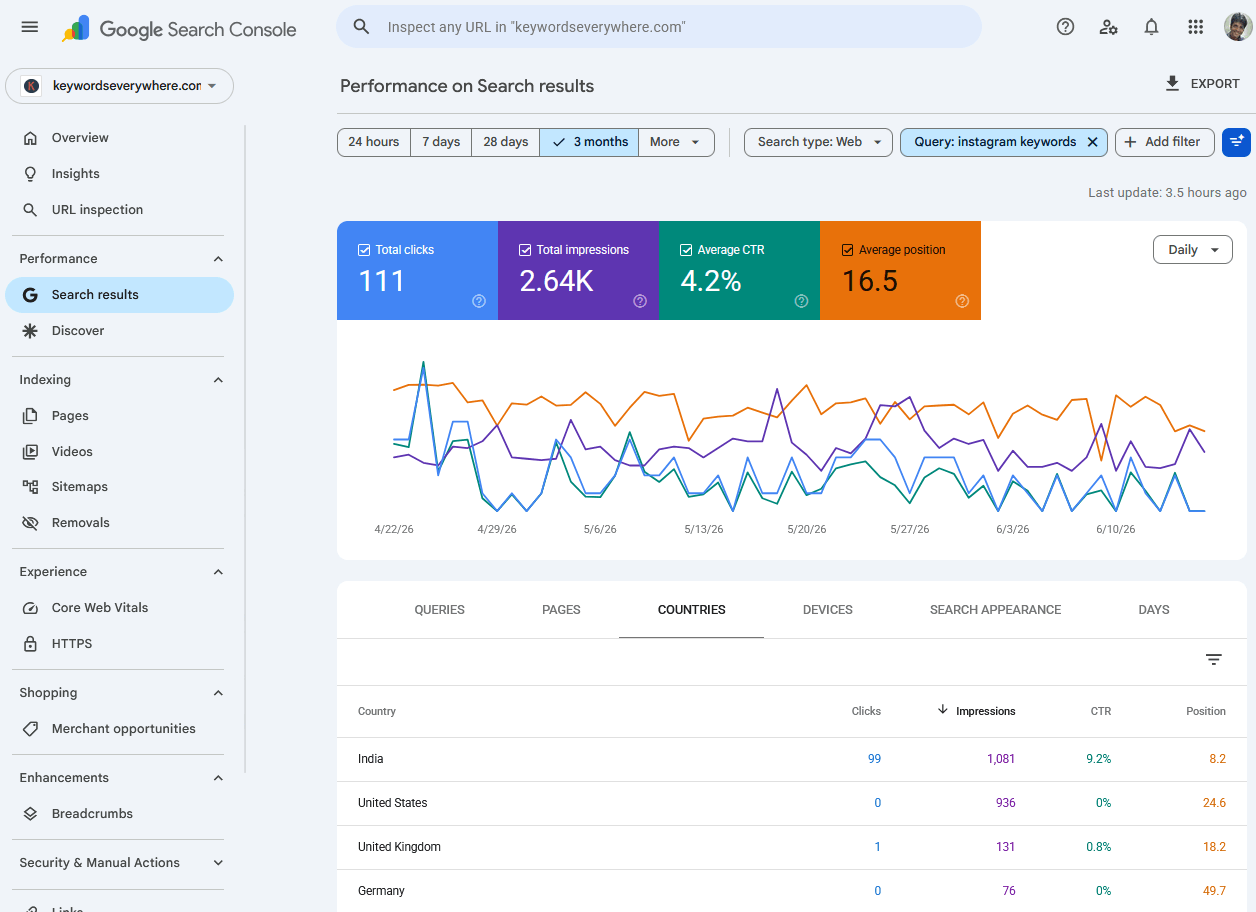
The same keyword, split by country. This is why your friend abroad sees something different.
Two things to know before you trust it blindly.
First, the data runs 2 to 3 days behind. You're looking at the recent past, not this second.
Second, that average hides variance, which is the next section.
Rather skip the spreadsheet stage? Website Ranking Checker connects to your Search Console and turns this exact data into daily positions, history charts, and alerts for every keyword you track. Free for Keywords Everywhere users.
What "average position" actually means
Average position is the position your site held, averaged over every search where it appeared.
The word doing the damage there is "averaged."
Remember the keyword from the intro: position 8 in India, position 25 in the US, average 16.5. Nobody on Earth actually saw us at 16.5. It's a blend of two real experiences.
So read GSC's average position the way you'd read "the average temperature of two cities": useful for tracking change, misleading as a literal description of any single search.
Practical rules:
- Watch the trend, not the decimal. Moving from 14.2 to 9.8 over a month is signal. 9.8 versus 10.1 on Tuesday is noise.
- Filter before you judge. One country, one device, one query gives you a number that describes something real.
- Expect the average to sit between your best and worst markets, not at either.
If you want the full story on why the blend misleads people, and how badly, I pulled it apart in why Search Console isn't a rank tracker.
The surprises you'll find once you can see everything
The first time you open the Queries report, two things usually happen.
First, you find out your "main keyword" isn't your main keyword. The query bringing you the most impressions is often something you never deliberately targeted.
Second, the sheer count. Our newest site is small, around ten thousand impressions a month. It showed up in Google for 464 different search queries in a single month.
I could name maybe a dozen of those from memory.
That's the real payoff of switching from "google yourself" to "read the data": you stop tracking the one keyword you're emotionally attached to and start seeing the whole market of queries you're actually in.
Some of those 464 are one-impression flukes. But sitting in that list are queries at position 11-15 that are one push from page 1, and queries where you rank well but nobody clicks. Those are the ones worth acting on, and mining GSC for keyword opportunities is a whole discipline of its own.
Common mistakes when checking your rank
Most ranking confusion comes from one of these six.
- Googling yourself while logged in and celebrating. Personalization flatters you. Your customers see a stricter Google.
- Treating one incognito search as your rank. It's one sample from one location. Fine for a rough look, wrong as a measurement.
- Panicking over small moves. Positions wobble day to day for boring reasons. A 2-3 spot bounce usually means nothing, and the daily noise floor is worth understanding before you track anything daily.
- Checking only your favorite keyword. The queries you never think about often carry more traffic than your pet keyword. Read the whole list.
- Comparing your GSC average to a friend's spot-check. Different instruments. An average across all searches will rarely match any single search.
- Expecting to find yourself at all when your site is new. If your site has existed for three weeks, you may genuinely not rank yet for anything competitive. That's normal, not broken. Search
site:yourdomain.comto confirm Google has indexed you, then give it time.
FAQ
- How do I find out where my website ranks on Google?
- The quick way is an incognito search or a free rank checker, both of which show one sample from one location. The accurate way is also free: verify your site in Google Search Console and check average position in the Performance report, which covers every real search that showed your site.
- Why does my website show a different rank for my friend?
- Because Google assembles results per searcher. Location is the biggest factor, then device, then search history. The same keyword can rank many positions apart in two cities on the same day, and that's normal.
- Is my Google ranking the same for everyone?
- No. There is no single ranking. Your site holds a range of positions across locations, devices, and searchers, which is why Search Console reports an average position rather than one number.
- How can I check my website ranking for free?
- Three free options: an incognito Google search (fast but biased), a free one-off checker like Seobility (one location of your choice), and Google Search Console (Google's own data covering every query you appear for). GSC is the one worth setting up.
- Why can't I find my website on Google at all?
- Either you rank further back than you scrolled, or Google hasn't indexed the page. Search for site:yourdomain.com. If pages appear, you're indexed and simply ranking low for that query. If nothing appears, add your site in Google Search Console and check its Pages report for indexing problems.
- What is a good average position in Google Search Console?
- It depends on the query. Positions 1-3 capture most clicks, page 1 (roughly 1-10) gets nearly all of them, and 11-20 is striking distance worth optimizing. A site-wide average is less meaningful than per-query positions, because it blends easy branded queries with hard competitive ones.
See where you actually rank, for every keyword at once
Website Ranking Checker connects to your Google Search Console and turns its data into daily positions, history charts, and alerts for every query your site appears in, not just the one you remember to check. Free for Keywords Everywhere users, and set up in about two minutes.
Check your real rankings