


Here are two true facts about the same portfolio, ours, in the same month.
Fact one: one of our keywords converts 54.2% of its impressions into clicks from position 1.8. More than half of everyone who sees it, clicks it.
Fact two: 89 of our 96 top-10 keywords convert less than 1% of impressions into clicks.
Both real. Both from the same Search Console data. And any metric that averages them together, site-wide CTR, blended average position, overall conversion rate, produces a number that describes NEITHER reality and helps nobody.
The difference between the two facts is one word: the 54% keyword is our brand name. People searching it were looking for us specifically; of course they clicked. The other 95 keywords are non-branded, fighting for strangers' attention in feature-crowded SERPs.
Brand and non-brand aren't two segments of the same market. They're two different businesses wearing one domain: one is your reputation being navigated to, the other is your SEO acquiring strangers. This article is about splitting them everywhere it matters, which is almost everywhere.
- Branded queries (your name, products, misspellings) behave nothing like non-branded ones: ours converts 54% at position 2 while our non-branded top-10 mostly converts under 1%. Blended metrics describe neither.
- The split takes five minutes in GSC: a regex include filter for the brand view, the same regex excluded for the SEO view. Save both.
- The brand half is a health monitor: a brand-query drop is a structural emergency (indexing, hack), never an optimization task.
- The non-brand half is the only honest SEO scoreboard: growth, quick wins, share of voice, and update exposure all live there.
What counts as branded (decide once)
Branded: any query where the searcher already knows you exist and is looking for YOU. Your name, spacing variants and misspellings ("keyword everywhere" carries real volume, we'd know), product names, "your-brand login", "your-brand pricing", "is your-brand safe".
Non-branded: queries about the problem or category, searchable by someone who's never heard of you. "keyword tracker", "how to check rankings".
The gray zone that trips everyone: brand + category ("your-brand alternative", "your-brand vs competitor", "sites like your-brand"). My rule: if the query works only because your brand is known, count it branded for performance math, but watch it separately, because "alternative" and "vs" queries are competitive intelligence, not navigation.
Decide your boundary once, write the regex down, and never re-litigate it mid-analysis; a moving boundary makes every trend a lie.
The split, mechanically
In Search Console: Performance report, query filter, "Custom (regex)". The include version:
(?i)(yourbrand|your brand|yourbrnad|yourproduct)
...with your real variants and misspellings. That's your BRAND view. Flip the same filter to "Doesn't match regex" and that's your SEO view. Save or bookmark both; you'll use them weekly. (The regex toolkit has the full syntax.)
In a tracker, the practical version is the brand canary: track your brand terms as their own small watched set with tight alerts, and pull them up with the keyword search whenever you want the health check. The heavy split-view analysis stays in GSC's saved regex views, where it belongs.
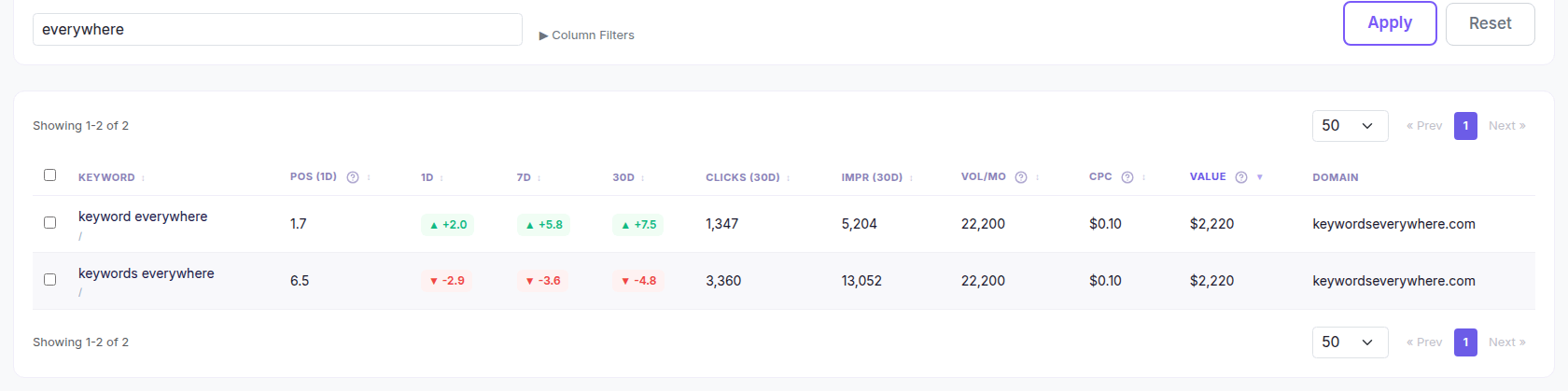
The canary set in one search: one variant steady at the top, the other drifting. One glance tells you whether to dig.
Two mechanical notes: GSC's anonymized-query gap means neither view sums perfectly to the total (expected, not a bug), and if you operate multiple brands or acquired names, the regex grows; document it.
What the brand half is for
Not for celebrating rankings. You rank #1 for your name because you're you; that's not an achievement, it's a pulse.
Which is exactly its value: the brand half is a health monitor.
- The canary. A brand-query position or impression drop is never "SEO fluctuation": it's indexing breakage, a penalty, a hack, or a competitor bidding or squatting on your name. Structural, urgent, triage-now territory.
- Demand thermometer. Brand impressions trend = how many people seek you out = the output of everything else you do (product, marketing, word of mouth). Watch the trend as a business signal, not an SEO one.
- Reputation surface. "your-brand review", "your-brand vs X" queries deserve owned answers. This is defense, and it costs almost nothing.
- The 54% reminder. Brand CTR near-perfectly measures navigation efficiency, and its inflation is why it must stay OUT of your SEO averages.
What the non-brand half is for
Everything you actually mean by "SEO."
- Growth measurement. Non-brand clicks trending up = strangers arriving = the channel working. This is KPI number one, correctly computed.
- The work queue. Quick wins, long-tail mining, decay watch: all non-brand disciplines by definition.
- Update exposure. Algorithm updates re-evaluate your content's competitiveness, so they hit non-brand first and hardest; brand queries barely notice. The update forensics should always run on the non-brand view first.
- Honest competitive metrics. Share of voice computed WITH brand keywords is your reputation flattering your strategy; computed without, it's your actual market position.
The metrics that only work split
CTR. The whole intro. Brand ~54%, non-brand top-10 sub-1% in exposed niches; the blend is noise. Every CTR-gap analysis should exclude brand (it's literally the position-2 culprit in our published observed-CTR chart).
Average position. Brand terms sit at 1-2 forever and drag the average toward flattery; then any non-brand long-tail growth drags it back down. Split, or the number is a random walk of mix effects.
Share of voice and visibility scores. Both weight by demand, and brand terms are high-demand permanent #1s: included, they're a stabilizing lie. Compute portfolio metrics non-brand, or at least know your brand share of them.
Conversion rate. Brand traffic converts at multiples of non-brand (they came looking for you). A blended "organic CVR" overstates what new SEO traffic will do, which quietly poisons every forecast built on it.
Update and incident forensics. Site-wide numbers can look "fine" after an update because brand held while non-brand bled 30%. The split view is the difference between catching it Tuesday and explaining it in the quarterly review.
Rebuilding the dashboard
The practical rewiring, by half:
Non-brand view: clicks trend (the growth KPI), SOV, quick-win pipeline, CTR gaps, decay, update overlays. This is the SEO dashboard.
Brand view: impressions trend (demand), position stability (the canary, alert-worthy on ANY sustained move), reputation-query coverage. This is the health strip: three numbers, glanced weekly.
Blended: almost nothing. Total traffic for finance, maybe, clearly labeled.
If your current reports mix them (most do), the single highest-leverage fix is re-cutting the topline: "organic grew 12%" becomes "brand grew 18% (thanks, product launch) and non-brand grew 6% (SEO's actual quarter)". Different sentence, different decisions.
The canary, standing: track your brand terms in Website Ranking Checker and their tiered alerts watch the structural layer for you, while the saved GSC regex views from this article handle the split analysis. Free for KE users.
Common mistakes
Six splitting mistakes.
- Reporting blended CTR or CVR as "organic performance". It's a mix effect wearing a metric's costume.
- Counting brand rankings as SEO wins. You'd rank for your name with an empty robots.txt. Wins live in the non-brand column.
- The moving brand boundary. Re-deciding what counts as branded per report makes trends unfalsifiable. Regex once, document, reuse.
- No brand canary in the tracker. Two minutes of setup for same-day structural alarms.
- Panicking at brand-CTR decline after sitelinks or SERP changes. Brand SERPs change shape too; watch clicks, not just CTR, on the brand half.
- Losing the gray zone. "your-brand alternative" rising is competitive intel worth its own bucket, not noise in either half.
FAQ
- What are branded keywords?
- Queries where the searcher already knows you and is looking for you specifically: your name, its misspellings and spacing variants, product names, and navigational phrasings like "brand login" or "brand pricing". Everything else, the problem- and category-language a stranger would use, is non-branded.
- Why is branded CTR so much higher?
- Because the searcher was navigating, not evaluating: our brand query converts 54% of impressions at position ~2, roughly triple what the position alone would predict, while non-branded informational queries in feature-heavy SERPs often convert under 1%. That gap is why blended CTR numbers mislead.
- How do I separate branded and non-branded keywords in Search Console?
- Use the query filter's regex mode: an include pattern covering your brand and variants gives the brand view; the same pattern as "doesn't match" gives the non-brand SEO view. Save both views and compute every performance metric on the appropriate one.
- What is a good branded vs non-branded traffic ratio?
- There's no universal target: strong consumer brands run brand-heavy, young sites run non-brand-heavy. The useful practice is watching each half's own trend: brand impressions as a demand signal, non-brand clicks as the SEO growth signal, rather than optimizing a ratio between them.
- Should I track branded keywords in my rank tracker?
- Yes, a small set, as a health canary rather than a scoreboard: your name and top variants. Any sustained brand-position drop signals something structural (indexing, security, a SERP change on your name) and deserves same-day attention.
- Do Google updates affect branded rankings?
- Rarely and lightly: updates re-evaluate competitive content, and nobody out-competes you for your own name. That's precisely why update analysis should run on the non-brand view: site-wide numbers can hide real non-brand damage behind stable brand traffic.
Split views, without the regex
Track your brand terms as their own small canary group with tight tiered alerts, keep the saved GSC regex views for the split analysis, and let Website Ranking Checker watch the daily positions on both halves from your own Search Console data. Free for Keywords Everywhere users.
Set up the split